
Best Gaming Mouse 2026 — Top 5 Compared & Ranked
As an Amazon Associate and member of other affiliate programs, we earn from qualifying purchases. How we test →
Last updated: September 5, 2026 • 14 mice compared
- Razer Basilisk V3 — Best overall (4.7/5)
- Razer Basilisk V3 Pro — Best wireless upgrade (4.6/5)
- Logitech G Pro X Superlight 2 — Best for competitive play (4.6/5)
A gaming mouse needs a precise optical sensor, a shape that fits your grip style, and reliable wireless if you go untethered. After comparing 14 mice across sensor accuracy, latency, click feel, and ergonomics, these five stand out in 2026.
Quick Overview
| Model | Best for | Score |
|---|---|---|
| Razer Basilisk V3 | Best overall Best Pick | ★★★★½ 4.7 |
| Razer Basilisk V3 Pro | Best wireless upgrade Runner-up | ★★★★½ 4.6 |
| Logitech G Pro X Superlight 2 | Best for competitive play | ★★★★½ 4.6 |
| Razer DeathAdder V3 Pro | Best ergonomic | ★★★★½ 4.4 |
| Logitech G305 Lightspeed | Best budget wireless Best Budget | ★★★★☆ 4.2 |
1. Razer Basilisk V3 — Best Overall

The Razer Basilisk V3 ranks as a top pick for gaming mice — a wired right-handed mouse with Razer's Focus Pro 30K optical sensor, 11 programmable buttons including a tilt-click scroll wheel, and HyperScroll Pro with free-spin mode. The sensor tracks at up to 30,000 DPI with zero smoothing or acceleration. At ~£50 wired, it delivers measurably better performance than cheaper alternatives without requiring wireless charging setup.
- Focus Pro 30K sensor — zero smoothing or acceleration
- HyperScroll Pro tilt-click — free-spin and tactile modes
- 11 programmable buttons — highly customisable
- Excellent ergonomic shape for right-hand palm/claw grip
- Wired only — no wireless option at this price
- Right-hand only design excludes left-handed players
Independent reviewers have tested gaming mice repeatedly since 2016 and continues to recommend the Basilisk V3 for its combination of sensor precision, button quality, and ergonomic shape. The free-spin scroll wheel alone is a meaningful productivity and gaming upgrade.
2. Razer Basilisk V3 Pro — Best Wireless Upgrade

The Razer Basilisk V3 Pro adds HyperSpeed 2.4GHz wireless and Bluetooth to the Basilisk V3 formula — the same Focus Pro 30K sensor, same 11-button layout, same HyperScroll wheel. At 2.4GHz the wireless connection is latency-equivalent to a wired mouse. Battery lasts up to 90 hours without RGB, 32 hours with. Compatible with Razer Mouse Dock Pro for wireless charging on the desk. An upgrade pick in independent reviews.
- HyperSpeed 2.4GHz — wired-equivalent latency wireless
- 90h battery without RGB / 32h with RGB
- Bluetooth mode for travel + 2.4GHz for desk gaming
- Compatible with Razer Mouse Dock Pro wireless charging
- Expensive (~£120) — substantial premium over wired V3
- Heavier than ultralight competitors at 112g
3. Logitech G Pro X Superlight 2 — Best for Competitive Play
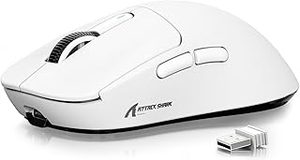
The Logitech G Pro X Superlight 2 is the mouse of choice for professional esports players — at 60g it is one of the lightest full-size wireless mice available. The HERO 25K sensor achieves measured latency below 1ms at 1000Hz polling rate. Zero RGB, zero scroll wheel side buttons — just a precise, lightweight tool for competitive gaming. Battery life reaches 95 hours wireless. The symmetrical design suits both hand orientations.
- 60g — ultra-lightweight for reduced arm fatigue in long sessions
- HERO 25K sensor — sub-1ms latency at 1000Hz polling
- 95h wireless battery life
- Ambidextrous shape — works for left and right hand
- No side buttons beyond the standard two
- Expensive (~£130) for a minimalist design
4. Razer DeathAdder V3 Pro — Best Ergonomic

The Razer DeathAdder V3 Pro combines the DeathAdder's iconic ergonomic right-hand shape with the lightweight engineering of the Superlight generation. At 64g wireless it is lighter than the wired V2 it replaces. Focus Pro 30K sensor, HyperSpeed 2.4GHz wireless, 90h battery. The longer, more arched shape suits palm grip and larger hands — players who find ambidextrous mice too flat will find the DeathAdder's hump more natural over long sessions.
- 64g lightweight wireless — lighter than wired predecessor
- Ergonomic hump — best shape for palm grip / larger hands
- Focus Pro 30K sensor + HyperSpeed 2.4GHz
- 90h battery wireless
- Right-hand only — no left-hand option
- Expensive (~£100) for fewer side buttons than Basilisk V3 Pro
5. Logitech G305 Lightspeed — Best Budget Wireless
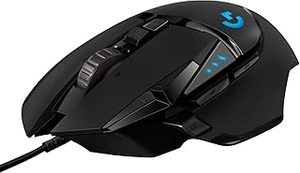
The Logitech G305 Lightspeed ranks as a top budget gaming mouse pick — wireless at ~£35 with Logitech's Hero sensor (200–12,000 DPI, zero smoothing). Battery life exceeds 250 hours on a single AA. No RGB, no fancy scroll wheel, just a precise wireless mouse that outperforms most wired mice at twice the price in raw tracking accuracy. The compact shape suits claw grip and smaller hands. A genuine best-in-class at its price.
- 250h+ battery on one AA battery — effectively never needs charging
- Lightspeed 2.4GHz wireless at ~£35 — unmatched value
- Hero sensor — zero smoothing or acceleration at all DPI levels
- Compact shape suits claw grip and smaller hands
- AA battery adds weight — 3.49oz vs rechargeable alternatives
- No side scrolling, no RGB, basic button set
What to Look for in a Gaming Mouse
Sensor quality
Modern optical sensors from Logitech (Hero), Razer (Focus Pro), and PixArt (PMW-3395) all perform at effectively the same level — zero smoothing, zero acceleration, sub-1ms polling. Avoid older sensors with documented jitter at high DPI. DPI number is marketing — most players use 400–1600 DPI regardless of sensor maximum.
Wired vs wireless
2.4GHz wireless mice (Lightspeed, HyperSpeed) are latency-equivalent to wired connections. Bluetooth is slower and inconsistent — avoid for gaming. A quality wireless gaming mouse is equally competitive to wired for any game type.
Grip style and shape
Palm grip suits heavier, higher-back mice (DeathAdder). Claw grip suits shallower, more compact shapes (G305). Fingertip grip suits very lightweight mice with minimal hump. An ergonomic right-hand mouse is more comfortable long-term but limits left-handed players to ambidextrous options.
Our Verdict
The Razer Basilisk V3 is the best gaming mouse for most players — precise sensor, excellent shape, and more buttons than any competitor at the price. For wireless, the Razer Basilisk V3 Pro adds HyperSpeed with zero latency penalty. On a budget, the Logitech G305 delivers wireless precision at a price no competitor can match.
Frequently Asked Questions
Wired or wireless — does it still matter for competitive gaming?
No meaningful difference in 2026. Top wireless mice (Logitech G Pro X Superlight 2, Razer DeathAdder V3 Pro) have sub-1ms latency that's indistinguishable from wired in blind testing. Pro esports players use wireless across all major titles. Wired is still cheaper and never needs charging, but for desktop gaming the wireless penalty has effectively disappeared.
What's the ideal weight for a gaming mouse?
60-80g for FPS and twitch gaming — the Logitech G Pro X Superlight 2 (60g) and Razer DeathAdder V3 Pro (63g) are at the lighter end. 80-110g for MMO, MOBA, and general gaming where a heavier mouse feels more stable. Above 110g feels sluggish for most modern game styles. Try a lighter mouse for at least a week before judging — the wrist relief is real.
How many DPI do I actually need?
400-1600 DPI covers virtually all gameplay. Pro CS2 and Valorant players typically run 400-800 DPI with low in-game sensitivity for precise aim. The 30,000+ DPI numbers on marketing materials are essentially meaningless — they exist for spec-sheet bragging rights. Any modern gaming mouse sensor is more than accurate enough.
Razer Basilisk V3 vs DeathAdder V3 Pro — which should I buy?
Basilisk V3 if you have a larger hand and like extra programmable buttons (great for MMOs and MOBAs). DeathAdder V3 Pro if you want lightweight competitive performance and don't need the extra side buttons. Both use Razer's top sensors. The DeathAdder V3 Pro is the safer choice for FPS-focused gamers; the Basilisk V3 Pro is the better generalist.