
Best Tablet 2026 — Top 5 Compared & Ranked
As an Amazon Associate and member of other affiliate programs, we earn from qualifying purchases. How we test →
Last updated: September 20, 2026 • 10 models compared
- iPad Air 11" M4 — Best overall (4.8/5)
- iPad Pro 13" M5 — Best pro tablet (4.9/5)
- Samsung Galaxy Tab S10 FE — Best Android value (4.3/5)
The tablet market in 2026 splits cleanly: iPads dominate for productivity, creative work, and app quality; Samsung leads Android tablets for value and flexibility. For most buyers, the iPad Air M4 is the sweet spot — powerful enough for 4K video export, light enough for daily carry, and well below iPad Pro money.
Quick Overview
| Model | Best for | Score | |
|---|---|---|---|
| iPad Air 11" M4 | Best overall Best Pick | ★★★★☆ 4.8 | Check price → |
| iPad Pro 13" M5 | Best pro tablet | ★★★★☆ 4.9 | Check price → |
| Samsung Galaxy Tab S10 FE | Best Android value Best Value | ★★★★½ 4.3 | Check price → |
| Samsung Galaxy Tab S11 Ultra | Best Android productivity Runner-up | ★★★★½ 4.6 | Check price → |
| Amazon Fire HD 10 | Best budget tablet | ★★★★☆ 4.0 | Check price → |
1. iPad Air 11" M4 — Best Overall
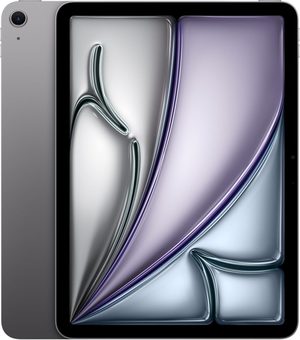
The iPad Air M4 replaced the M3 version and is the best tablet for most buyers in 2026. The M4 chip handles 4K video export, Procreate brushwork, and split-screen multitasking without hesitation, and iPadOS now runs a flexible windowing system that makes several apps at once genuinely workable. The 11" Liquid Retina panel uses P3 wide colour, True Tone, and an ultralow-reflectivity coating that matters more in a bright room than another few hundred nits would. Wi-Fi 7 with Apple's own N1 radio speeds up large file transfers. Touch ID rather than Face ID, storage to 1TB, and full Apple Pencil Pro and Magic Keyboard support. What you give up against the Pro is the OLED panel and 120Hz — not speed.
- M4 chip with Apple Intelligence — a generation ahead of the M3 Air
- Apple Pencil Pro + Magic Keyboard compatible
- Wi-Fi 7 with Apple N1 radio; up to 1TB storage
- Ultralow-reflectivity P3 display; all-day battery
- 60Hz only — no ProMotion (Pro gets 120Hz)
- IPS LCD — no OLED like the Pro's tandem OLED panel
- Touch ID, not Face ID
2. iPad Pro 13" M5 — Best Pro Tablet
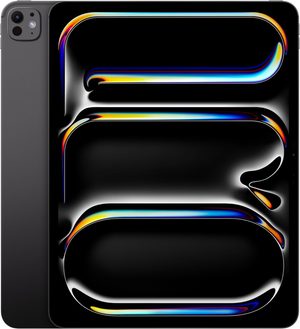
The iPad Pro M5 is the most capable tablet ever made. The tandem OLED display — two OLED stacks bonded together — delivers 1,600 nits peak brightness, ProMotion 120Hz, and true infinite contrast without burn-in risk. The M5 chip runs desktop-class apps: Final Cut Pro for iPad exports 4K 30fps in real time; Affinity Photo performance matches the M2 Mac mini. Thunderbolt 4 outputs to 6K external displays. Apple Intelligence runs fully on-device. At $1,199+ it commands a genuine premium — justified for pro creative users who push iPadOS to its limits.
- Tandem OLED: 1,600 nits, 120Hz ProMotion, infinite contrast
- M5 chip — desktop-class performance in tablet form factor
- Thunderbolt 4: 6K external display output
- Apple Intelligence fully on-device
- $1,199+ starting price — laptop-level investment
- iPadOS limits some desktop workflows vs macOS
3. Samsung Galaxy Tab S10 FE — Best Android Value
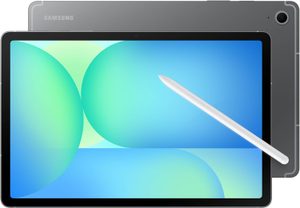
Samsung's Tab S10 FE brings S Pen stylus and Galaxy AI to under $500. The 10.9" LCD display at 2304×1440 / 90Hz delivers smooth Android performance. Snapdragon 8 Gen 1 handles multitasking, Samsung DeX desktop mode, and Samsung Notes with the included S Pen. Galaxy AI features cover note translation, Circle to Search, and live translation in Samsung apps. IP68 water resistance; 8,000mAh battery with 45W fast charging. For Android users wanting stylus functionality at iPad Air pricing, the Tab S10 FE is the clear 2026 choice.
- S Pen included — precise stylus at no extra cost
- IP68 water resistance; 8,000mAh + 45W fast charge
- Galaxy AI + DeX desktop mode built in
- Under $500 — best Android stylus tablet at this price
- LCD display — lower contrast than OLED iPads
- Android tablet app selection thinner than iPadOS
4. Samsung Galaxy Tab S11 Ultra — Best Android Productivity
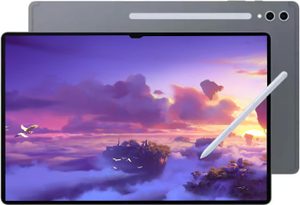
Samsung's flagship Android productivity tablet: a 14.6" Dynamic AMOLED 2X display at 2960×1848 / 120Hz / 930 nits, Snapdragon 8 Elite, up to 16GB RAM, and an integrated S Pen with Book Cover Keyboard for genuine laptop replacement. Galaxy AI runs Note Assist, PDF summarisation, and cross-app translation. DeX mode enables 4K external monitor output. At 728g it's heavier than the iPad Pro 13" (579g) but delivers a larger canvas well-suited for illustration, technical annotation, and large spreadsheets.
- 14.6" AMOLED 2X 120Hz — largest premium Android display
- S Pen + Book Cover Keyboard for laptop-replacement use
- Snapdragon 8 Elite + up to 16GB RAM + 4K DeX output
- 728g — notably heavier than iPad Pro 13" at 579g
- $1,099+ competes directly with iPad Pro M5
5. Amazon Fire HD 10 — Best Budget Tablet

At $139, the Amazon Fire HD 10 is the cheapest 10" tablet worth recommending. The 1080p display at 224 ppi handles Prime Video, Kindle, and Alexa interactions well. Dolby Atmos stereo speakers outperform the price point. Alexa integration for smart home control is best-in-class on any tablet. Limited to the Amazon Appstore — no Google Play or YouTube without sideloading. 3GB RAM handles light multitasking. 12h battery. The right choice for a media consumption tablet, child's device, or Alexa display hub at the lowest price available.
- $139 — cheapest 10" 1080p tablet worth buying
- Dolby Atmos speakers; 12h battery; best-in-class Alexa
- Amazon Appstore only — no Google Play or Chrome natively
- 3GB RAM limits multitasking to light tasks
What to Look for in a Tablet
Operating System and App Ecosystem
iPadOS has the widest tablet-optimised app library — Procreate, LumaFusion, and Final Cut Pro iPad exist only on Apple. Android offers more flexibility (sideloading, file management) but fewer apps designed for large screens. Amazon Fire is best treated as a media consumption device: streaming works well, productivity apps are limited by the Amazon Appstore.
Stylus Support
Apple Pencil Pro requires iPad Air 2024 or later, or iPad Pro M4+. Samsung S Pen is included with Galaxy Tab S FE and Ultra models. If you draw professionally or take detailed handwritten notes, Apple Pencil remains the benchmark for pressure sensitivity and latency.
Our Verdict
For most buyers, the iPad Air M4 offers the best mix of performance, display, and price. The iPad Pro M5 justifies its premium only with ProMotion OLED and Thunderbolt 4 requirements. Android users get the best value from the Samsung Galaxy Tab S10 FE — S Pen, Galaxy AI, and IP68 under $500.
Frequently Asked Questions
iPad or Android tablet — which is better in 2026?
iPad still leads for apps. Most premium creative apps (Procreate, Affinity Suite, LumaFusion, Apple's own pro apps) are iPad-first or iPad-exclusive. Android tablets like the Galaxy Tab S11 Ultra have caught up on hardware (faster chips, brighter screens, better keyboards) but the app catalogue lags. Choose iPad if you want best-in-class creative software; Android if you want Samsung DeX desktop mode or are deep in Google's ecosystem.
Is the iPad Pro M5 worth it over the iPad Air M4?
Only for power users. The iPad Pro M5 adds a tandem OLED display with ProMotion 120Hz, Face ID, Thunderbolt, and more memory. The iPad Air M4 costs substantially less and matches the Pro for browsing, note-taking, streaming, and most creative apps. Buy Pro if you do heavy video editing, 3D work, or use a tablet as your primary computer; otherwise Air is the better value.
Can a tablet replace a laptop?
For many users, yes. With a keyboard cover and trackpad, an iPad Pro M5 or Galaxy Tab S11 Ultra handles email, documents, browsing, video calls, light photo editing, and most creative work comfortably. The limits remain on power-user tasks: serious video editing timelines over 10 minutes, code compilation, virtual machines, and Windows-only enterprise software. For students and lifestyle users, a tablet+keyboard replaces a laptop well.
Do I need an Apple Pencil or Samsung S Pen?
Only if you'll actually draw, sketch, or annotate. The Apple Pencil Pro ($129) and Samsung S Pen (included with Tab S series) are exceptional for digital artists, students taking handwritten notes, and PDF markup. If you only browse and watch video, save the money. If you draw weekly or take frequent handwritten notes, the pen transforms the tablet into a far more useful tool.