
Best USB Hub 2026 — Top 5 Compared & Ranked
As an Amazon Associate and member of other affiliate programs, we earn from qualifying purchases. How we test →
Last updated: September 5, 2026 • 10 hubs compared
- Anker 555 USB-C Hub (7-in-1) — Best overall (4.7/5)
- CalDigit TS3 Plus — Best Thunderbolt dock (4.6/5)
- UGREEN 9-in-1 USB-C Hub — Best value multi-port (4.4/5)
A USB-C hub transforms a single laptop port into a full desk setup. The key variables are power delivery (does it charge your laptop?), data speeds (USB 3.2 vs Thunderbolt), display output (4K@60Hz or 4K@30Hz?), and build quality. These five cover compact travel hubs to full desktop docking stations.
Quick Overview
| Model | Best for | Score |
|---|---|---|
| Anker 555 USB-C Hub (8-in-1) | Best overall Best Pick | ★★★★½ 4.7 |
| CalDigit TS4 | Best Thunderbolt dock Runner-up | ★★★★½ 4.6 |
| UGREEN Revodok Pro 9-in-1 | Best value multi-port | ★★★★½ 4.4 |
| Plugable USB-C Triple Display Dock (15-in-1) | Best for multi-monitor | ★★★★½ 4.4 |
| Anker USB-C Hub (7-in-1) | Best budget compact Best Budget | ★★★★☆ 4.1 |
1. Anker 555 USB-C Hub (8-in-1) — Best Overall
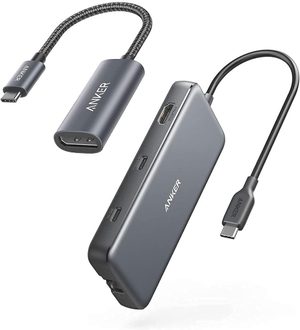
The Anker 555 puts gigabit Ethernet, 4K@60Hz HDMI, two USB-A and one USB-C data port at 10Gbps, an SD/microSD reader and 85W pass-through charging on a single cable. Ethernet is what separates it from most hubs at this price — you get a wired connection without a second adapter hanging off the laptop. The 4K@60Hz output needs a DisplayPort 1.4 laptop; on older DP 1.2 machines it drops to 4K@30Hz. Around $35, it is the best balance of ports, build quality and price in the category.
- Gigabit Ethernet built in — no second adapter needed
- 4K@60Hz HDMI — full resolution external display
- 10Gbps data ports — twice the speed of most hubs at this price
- SD + microSD card reader — photographers and content creators
- Single HDMI output only — cannot drive two external monitors
- 4K@60Hz needs a DisplayPort 1.4 laptop — older machines get 30Hz
- Not compatible with Linux
The Anker 555 consistently tops hub rankings for its combination of Ethernet, 10Gbps ports and 4K@60Hz at a compact price. It is the hub most MacBook and Windows laptop users should buy as their first hub.
2. CalDigit TS4 — Best Thunderbolt Dock
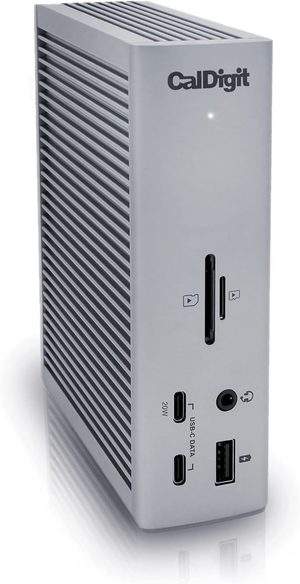
The TS4 replaced the long-running TS3 Plus and is the most comprehensive Thunderbolt 4 dock you can buy — 18 ports in an aluminium enclosure that stands upright or lies flat. Three Thunderbolt 4 ports at 40Gbps, DisplayPort 1.4, eight USB ports all running at a full 10Gbps, UHS-II SD and microSD readers, 2.5 gigabit Ethernet and 98W laptop charging over the same single cable. Windows machines drive a single 8K display or dual 4K@60Hz; M-series Macs drive up to 6K. It is the definitive desk dock, and priced accordingly.
- 18 ports — 3x Thunderbolt 4, DisplayPort 1.4, 8x USB at 10Gbps, UHS-II card readers
- Thunderbolt 4 at 40Gbps — no port congestion with everything plugged in
- 98W laptop charging — enough for a 16-inch MacBook Pro
- 2.5 gigabit Ethernet — faster than the 1GbE on almost every rival
- Very expensive — around $380
- Needs a Thunderbolt 4 or full USB4 port — plain USB-C laptops run slower
3. UGREEN Revodok Pro 9-in-1 — Best Value Multi-Port
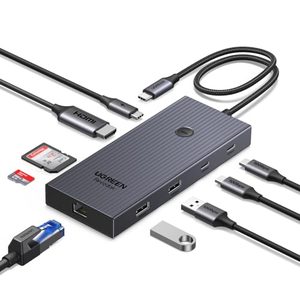
The Revodok Pro 9-in-1 matches the Anker 555 almost port for port — gigabit Ethernet, 4K@60Hz HDMI, 10Gbps data, SD and microSD, 85W pass-through charging — and adds a ninth port, for roughly $10 less. Around $30 it is the cheapest way to get a wired network connection and a full-speed 4K display out of one USB-C port. The trade-off is UGREEN's shorter one-year warranty against Anker's 18 months, and a plastic-and-metal shell that feels less solid in the hand.
- Gigabit Ethernet at around $30 — the cheapest way to get it
- 4K@60Hz HDMI — full refresh rate, not the 30Hz of cheaper hubs
- 85W pass-through charging — enough for most laptops
- SD and microSD readers included
- One-year warranty — Anker gives 18 months
- The USB-C port charges only — no data or video through it
4. Plugable USB-C Triple Display Dock (15-in-1) — Best for Multi-Monitor
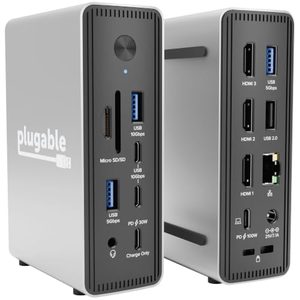
This is the dock for a Windows laptop that has to drive three screens. Three HDMI outputs run either two monitors at 4K@60Hz or three at 1x 4K@60Hz plus 2x 1080p@60Hz, using Multi-Stream Transport rather than DisplayLink — so there is no driver to install and no software layer between the laptop and the displays. Alongside the video it carries 100W host charging, a separate 30W USB-C charge port for a phone, six USB ports and 2.5 gigabit Ethernet. It stands upright or lies flat, which matters on a crowded desk. Windows 11 and ChromeOS only.
- Three HDMI outputs — dual 4K@60Hz, or triple with two at 1080p
- Driverless MST — nothing to install, no DisplayLink software layer
- 100W laptop charging, plus a 30W port for a phone, and 2.5GbE
- Mounts upright or flat — fits a crowded desk
- Windows 11 and ChromeOS only — not recommended for Mac or ARM
- Around $150, and the triple-screen mode drops two displays to 1080p
5. Anker USB-C Hub (7-in-1) — Best Budget Compact
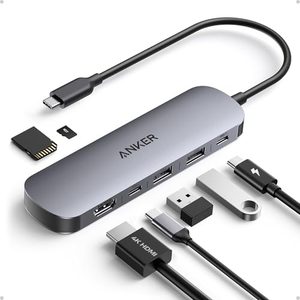
Anker's compact 7-in-1 is the one to pack rather than the one to leave on the desk: 4K@60Hz HDMI, two USB-A and one USB-C at 5Gbps, SD and microSD slots, and 85W pass-through charging, for around $25. There is no Ethernet and the data ports run at 5Gbps rather than 10, so it is a step down from the 555 — but it is also $10 cheaper and small enough to disappear into a laptop sleeve. For occasional use and travel, that is the right trade.
- Compact pocket size — ideal for travel
- 85W PD pass-through — sufficient for most laptops
- Anker build and 18-month warranty at around $25
- SD + microSD reader included
- No Ethernet — WiFi only unless you add an adapter
- Data ports run at 5Gbps, half the speed of the 555
What to Look for in a USB Hub
USB-C vs Thunderbolt
Standard USB-C hubs share ~10Gbps bandwidth across all ports — adequate for most setups. Thunderbolt 3/4 docks have 40Gbps, enabling simultaneous 4K displays, fast storage, and data transfer without congestion. Only Thunderbolt laptops (most MacBooks, select Windows) get full Thunderbolt speeds.
Power delivery
Hubs with less than 60W PD pass-through cannot fully charge larger laptops (MacBook Pro 14/16, most Windows gaming laptops require 90W+). Look for 85–100W PD if you want to charge at full speed. The hub itself consumes some power — a "100W" hub typically delivers 85–90W to the laptop.
Display output: 30Hz vs 60Hz
4K@30Hz is noticeably less smooth for scrolling and cursor movement — most users notice the difference. Pay the small premium for 4K@60Hz HDMI if using it as a primary monitor connection. 1080p/1440p@60Hz is fine on 30Hz-capable hubs.
Our Verdict
The Anker 555 is the best USB hub for most users — Ethernet, 10Gbps ports and 4K@60Hz for around $35. Spend $5 less and the UGREEN Revodok Pro does almost the same job with a shorter warranty. For a full desk setup, the CalDigit TS4 is unmatched in port count and bandwidth, and priced to match at $380.
Frequently Asked Questions
USB-C hub vs Thunderbolt dock — what's the difference?
USB-C hubs (Anker 555, UGREEN Revodok) work with any USB-C device, are smaller and cheaper, but limited to ~10Gbps bandwidth and lower power delivery. Thunderbolt 4 docks such as the CalDigit TS4 deliver 40Gbps bandwidth, drive dual 4K monitors at 60Hz, and provide 98W for charging the laptop. Choose USB-C for occasional needs (laptop to TV); Thunderbolt for desktop replacement use with monitors and high-speed external drives.
Can a USB-C hub power my laptop?
Some can, with limitations. USB-C hubs with 'Power Delivery passthrough' (Anker 555, UGREEN 9-in-1) let your laptop charger plug into the hub, which then charges the laptop while running peripherals. Typical limit is 65W to the laptop (charging + peripherals reduce this). For 96W+ requirements like MacBook Pro M4 16", use a Thunderbolt 4 dock with dedicated 96W charging.
Do I need a hub with ethernet?
Yes if you need reliable connectivity. WiFi is convenient but introduces latency, packet loss, and bandwidth caps. For video calls, large downloads, and gaming, ethernet is meaningfully better. The Anker 555 and UGREEN 9-in-1 include gigabit ethernet, sufficient for full WiFi 6 throughput. If your home internet is faster than 1Gbps, choose a Thunderbolt dock with 2.5GbE.
Why do some hubs cost $380 when others cost $30?
Three factors: bandwidth (USB-C 10Gbps vs Thunderbolt 4 40Gbps), build quality (CalDigit uses aluminium chassis, premium chipsets, better thermal management), and reliability over years of use. Cheap hubs often experience overheating, intermittent disconnections, and chipset failures within 1-2 years. For daily heavy use, the premium pays for itself in reliability. For occasional use, the cheap hubs work fine.