
Best Webcam 2026 — Top 5 for Video Calls & Streaming
As an Amazon Associate and member of other affiliate programs, we earn from qualifying purchases. How we test →
Last updated: September 5, 2026 • 9 models compared
- Logitech Brio 300 — Best overall (4.7/5)
- Elgato Facecam Pro — Best for streaming (4.7/5)
- Logitech C920S — Best value 1080p (4.5/5)
The best webcams in 2026 significantly outperform laptop built-in cameras on background separation, low-light performance, and autofocus speed. For most people, a $100–$130 webcam transforms video calls from blurry and dark to crisp and well-lit. For streamers and content creators, 4K 60fps and manual controls are worth the premium.
Quick Overview
| Model | Best for | Score |
|---|---|---|
| Logitech Brio 300 | Best overall Best Pick | ★★★★½ 4.7 |
| Elgato Facecam Pro | Best for streaming Runner-up | ★★★★½ 4.7 |
| Logitech C920S | Best value 1080p Best Value | ★★★★½ 4.5 |
| Elgato Facecam MK.2 | Best 1080p 60fps | ★★★★½ 4.5 |
| Razer Kiyo Pro Ultra | Best low-light | ★★★★½ 4.6 |
1. Logitech Brio 300 — Best Overall

The Logitech Brio 300 is the best webcam for most people in 2026 — Wirecutter and PCMag name it the top pick for everyday video calls. The 1080p/30fps sensor with RightLight 5 auto-exposure handles uneven lighting and bright windows behind you without overexposing. Privacy shutter snaps over the lens physically. Omni-directional stereo microphones with noise cancellation capture clear audio without an external mic for Teams and Zoom calls. USB-C with included USB-A adapter; no drivers required; works on Mac, Windows, and ChromeOS out of the box. Under $130 and available in four colours.
- RightLight 5: best auto-exposure of any 1080p webcam tested
- Physical privacy shutter — lens covered when not in use
- USB-C; no driver install; works on Mac, Windows, ChromeOS
- Under $130; available in four colours including white
- 1080p/30fps only — no 60fps option
- Fixed focus — no zoom or pan/tilt
2. Elgato Facecam Pro — Best for Streaming
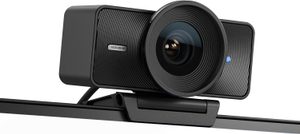
The Elgato Facecam Pro shoots 4K at 60fps with uncompressed USB video — no internal compression that degrades image quality before it reaches OBS. The Sony STARVIS CMOS sensor delivers exceptional detail and low-light performance: f/2.0 aperture, 8-element glass lens, hardware controls for gain, contrast, and white balance that persist across reboots. Camera Hub software on PC gives granular control over every parameter. For Twitch and YouTube streamers who want their face camera to match the quality of their gameplay capture, the Facecam Pro is the reference pick.
- 4K 60fps uncompressed — no pre-compression before OBS receives the feed
- Sony STARVIS sensor, f/2.0 aperture — best low-light of 4K webcams
- Hardware controls (gain, contrast, white balance) persist after reboot
- Camera Hub software: full manual control on PC
- No built-in microphone — requires separate mic for audio
- 4K 60fps requires USB 3.0 port and strong CPU for encoding
3. Logitech C920S — Best Value 1080p
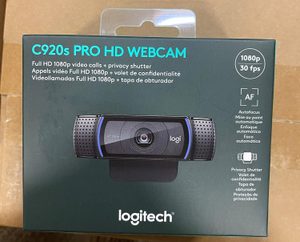
The Logitech C920S has been the benchmark affordable 1080p webcam for years, and it still holds up in 2026. Full HD 1080p at 30fps (720p at 60fps), H.264 hardware compression reduces CPU load, dual omni-directional microphones, and a physical privacy shutter. Logitech Capture software provides background replacement, smoothing, and multi-camera support. Universally compatible via USB-A. At under $70 on sale, it's the most cost-effective upgrade over a laptop built-in camera for Teams, Zoom, and Google Meet users who don't need 4K.
- Under $70 on sale — best value full-HD webcam
- H.264 hardware encoding — low CPU impact during calls
- Physical privacy shutter; dual stereo mics
- Universally compatible; Logitech Capture background replacement
- 1080p only; no 60fps at full HD
- Auto-exposure slower than Brio 300 in rapidly changing light
4. Elgato Facecam MK.2 — Best 1080p 60fps

The Elgato Facecam MK.2 delivers 1080p at 60fps with uncompressed USB output — the same no-compression approach as the Facecam Pro, but at half the resolution for half the price. The Sony sensor with f/2.4 aperture and 8-element all-glass lens captures sharp, saturated footage. Camera Hub software provides full manual control. The 60fps frame rate is visible on-screen in live streams — motion blurs less during head movements, making the feed look more cinematic. At ~$160, it's the mid-tier option between the C920S value pick and the Facecam Pro premium pick.
- 1080p 60fps uncompressed — smoother motion than 30fps alternatives
- Sony sensor, f/2.4 glass lens; Camera Hub full manual control
- Good low-light without extra lighting equipment
- No built-in microphone — requires separate audio solution
- ~$160 — pricier than C920S for 1080p-only output
5. Razer Kiyo Pro Ultra — Best Low-Light

The Razer Kiyo Pro Ultra is the best webcam for dark or poorly lit environments: a 1/1.2" Sony IMX715 sensor — the largest sensor of any webcam in this guide — with f/1.7 aperture and HDR capability. Reviewers shooting at around 50 lux report bright, detailed images where competing webcams go noisy and dark. 4K 30fps or 1080p 60fps; adaptive light control adjusts in real-time as room lighting changes. Razer Synapse software provides background replacement, colour correction, and zoom controls. For home-office workers who can't or won't use a ring light, the Kiyo Pro Ultra is the answer.
- 1/1.2" IMX715 sensor — largest sensor in any webcam tested
- f/1.7 aperture: best low-light at 50 lux, no ring light required
- 4K 30fps or 1080p 60fps; HDR mode
- ~$200 — premium price for a webcam
- Razer Synapse software required for full control (Windows-focused)
What to Look for in a Webcam
Resolution and Frame Rate
1080p at 30fps is sufficient for video calls and most streaming. 60fps makes motion look smoother — perceptible during head movement and hand gestures. 4K adds detail on large monitors but requires a USB 3.0 port and extra CPU headroom. For Zoom and Teams, 1080p/30fps is the standard; for Twitch streaming, 1080p/60fps is the target.
Low-Light Performance
Sensor size and aperture determine low-light quality — not resolution. The Kiyo Pro Ultra's f/1.7 aperture gathers 2.7× more light than an f/2.8 lens. If your workspace has limited window light, a large-aperture webcam or a $20 LED ring light will improve your video quality more than upgrading to 4K.
Privacy
Physical privacy shutters block the lens without unplugging the camera. All five picks here include a shutter. Avoid webcams that only offer software privacy controls — a physical cover is more reliable and faster.
Our Verdict
For most people, the Logitech Brio 300 is the best webcam — excellent auto-exposure, physical privacy shutter, and USB-C for under $130. Streamers should look at the Elgato Facecam Pro for uncompressed 4K 60fps quality. Value buyers who need reliable 1080p for calls: Logitech C920S remains the long-standing reference pick under $70. For dark offices, the Razer Kiyo Pro Ultra's large sensor eliminates the need for extra lighting.
Frequently Asked Questions
Is a dedicated webcam worth it over my laptop's built-in camera?
Yes for video calls, streaming, or content creation. Laptop webcams use cheap fixed-focus sensors with poor low-light performance. The Logitech Brio 300 (4K) or Elgato Facecam Pro deliver dramatically better video quality — sharper image, better low-light, proper colour reproduction. For occasional Zoom calls, the built-in webcam is fine; for daily remote work or streaming, an upgrade is one of the best productivity investments.
Do I need 4K webcam quality?
Mostly no. Most video conferencing platforms (Zoom, Teams, Meet) cap participant streams at 720p or 1080p to save bandwidth. 4K matters for: streaming (Twitch, YouTube), recording professional content, or sharing your camera output via OBS. For ordinary calls, an excellent 1080p webcam like the Logitech C920S delivers better real-world results than a budget 4K webcam.
How much should I spend on a webcam?
£60-100 (Logitech C920S, Brio 300) gets excellent 1080p that beats every laptop webcam. £150-250 (Elgato Facecam Pro, Logitech Brio 4K) adds 4K, better low-light sensors, and dedicated streaming features. Above £250 is for content creators who pair webcams with proper lighting and dedicated audio. Don't spend on webcam upgrades until you've added better lighting first — lighting matters more than camera resolution.
Why do I look bad on webcams even with a good one?
Lighting matters more than camera quality. A £100 webcam with proper key lighting (a £25 ring light or natural window in front of you) looks dramatically better than a £300 webcam in dim room lighting. Add: a light source IN FRONT of you, not behind. Avoid ceiling lights creating shadows. Test with a daylight-coloured bulb (5000-6500K). Most 'bad webcam' problems are actually bad lighting.