
Best Ergonomic Mouse 2026 — Top 5 Compared & Ranked
As an Amazon Associate and member of other affiliate programs, we earn from qualifying purchases. How we test →
Last updated: September 20, 2026 • 8 mice compared
- Logitech MX Vertical — Best vertical mouse (4.7/5)
- Logitech MX Master 4 — Best productivity mouse (4.8/5)
- Logitech MX ERGO — Best trackball mouse (4.5/5)
An ergonomic mouse reduces wrist strain and repetitive stress injury risk during long computing sessions. After comparing 8 mice for wrist positioning, comfort over extended use, and precision, these five stand out.
Quick Overview
| Model | Best for | Score |
|---|---|---|
| Logitech MX Vertical | Best vertical mouse Best Pick | ★★★★½ 4.7 |
| Logitech MX Master 4 | Best productivity mouse Runner-up | ★★★★☆ 4.8 |
| Logitech MX ERGO | Best trackball mouse | ★★★★½ 4.5 |
| Microsoft Arc Mouse | Best for travel Best Budget | ★★★★☆ 4.2 |
| Anker Vertical Mouse | Best budget vertical | ★★★★☆ 4.0 |
1. Logitech MX Vertical — Best Vertical Mouse
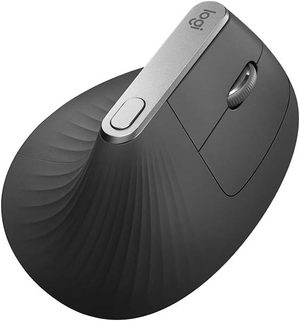
The Logitech MX Vertical holds your hand in a natural handshake position at 57° — reducing muscle strain by 10% (compared to a standard mouse in Logitech's research) by eliminating forearm pronation. The textured thumb grip, premium optical sensor, and rechargeable battery via USB-C make it the best all-round vertical mouse. Compatible with up to 3 devices via Easy-Switch, with Logitech Flow for cross-computer cursor movement.
- 57° natural handshake grip — reduces forearm strain
- Multi-device: connect up to 3 computers
- USB-C rechargeable
- High-precision optical sensor
- Requires adjustment period for new vertical mouse users
- Right-hand only design
Switching to a vertical mouse requires 1–2 weeks of adaptation. Most users report noticeably reduced wrist and forearm discomfort after the adjustment period. The MX Vertical's grip texture and button placement make the transition easier than competing vertical mice.
2. Logitech MX Master 4 — Best Productivity Mouse
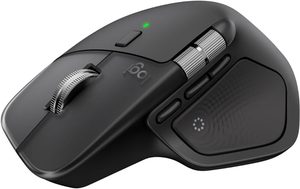
The Logitech MX Master 4 is the most feature-rich ergonomic mouse available. MagSpeed electromagnetic scrolling (spins freely for fast document navigation, clicks for precise control), a customisable thumb scroll wheel, and app-specific button configurations via Logi Options+ make it the definitive productivity mouse. The sculpted right-hand shape provides all-day comfort without the extreme vertical angle.
- MagSpeed scroll wheel — fastest scrolling available
- App-specific button customisation via Logi Options+
- Multi-device with Logitech Flow
- Sculpted shape excellent for all-day use
- Premium price
- Right-hand only — no left-hand version
3. Logitech MX ERGO — Best Trackball
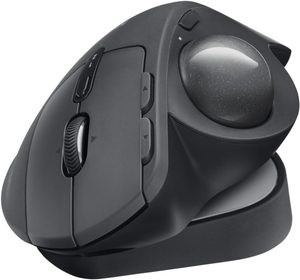
The MX ERGO is the best trackball available — the adjustable tilting base allows 0° or 20° tilt to find your ideal wrist angle. Trackballs eliminate the need to move your whole arm, instead controlling the cursor with your thumb — which can dramatically reduce repetitive strain for certain users. Particularly beneficial for small desks or those with shoulder/elbow issues alongside wrist pain.
- Adjustable tilt — 0° or 20° base angle
- No arm movement required — thumb controls cursor
- Works on any surface — no mouse pad needed
- Multi-device via Unifying receiver
- Significant learning curve for trackball newcomers
- Lower precision for pixel-level design work
4. Microsoft Surface Arc Mouse — Best for Travel
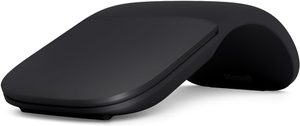
The Microsoft Arc Mouse is the most portable ergonomic mouse available. It snaps flat for storage in a laptop bag, then curves open into a comfortable arc shape during use — the curved form lifts the wrist slightly for a more natural position. Bluetooth connection, 6-month battery life, and touch scroll strip make it an excellent companion for laptop users who travel frequently.
- Snaps flat for ultra-portable storage
- 6-month battery life
- Bluetooth — no USB dongle needed
- Touch scroll less precise than scroll wheel
- Limited ergonomic benefit vs full vertical mice
5. Anker Vertical Mouse — Best Budget Vertical

At around $1 the Anker Vertical Mouse delivers the core benefits of a vertical ergonomic mouse at an entry-level price. USB receiver, three DPI settings, and a rubber grip surface provide a functional vertical mouse experience without the Logitech premium. An excellent starting point for those who want to try vertical mousing before investing in an MX Vertical.
- Outstanding value
- Delivers vertical ergonomic position
- Three DPI settings
- Less precise sensor than Logitech
- No rechargeable battery — AA batteries
What to Look for in an Ergonomic Mouse
Vertical vs standard ergonomic
Vertical mice (MX Vertical, Anker) hold the hand in a handshake position, eliminating forearm pronation. Standard ergonomic mice (MX Master 4) have a sculpted shape that's more comfortable than flat mice but less extreme than vertical. Trackballs (MX ERGO) eliminate arm movement entirely. The best choice depends on your specific discomfort — seek advice from a physiotherapist if you have wrist pain.
Size
Mouse size should match your hand size. Most ergonomic mice are designed for medium-large hands. Check dimensions before buying — a mouse that's too small causes finger tension; too large causes overextension.
DPI and precision
For office and productivity work, 800–1600 DPI is ideal. Higher DPI (4000+) is for gaming. Most ergonomic mice offer adjustable DPI via a dedicated button. A precise optical sensor reduces the micro-corrections that cause wrist movement.
Wireless range
USB dongle wireless (Logitech Unifying, Logi Bolt) offers the most reliable connection with negligible latency. Bluetooth suits minimalist setups without a USB port to spare. Battery life ranges from 3 months (AA) to 70 days rechargeable — consider how often you want to charge or replace batteries.
Our Verdict
The Logitech MX Master 4 is the best ergonomic mouse for productivity — MagSpeed scrolling and multi-device switching are genuinely transformative for heavy computer users. For wrist pain specifically, the Logitech MX Vertical is the most effective ergonomic intervention. On a budget, the Anker Vertical provides the core vertical ergonomic benefit.
Frequently Asked Questions
Vertical mouse vs traditional mouse — which is better for wrist pain?
Vertical mice (Logitech MX Vertical) reduce forearm pronation, the main cause of RSI and carpal tunnel symptoms. The handshake grip position is more natural for the forearm. Adjustment period is 1-2 weeks. For users with existing wrist pain, vertical is genuinely transformative. For pain-free users, the productivity gain over a quality traditional mouse (MX Master 4) is minimal.
Is the Logitech MX Master 4 worth the $100+ price?
Yes for daily heavy users. The MX Master 4 features: precise scroll wheel with hyper-fast mode (1000 lines per second for long documents), customisable thumb buttons, ergonomic shape for medium-large hands, multi-device pairing (3 computers), and Logitech Flow (move between Mac and PC like one desktop). Over 5 years of daily use, it's $20/year — exceptional value.
Trackball mouse — should I try one?
Yes if you have limited desk space or wrist mobility issues. The Logitech MX ERGO Trackball doesn't require arm movement — only thumb movement — perfect for cramped desks or laptop trays. Adjustment period is 2-3 weeks. After adjustment, productivity matches traditional mice for most tasks; precision work (graphics, gaming) is harder with a trackball.
How long should I use a mouse before getting wrist pain?
Pain shouldn't be normal at any duration. If wrist pain appears after 1-2 hours of mouse use, you have a setup problem. Solutions: vertical mouse, better wrist position (wrist straight, not bent), keyboard tray to lower elbow to 90°, ergonomic mouse pad. The Logitech MX Vertical specifically addresses pronation pain. See an ergonomics specialist if pain persists after equipment changes.