
Best Smart Home Hub 2026
As an Amazon Associate and member of other affiliate programs, we earn from qualifying purchases. How we test →
Last updated: May 26, 2026
- Amazon Echo (4th Gen) — Best for most — Zigbee + Matter built-in (4.6/5)
- Home Assistant Green — Best local — 3,000+ integrations (4.8/5)
- Apple HomePod mini — Best for Apple HomeKit users (4.5/5)
A smart home hub is the brain of your setup — it connects devices from different brands, runs local automations and lets you control everything from one app or voice command. In 2026, Matter has changed the landscape significantly: many devices now work without a hub at all. But for Zigbee, Z-Wave and complex automations, a hub is still essential.
Quick Overview
| Hub | Best for | Score |
|---|---|---|
| Amazon Echo (4th Gen) | Best for most — Zigbee + Matter built-in Best Pick | ★★★★½ 4.6 |
| Home Assistant Green | Best local — 3,000+ integrations Premium | ★★★★☆ 4.8 |
| Apple HomePod mini | Best for Apple HomeKit users Runner-up | ★★★★½ 4.5 |
| Google Nest Hub (2nd Gen) | Best Google Home hub with display Runner-up | ★★★★☆ 4.2 |
| Homey Pro | Best multi-protocol — Zigbee + Z-Wave + Matter Premium | ★★★★½ 4.6 |
1. Amazon Echo (4th Gen) — Best for Most People
Built-in Zigbee hub, Thread border router and Matter controller — all in one speaker under £100. Controls thousands of Zigbee devices natively without a separate bridge, including IKEA TRADFRI, Philips Hue Zigbee and Aqara sensors. Alexa routines are the most powerful on any consumer hub, with conditional logic, delays and cross-device triggers. The spherical design sounds genuinely good for a smart home device.
- Zigbee hub built-in — no extra hardware
- Thread border router + Matter controller
- Alexa routines — extremely powerful
- Excellent speaker quality for a smart hub
- Cloud-dependent — automations need internet
- No Z-Wave support
2. Home Assistant Green — Best for Power Users
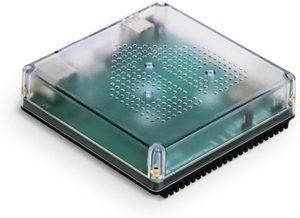
Open-source platform running 100% locally — no cloud, no subscriptions, no data leaving your home. Home Assistant Green is the plug-and-play hardware version (~$99) that ships pre-installed and ready in 5 minutes, compared to the hours of Raspberry Pi setup. Supports 3,000+ integrations including Zigbee (ZHA/Zigbee2MQTT), Z-Wave, Matter, Thread and every major brand. Full automation scripting via YAML or a visual flow editor; backups, updates and remote access via Nabu Casa ($7/month, optional).
- 100% local — works without internet
- 3,000+ device integrations — broadest of any hub
- Zigbee, Z-Wave, Matter, WiFi — all in one (with USB dongles)
- Green hardware ships pre-installed — no Pi assembly
- Initial learning curve — YAML and UI take time to master
- Updates occasionally break integrations
3. Apple HomePod mini — Best for HomeKit

Apple's dedicated Thread border router — adds HomeKit, Siri and Thread mesh networking to your home without any configuration. Every Matter-over-Thread device pairs natively and automations run locally on the device even when the internet is down. Essential for Apple ecosystem users: it unlocks remote access, automations and family sharing for all HomeKit accessories. The compact grapefruit-sized design fits anywhere and costs $99.
- Thread border router built-in
- Native HomeKit + Matter support — local automations
- Spatial Audio for music in a compact form
- Required for full HomeKit remote access
- Apple ecosystem only — no Alexa or Google Home
- Siri less capable than Alexa for complex routines
4. Google Nest Hub (2nd Gen) — Best for Google Home
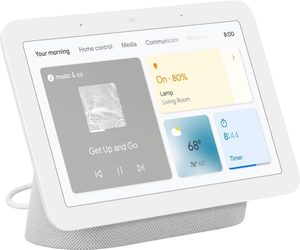
A 7" touchscreen smart display that doubles as a Google Home hub. Controls all Google-compatible devices, shows live camera feeds and includes Sleep Sensing via Soli radar — no wearable required. Google's natural language is the most conversational of any assistant, and the display shows camera feeds, routines and daily briefings without unlocking. At $100 it's the most visual way to manage a Google-heavy smart home.
- 7" touchscreen — visual camera and device control
- Google Home hub built-in
- Sleep Sensing via Soli radar — no wearable needed
- Google Assistant natural language — best of any hub
- No Thread border router
- No local processing — cloud-dependent automations
5. Homey Pro — Best Multi-Protocol Hub
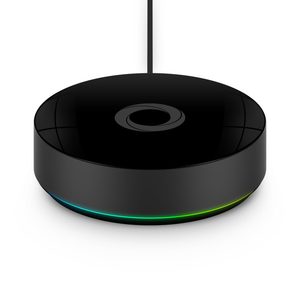
The only consumer hub that supports Zigbee, Z-Wave, Matter, Thread, Infrared and 433/868 MHz RF all in one box — covering legacy RF devices (gates, roller shutters) that no other hub touches. Runs all automations locally so they execute in under 100ms without cloud round-trips. The Homey app is the most polished flow editor available: visual, condition-rich automations that rival Home Assistant complexity without the YAML. At $399 it's expensive, but replaces 3–4 separate bridges.
- Zigbee + Z-Wave + Matter + IR + RF — all built-in
- 100% local automations — sub-100ms response
- Best visual flow editor of any consumer hub
- Replaces multiple bridges in one device
- $399 — most expensive hub on this list
- Smaller integration library than Home Assistant
Do You Actually Need a Hub?
When you need a hub
You need a hub if you have Zigbee or Z-Wave devices (most IKEA, Aqara, Philips Hue Zigbee range, many sensors). These protocols don't connect to your router — they need a coordinator device to bridge them to your network.
You also benefit from a hub for complex automations that go across brands — "when the motion sensor sees movement AND it's after sunset AND the smart lock is unlocked, turn on the hallway lights to warm white".
When you don't need a hub
If all your devices support Matter over WiFi or Thread, you technically don't need a dedicated hub — Matter devices connect directly to your router or a Thread border router (built into modern Echo, HomePod mini and Google Nest Hub).
In practice, most homes have a mix: Matter devices from 2024–2026 plus older Zigbee devices from earlier. A hub handles both.
Zigbee vs Z-Wave vs Matter — Quick Comparison
| Protocol | Range | Devices | Hub required |
|---|---|---|---|
| Zigbee | 10–20m, mesh | IKEA, Aqara, Hue, sensors | Yes |
| Z-Wave | 30–100m, mesh | Schlage, Yale, Fibaro | Yes |
| Matter/Thread | 10–20m, mesh | New 2024–2026 devices | Thread border router |
| WiFi (2.4GHz) | Router range | Govee, TP-Link, most budget | No |
Verdict
For most homes: start with an Amazon Echo (4th Gen) — it's the cheapest path to a working Zigbee+Matter hub with excellent voice control. If you're deep in the Apple ecosystem, a HomePod mini doubles as your Thread border router and HomeKit hub. For those who want full local control with no cloud dependency, Home Assistant Green is the most capable platform available. And if you have mixed legacy protocols (Z-Wave + Zigbee + RF), Homey Pro consolidates everything into one device.
Frequently Asked Questions
Do I really need a separate smart home hub?
Depends on your devices. If everything uses WiFi only (Philips Hue, Tapo, basic smart bulbs): no hub needed. If using Zigbee or Z-Wave devices (Aqara, Hue Bridge required for full features): yes. For comprehensive automation: Apple HomePod mini (HomeKit), Amazon Echo (4th gen) for Alexa, Home Assistant Green for power users. Most homes benefit from at least one voice-activated hub.
Apple HomePod mini vs Amazon Echo — which?
HomePod mini: best for Apple users — seamless HomeKit, Siri, integration with iPhone/Apple Watch. Echo (4th gen): largest smart home ecosystem support (Alexa works with more brands), better music features, generally better voice recognition. For Apple-heavy households: HomePod mini. For mixed-ecosystem or Android users: Echo. Buy a $20-30 Echo Dot first as a cheap entry point.
What is Home Assistant and is it worth the effort?
Home Assistant is open-source smart home software running on a Raspberry Pi or dedicated hardware (Home Assistant Green = £100 turn-key device). It offers: local control (works offline), supports virtually any smart device, unlimited customisation. Steep learning curve but massive flexibility. For technically inclined users wanting deep customisation: yes. For convenience-first users: stick with commercial hubs.
Will buying a hub today still be useful in 5 years?
Yes for premium options. Apple, Amazon, and Google update their hubs for many years. Matter compatibility means hubs purchased today work with future smart home products. Avoid niche brands (Aqara Hub, SmartThings) that may have less long-term support. Software updates often extend hub useful life — buy from companies with proven update commitment.