
Best Smart Home Hubs 2026
As an Amazon Associate and member of other affiliate programs, we earn from qualifying purchases. How we test →
Last updated: September 12, 2026 • 5 hubs compared
- Amazon Echo Hub — Best Alexa control panel (4.8/5)
- Apple HomePod mini — Best for HomeKit (4.6/5)
- TP-Link Tapo H200 — Best budget hub (4.5/5)
A smart home hub connects and controls all your devices — lights, locks, cameras, and sensors — from one place. The best in 2026 support Matter and Thread for cross-brand compatibility, plus a voice assistant for hands-free control. Here are the five best across every ecosystem.
Quick Overview
| Hub | Best for | Score |
|---|---|---|
| Amazon Echo Hub | Best Alexa control panel Best Pick | ★★★★☆ 4.8 |
| Apple HomePod mini | Best for HomeKit Runner-up | ★★★★½ 4.6 |
| TP-Link Tapo H200 | Best budget hub Best Value | ★★★★½ 4.5 |
| Google Nest Hub 2nd gen | Best display hub | ★★★★½ 4.3 |
| SwitchBot Hub 2 | Best IR bridge | ★★★★☆ 4.2 |
1. Amazon Echo Hub — Best Alexa Smart Home Control Panel
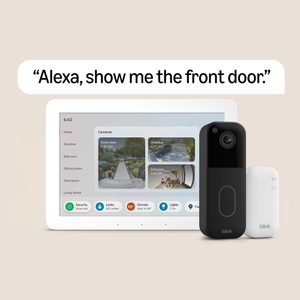
The Amazon Echo Hub is a dedicated smart home control panel — an 8" touchscreen wall-mountable display designed specifically for managing your smart home. Built-in Zigbee, Matter, and Thread border router. Controls Ring cameras, smart locks, thermostats, lights, and plugs from one screen. Alexa supports over 100,000 compatible third-party devices. Works as a standard Echo speaker too.
- 8" touchscreen — dedicated smart home control panel
- Built-in Zigbee, Matter, and Thread border router
- Alexa — 100,000+ compatible devices
- Wall-mountable for permanent installation
- ~€179 — most expensive hub on this list
- Alexa ecosystem only — limited for HomeKit users
For users building an Alexa-centric smart home who want a central control panel, the Echo Hub is the premium option. The dedicated hub screen is a genuine upgrade for homes with many smart devices.
2. Apple HomePod mini — Best HomeKit Hub

For iPhone users, the HomePod mini integrates seamlessly into the Apple ecosystem. Thread border router built in. The Home app works on iPhone, iPad, Mac, and Apple Watch. HomeKit certification is strict — fewer compatible devices than Alexa but privacy-focused with on-device processing. Siri smart home control is reliable and hands-free.
- Thread border router built in — future-proof
- Native Apple Home app integration on all Apple devices
- On-device privacy processing — no cloud required
- ~€109 — good value for hub + speaker combo
- Apple ecosystem only — not suitable for Android households
- Narrower device compatibility than Alexa or Google
3. TP-Link Tapo H200 — Best Budget Multi-Protocol Hub

The TP-Link Tapo H200 connects Tapo cameras, sensors, and smart devices over Wi-Fi and Zigbee from a compact hub. Supports Alexa and Google Home. Built-in siren for security alerts. At ~€30 it is the most affordable hub on this list, and pairs directly with the extensive Tapo ecosystem — plugs, cameras, sensors, and bulbs. Local control means automations run without internet.
- Most affordable hub — ~€30
- Zigbee + Wi-Fi — wide device support
- Built-in siren for security alerts
- Local control — automations run without internet
- Best value within Tapo ecosystem — limited outside it
- No Thread support
4. Google Nest Hub 2nd gen — Best Display Hub

The Google Nest Hub 2nd gen's 7" touchscreen displays cameras, weather, music controls, and cooking guides. Google Assistant handles smart home control and general queries. A built-in passive sleep tracking sensor monitors rest quality. Integrates natively with Android, Gmail, Calendar, and YouTube. Best for households in the Google ecosystem who want a display hub for kitchen or living room use.
- 7" display for visual camera and control feedback
- Passive sleep tracking via built-in sensor
- Deep Google ecosystem integration
- ~€99 — affordable for a display hub
- Matter support more limited than Amazon and Apple
- No Thread border router
5. SwitchBot Hub 2 — Best IR + Smart Home Bridge
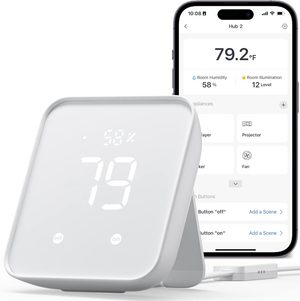
The SwitchBot Hub 2 bridges SwitchBot's ecosystem of blinds, curtain motors, locks, and plugs with Alexa, Google Home, and Apple HomeKit via Matter — all from a compact hub with a built-in temperature and humidity display. The IR blaster controls TVs, ACs, and any IR remote. Acts as a Matter bridge for SwitchBot devices at ~€69. No subscription required.
- Matter bridge — SwitchBot devices work with Alexa, Google, HomeKit
- Built-in IR blaster for TV and AC control
- Temperature and humidity display built in
- No subscription — local control
- Best value within SwitchBot ecosystem
- No Zigbee radio — cannot pair non-SwitchBot Zigbee devices
Choosing a Smart Home Hub
Alexa vs Google vs Apple — which ecosystem?
Amazon Alexa supports the most third-party devices — over 100,000. Google Home integrates deeply with Android and Google services. Apple HomeKit is the most privacy-focused with strict certification requirements. If you use an iPhone, HomePod mini is the natural starting point. For Android and Google services, choose Nest. For the broadest device support, choose Echo.
Matter and Thread — why they matter
Matter is a universal smart home standard that lets devices from different brands work together across Amazon, Apple, Google, and Samsung. Thread is a low-power mesh networking protocol that improves reliability for sensors and switches. Both are supported by the Echo Hub, HomePod mini and Tapo H200 — making those three the most future-proof choices here. The Nest Hub handles Matter but is not a Thread border router, and the SwitchBot Hub 2 bridges Matter and infrared rather than running Thread itself.
Our Verdict
The Amazon Echo Hub is the best smart home control panel for Alexa-centric homes — the dedicated touchscreen is a genuine upgrade. For Apple users, the HomePod mini is the seamless HomeKit solution. For the best value at the lowest price, the TP-Link Tapo H200 delivers solid Zigbee + Wi-Fi coverage. The SwitchBot Hub 2 is the pick for Matter bridging and IR blaster control.
Frequently Asked Questions
Amazon Echo Hub vs Apple HomePod mini vs TP-Link Tapo H200 — which should I buy?
Amazon Echo Hub: best for mixed-ecosystem homes — works with Alexa, Matter, Zigbee, Bluetooth, deep automation routines. Apple HomePod mini: best for Apple-only households — HomeKit integration is seamless, great speaker quality. TP-Link Tapo H200: most affordable, narrower compatibility (mostly Tapo and Matter). For most users: Echo Hub. iPhone-only households: HomePod. Budget Matter: Tapo H200.
Do I need a hub if my devices have built-in WiFi?
Hubs add value beyond simple control: local automation that works offline, faster response times, ability to bridge Zigbee/Z-Wave devices that don't speak WiFi, and reducing strain on your home WiFi network. For 1-3 smart devices, WiFi-only works fine. For 10+ devices and serious automation, a hub significantly improves reliability and speed.
Matter compatibility — what does it actually mean?
Matter is the universal smart home standard launched 2022, now widely adopted. Matter-certified devices work natively with all major ecosystems (Apple HomeKit, Google Home, Amazon Alexa, Samsung SmartThings) — no proprietary bridges needed. Buy Matter-certified devices for future-proofing. All three of our top picks support Matter.
Do smart home hubs work without internet?
Partial functionality. Local automations (turn on lights when motion detected) work without internet on hubs with local processing. Cloud-dependent features (voice control, app remote access, third-party integrations) require internet. Home Assistant on a Raspberry Pi or Apple HomePod mini have the most local-only capability; cloud-dependent hubs are limited when offline.