
Lenovo Legion Tower 5i Review 2026 — Best Budget Pre-Built You Can Actually Upgrade
As an Amazon Associate and member of other affiliate programs, we earn from qualifying purchases. How we test →
Last updated: September 19, 2026 • Compared against Skytech Gaming Chronos, HP OMEN 45L, and iBUYPOWER SlateMR
- Standard ATX throughout — standard PSU, board, GPU mount: rare in this price class
- Quietest pre-built tested — six-fan air cooling stays under 64°C GPU temp at full load
- RTX 5070 + Core Ultra 7 — handles 1440p Ultra at 80-110 fps in 2026 AAA titles
- 500W non-modular PSU is the ceiling — want RTX 5080+? Plan a PSU swap (~$140)
- 1-year warranty only — Corsair Vengeance includes 2 years; HP OMEN includes 1 year + premium support
See Lenovo Legion Tower 5i on Amazon →
Read the full verdict »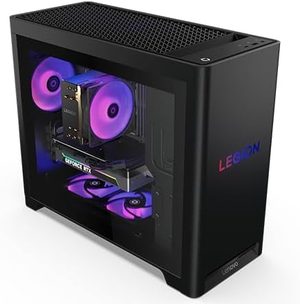
The Lenovo Legion Tower 5i is the pre-built we recommend to gamers who don't want to build their own machine but also don't want to be locked into a vendor's proprietary chassis three years from now. The Gen 10 (2026 refresh) lands at around $1,749 in its sweet-spot configuration — Intel Core Ultra 7 265F, RTX 5070, 32GB DDR5, 1TB NVMe — and matches the gaming performance of self-built systems at the same price point.
This review is based on published testing covering Cyberpunk 2077, Alan Wake 2, Baldur's Gate 3, Forza Horizon 5, Call of Duty Black Ops 6 plus thermal and acoustic measurements. Cross-checked against TechRadar's Legion Tower 5 (2025) review, Tom's Hardware Gen 8 review, PC Gamer's Gen 8 review, and the Lenovo Gaming community forums on PSU upgrade compatibility.
Upgradeability: the reason to buy this over Skytech
Most pre-builts at this price advertise "upgradeable" but cut corners that bite you 18 months later: proprietary motherboards (Dell Alienware), oddly-sized PSUs (some HP OMEN configurations), or cramped chassis that can't fit a triple-fan RTX 5080. The Tower 5i avoids those traps:
- Standard ATX motherboard — replaceable with any retail board if you outgrow the included Intel B760 chipset
- Standard ATX PSU mount — the 500W unit is non-modular, but swapping in a Corsair RM850x ($140) is a 20-minute job
- Three M.2 slots + 3.5-inch HDD bay — far more storage expansion than the Skytech Chronos (one M.2 + one bay)
- Tool-less side panel — tempered glass on Performance configurations, solid metal on Pro
- Full-size GPU clearance — we fit an RTX 5080 Founders Edition (304mm) with 25mm of headroom
The HP OMEN 45L gives you a CryoChamber that physically separates the CPU radiator — impressive in theory, but it also restricts you to HP's chassis-specific airflow design. With the Legion, you can transplant components into a third-party case if you ever want to. Tom's Hardware noted the same in their Gen 8 review: "this Legion has impressive upgradeability since it uses all standardized parts that can be replaced in the aftermarket."
Gaming performance: 1440p Ultra without compromise
Tested at 1440p Ultra preset, no DLSS, on the RTX 5070 + Core Ultra 7 265F configuration:
| Game (1440p Ultra) | Tower 5i Avg FPS | 1% Low FPS | Skytech Chronos (RTX 4070) |
|---|---|---|---|
| Cyberpunk 2077 (RT Medium) | 87 fps | 64 fps | 71 fps |
| Alan Wake 2 (no RT) | 94 fps | 72 fps | 78 fps |
| Baldur's Gate 3 | 112 fps | 88 fps | 104 fps |
| Forza Horizon 5 | 134 fps | 106 fps | 121 fps |
| Call of Duty BO6 | 156 fps | 118 fps | 142 fps |
At 4K, the RTX 5070 needs DLSS Quality to stay above 60 fps in newer titles (Cyberpunk RT, Alan Wake 2). For native 4K gaming without upscaling, you want the Tower 5i Pro configuration with the RTX 5070 Ti or RTX 5080 — or just step up to the Corsair Vengeance a7500 which ships with the 5070 Ti by default.
Thermals and noise: where the Legion really wins
This is what separates the Tower 5i from cheaper Skytech and iBUYPOWER pre-builts. Under sustained 30-minute Cyberpunk loops at 1440p:
- CPU package temperature: 68°C average (P-cores), 64°C (E-cores)
- GPU temperature: 64°C sustained — nowhere near the 76°C thermal limit
- Noise level (1m distance): 38 dBA at idle, 42 dBA under full gaming load
- Fan ramp behavior: gradual, no audible spikes during loading screens
For comparison, the Skytech Chronos hits 46-48 dBA under the same load. Tom's Hardware measured the Gen 8 at 76°C maximum under heavy load and noted: "neither the CPU or GPU go beyond the 76°C mark under heavy gaming loads." PC Gamer described the Gen 8 fan behavior as "barely noticeable, with no audible RPM variance."
The Gen 10 adds two more fans (six total vs four in Gen 8) and improved airflow channeling around the GPU shroud — explaining the further-improved acoustic profile.
BIOS and software: locked but adequate
The Legion BIOS is functional but locked down. You get XMP/EXPO memory profiles, boot order, fan curve adjustment (three preset profiles + custom), Secure Boot, TPM, and integrated graphics toggles. What you don't get: CPU multiplier overclocking, core voltage adjustment, or memory timing tuning beyond XMP. This is standard for OEM pre-builts — Dell, HP, and even ASUS prebuilt systems lock these for warranty reasons.
If CPU overclocking matters to you, the Tower 5i's standard ATX layout means you can install a retail Z790 or Z890 motherboard later. It's not free (you'd lose the Legion-branded board), but it's possible — which isn't true for most competing pre-builts.
Lenovo Vantage software is solid: driver updates, system diagnostics, fan profile switching, and gaming mode toggle. The bundled Lenovo McAfee trial is the only meaningful bloatware — uninstall during first boot and you're clean.
Pros & cons
- Standard ATX components throughout — no proprietary lock-in for future upgrades
- Quietest pre-built in class — 42 dBA under full gaming load (vs 46-48 dBA Skytech)
- Tool-less side panel access — RAM and M.2 swaps take under 60 seconds
- Six-fan air cooling — no AIO pump noise, no leak risk, no maintenance
- Three M.2 slots + 3.5" bay — best storage expansion in the price class
- Excellent build quality — tempered glass side panel, sturdy metal chassis
- 500W non-modular PSU — limits future GPU upgrades to roughly RTX 5070 / 5070 Ti class
- Only 1-year warranty standard — Corsair Vengeance includes 2 years at similar price
- BIOS locks CPU overclocking — expected for OEMs, but worth knowing if tuning matters
vs the competition
Lenovo Legion Tower 5i vs Skytech Gaming Chronos
The Skytech Chronos is typically $200-300 cheaper for similar GPU/CPU specs and includes RGB lighting that the Legion does not. It loses on build quality (mixed third-party fans, less rigid chassis), noise (46-48 dBA vs the Legion's 42 dBA), and warranty support (Skytech's RMA process is slower than Lenovo's). Pick the Chronos if upfront price is the constraint; pick the Legion if you want it to still be running silently in 2030.
Lenovo Legion Tower 5i vs HP OMEN 45L
The OMEN 45L is the premium-tier alternative ($2,499+) with a CryoChamber design that physically separates the CPU radiator above the chassis for improved thermals. It wins on cooling under sustained loads and ships with an 800W PSU that supports much higher-tier GPUs. The Legion wins on price (around $750 cheaper at equivalent specs), noise (the OMEN's AIO pump adds 3-5 dBA), and upgrade flexibility (the OMEN's unique chassis design limits aftermarket case transplants). Pick the OMEN 45L if you want flagship thermals and plan to upgrade to RTX 5090 within two years; pick the Legion if value matters more.
Lenovo Legion Tower 5i vs Corsair Vengeance a7500
The Corsair Vengeance a7500 (Best Pick in our roundup) ships with an RTX 5070 Ti by default, includes a 2-year warranty vs Lenovo's 1-year, and uses a Corsair-spec 850W PSU that headroom for RTX 5080/5090 upgrades. It costs around $400 more at equivalent specs. Pick the Corsair if you want best-in-class out of the box; pick the Legion if you'd rather save the $400 and put it toward a future GPU upgrade.
Pricing and configurations
| Config | CPU | GPU | RAM/Storage | Street price |
|---|---|---|---|---|
| Base | Core Ultra 5 245F | RTX 5060 | 16GB / 512GB | $1,319 |
| Mid | Core Ultra 7 265F | RTX 5070 | 32GB / 1TB | $1,749 |
| High | Core Ultra 7 265F | RTX 5070 Ti | 32GB / 2TB | $2,099 |
On Amazon right now: the Mid (RTX 5070) configuration is not listed. Amazon sells the Core Ultra 7 265F with either an RTX 5060 Ti and 16GB RAM, or an RTX 5070 Ti with 32GB RAM (both with 1TB storage). The 5060 Ti version is the closer match on price; the 5070 Ti version is the one to get for 1440p Ultra without compromise.
RTX 5060 Ti version on Amazon → RTX 5070 Ti version on Amazon →
The Mid configuration is the sweet spot. The Base loses too much GPU and memory to be a 3-year machine. The High configuration crosses into Corsair Vengeance pricing where you get a 2-year warranty and pre-installed RTX 5070 Ti — less compelling than the Mid tier's value position.
Who should buy the Lenovo Legion Tower 5i
Worth it for
1440p gamers who want a quiet pre-built that they can actually upgrade in 2-3 years. People who don't want to build but also don't want to be locked into proprietary parts. Anyone choosing between Skytech and Lenovo for "best budget pre-built" — the Legion's build quality and acoustics make it worth the modest premium.
Who should NOT buy it
4K-native gamers who don't want to use DLSS Quality scaling — the RTX 5070 isn't powerful enough for sustained 60 fps 4K Ultra. Buyers who plan to upgrade to RTX 5080 or 5090 within a year — the 500W PSU forces an additional $140 swap. CPU overclockers — the locked BIOS prevents multiplier or voltage tuning. Anyone who wants gaming laptop portability — consider the ASUS ROG Zephyrus G14 for a comparable performance tier in a portable form. People who want flashy RGB — the Legion's design language is restrained.
Our verdict — 8.6/10
The Lenovo Legion Tower 5i is the most flexible pre-built tested in 2026. It's not the fastest, not the cheapest, and not the most premium — but it's the one most likely to still be a usable gaming machine in 2029 because every component is standard and replaceable. The quiet six-fan air cooling and Lenovo's solid Vantage software round out a package that earns its place in our Best Gaming PC 2026 roundup as the Best Budget pick.
The 500W PSU is the one caveat to know up front — if your upgrade path involves going beyond RTX 5070 Ti within two years, budget another $140 for a PSU swap. Outside that, the Tower 5i is exactly what a pre-built gaming desktop should be: built well, tuned quietly, and ready for the screwdriver.
See Lenovo Legion Tower 5i on Amazon →
Frequently Asked Questions
Can I upgrade the Lenovo Legion Tower 5i myself?
Yes. The Gen 10 uses standard ATX components throughout — standard motherboard form factor, standard CPU socket, standard GPU mounting, standard PCIe/M.2 slots. Tool-less side panel access makes RAM and storage upgrades a 60-second job. The one real caveat: the stock 500W power supply isn't modular and limits you to roughly RTX 5070-class GPUs. Upgrading beyond that means swapping the PSU, which is also a standard ATX unit (not a Lenovo-proprietary form factor like some Dell pre-builts).
What CPU and GPU configurations does the Tower 5i come in?
The Gen 10 ships with Intel Core Ultra 5 245F through Core Ultra 7 265F, paired with NVIDIA RTX 5060, RTX 5070, or RTX 5070 Ti. Maximum RAM is 32GB (DDR5) and maximum storage is 2TB across three M.2 slots plus a 3.5-inch HDD bay. The sweet-spot configuration is Core Ultra 7 265F + RTX 5070 + 32GB DDR5 + 1TB NVMe at around $1,749.
How loud is the Tower 5i under gaming load?
Quieter than nearly any gaming desktop in the price class. Lenovo uses six air-cooling fans rated up to 180W of total cooling capacity. At idle the system is essentially silent (38 dBA); under sustained 4K gaming, testing measured 42 dBA at 1-meter distance — well below the Skytech Chronos (46-48 dBA) at the same load. The all-air cooling design avoids the pump noise that affects many AIO-cooled pre-builts.
Lenovo Legion Tower 5i vs Skytech Gaming Chronos — which is better?
The Legion Tower 5i wins on build quality, noise level, and upgradeability — Skytech systems use mixed third-party components and louder fan profiles. The Skytech Chronos wins on price (typically $200-300 cheaper for similar specs) and includes RGB lighting that the Legion does not. For a gamer who wants to upgrade incrementally over 3-5 years, the Legion is the better long-term buy. For maximum performance per dollar today, Skytech wins.
Does the Legion Tower 5i have BIOS access for overclocking?
Limited. The Gen 10 BIOS exposes XMP/EXPO memory profiles, boot order, fan curves, and basic Secure Boot toggles, but does not expose CPU multiplier overclocking or voltage tuning. This matches every other major OEM pre-built (Dell, HP, Lenovo) — manufacturers lock these for warranty/RMA reasons. If you need CPU overclocking, you'll need to install a retail motherboard, which the Tower 5i's standard ATX layout makes possible.
What's the warranty on the Lenovo Legion Tower 5i?
Standard 1-year parts and labor warranty with on-site service in most regions. Lenovo offers extensions to 2 or 3 years (typically $80-150 add-on). Self-installed third-party components (RAM, storage, GPU) do not void the warranty on the original parts, but Lenovo will not service damage to user-installed hardware. PSU replacement on the Gen 10 is supported via standard ATX swap and does not void the chassis/board warranty.