
Best Monitor Arm 2026 — Top 5 Compared & Ranked
As an Amazon Associate and member of other affiliate programs, we earn from qualifying purchases. How we test →
Last updated: September 11, 2026 • 7 arms compared
- Ergotron LX — Best single monitor arm (4.9/5)
- Ergotron LX Pro — Best for heavy monitors (4.7/5)
- Humanscale M10 — Best premium arm (4.6/5)
A monitor arm frees up desk space, enables perfect ergonomic positioning, and allows instant height and angle adjustment without moving the whole monitor. After comparing 7 arms for stability, range of motion and build quality, these five stand out.
Quick Overview
| Model | Best for | Score |
|---|---|---|
| Ergotron LX | Best single monitor arm Best Pick | ★★★★☆ 4.9 |
| Ergotron LX Pro | Best for heavy monitors Runner-up | ★★★★½ 4.7 |
| Humanscale M10 | Best premium arm | ★★★★½ 4.6 |
| Flexispot F7L | Best budget arm Best Budget | ★★★★½ 4.3 |
| Ergotron LX Dual | Best dual monitor arm | ★★★★½ 4.5 |
1. Ergotron LX — Best Single Monitor Arm
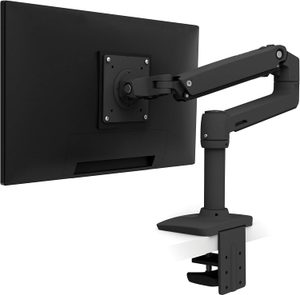
→ Read our full Ergotron LX review (10-yr warranty, industry-standard)
The Ergotron LX is the benchmark single monitor arm — used in professional office installations worldwide. The Constant Force technology allows effortless repositioning with fingertip control: the arm moves smoothly to any position and stays there. Supporting monitors from 3.2kg to 11.3kg (up to 34"), it handles everything from ultrawides to standard screens. Cable management channels keep wires hidden inside the arm.
- Constant Force spring — stays in any position
- Wide weight range: 3.2–11.3kg
- Internal cable routing
- VESA 75×75 and 100×100 compatible
- Spring tension requires adjustment for lighter monitors
- Expensive vs budget alternatives
The Ergotron LX's Constant Force mechanism is the key differentiator — budget arms drift or require tools to reposition. The LX adjusts with one hand while the other stays on the keyboard. It's the quality difference that justifies the price gap over cheap arms.
2. Ergotron LX Pro — Best for Heavy Monitors
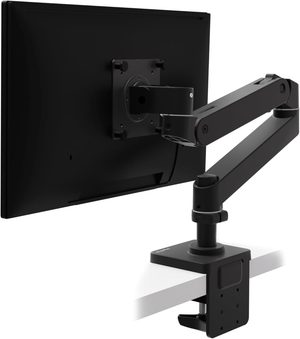
The Ergotron LX Pro extends the LX's weight capacity up to 19.1kg — designed for large gaming monitors, 34"+ ultrawides, and professional displays that exceed the standard LX's limit. The same Constant Force mechanism, internal cable routing, and quality construction. If you have or plan to buy a large, heavy monitor, the LX Pro is the arm to buy.
- Up to 19.1kg weight capacity
- Handles 34"+ ultrawide monitors
- Same Constant Force quality as standard LX
- Internal cable routing
- More expensive than standard LX
- Overkill for standard monitor weights
→ Read our full Ergotron LX Pro review (HD version for heavier displays)
3. Humanscale M10 — Best Premium Arm
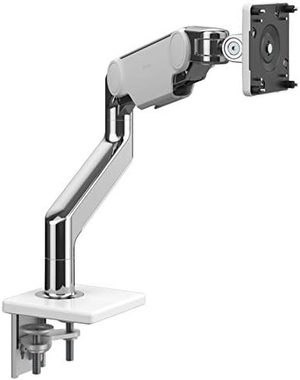
Humanscale's M10 is designed for corporate and professional ergonomic installations and brings that quality to a home office setting. The counterbalance spring mechanism supports monitors with fingertip ease, and the clean minimalist design suits premium workspaces. Multiple mounting options including desk clamp, bolt-through, and wall mount. Excellent for architects, designers and professionals who want the absolute best ergonomic arm.
- Premium counterbalance mechanism
- Multiple mounting options
- Minimalist design for professional spaces
- Corporate-grade build quality and longevity
- Very expensive
- Overkill for typical home office needs
4. Flexispot F7L — Best Budget Arm

→ Read our full Flexispot F7L review (Dual monitor under $200)
The Flexispot F7L provides solid monitor arm functionality at around $1. Supports monitors up to 9kg and 32", offers full tilt, swivel, and height adjustment, and includes internal cable routing. The spring mechanism requires more effort to adjust than Ergotron, but holds position reliably once set. The best budget arm for those who want more than a simple fixed riser but aren't ready for the Ergotron investment.
- Solid value
- Full articulation — tilt, swivel, height, rotation
- Internal cable routing
- Spring mechanism stiffer than Ergotron LX
- Less stable under heavy loads
5. Ergotron LX Dual — Best Dual Monitor Arm
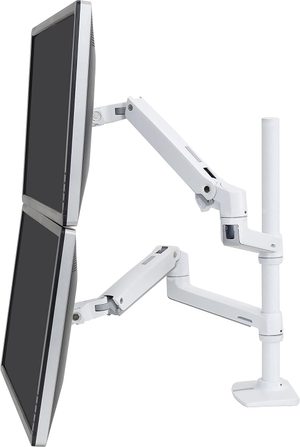
The Ergotron LX Dual stacks two monitors on a single pole — one above the other. Each screen gets independent tilt and rotation adjustment. The stacked design saves horizontal desk space compared to side-by-side dual arms. Ideal for coding, trading and video editing workflows where a reference screen above the main workspace is useful. Each arm supports up to 9.1kg.
- Stacked design saves horizontal space
- Independent adjustment per screen
- Ergotron quality and Constant Force mechanism
- Upper screen at non-ideal eye height for primary use
- Expensive
What to Look for in a Monitor Arm
Weight capacity
Check your monitor's weight before buying. Standard 24"–27" monitors weigh 4–7kg. Large 34"+ ultrawides can exceed 10kg. The Ergotron LX (11.3kg) suits most standard monitors; the LX Pro (19.1kg) is for heavy ultrawides. Exceeding the arm's weight limit causes drift and arm failure.
VESA mounting
Most monitors support VESA mounting — 75×75mm or 100×100mm patterns. Check the monitor's VESA compatibility before purchasing a monitor arm. Some monitors (particularly older budget models) are not VESA compatible.
Articulation
A good monitor arm should adjust height (typically 33–49cm range), tilt (±45°), pan (180°+), and rotate (portrait/landscape). The ease of adjustment is as important as the range — Ergotron's Constant Force spring allows single-hand repositioning; cheaper arms require two hands and effort.
Cable management
Internal cable routing (Ergotron LX, Humanscale M10) keeps monitor cables hidden inside the arm spine for a clean desk aesthetic. External clip-based management routes cables along the outside — functional but less elegant. For a clean setup, internal routing is worth prioritising.
Our Verdict
The Ergotron LX is the best monitor arm — the Constant Force mechanism is genuinely in a different class to budget alternatives. If you have a heavy ultrawide monitor, the Ergotron LX Pro is the same quality arm with higher weight capacity. For a budget-friendly option, the Flexispot F7L delivers adequate functionality.
Frequently Asked Questions
Are monitor arms worth it over standard monitor stands?
Yes for ergonomics and desk space. A monitor arm (Ergotron LX) raises the monitor to proper eye level (preventing neck strain), tilts freely for ideal viewing angles, and clears desk space underneath for keyboards, books, or laptops. The £150-300 cost pays back in better posture and significantly more usable desk surface. For permanent desk setups, monitor arms are one of the best ergonomic investments.
What weight capacity do I need on a monitor arm?
Standard 27" monitors: 4-8kg (Ergotron LX handles up to 11.3kg). 32" ultrawide or 4K monitors: 8-13kg (Ergotron LX Pro). 38-49" ultrawide curved: check spec carefully — these are 15-25kg and need premium arms (Humanscale M10). Always exceed monitor weight by 20% headroom — under-rated arms sag over time and stress mounting points.
VESA mount — do I need a specific size?
Most monitors use 75x75mm (small) or 100x100mm (standard) VESA mounting. Premium monitors and ultrawides may use 200x100mm or 200x200mm. Check your monitor's spec sheet under "VESA mount" before buying. Most monitor arms (Ergotron LX, Humanscale M10) support 75x75mm and 100x100mm. For larger VESA patterns, you may need an adaptor plate (£15-25).
Can I mount two monitors on one arm?
Yes with a dual-monitor arm (Ergotron LX Dual). Performance is good for 24-27" monitors. For 32" or larger displays, individual single arms are more stable. Dual arms work best when both monitors are the same size and weight — uneven loading stresses the central pivot. For triple monitor setups, multiple single arms are the typical solution.