
Best Wireless Keyboard and Mouse Combo 2026 — Top 6 Compared & Ranked
As an Amazon Associate and member of other affiliate programs, we earn from qualifying purchases. How we test →
Last updated: September 20, 2026 • 7 combos compared
- Logitech MX Keys S Combo — Best overall (4.9/5)
- Logitech MK850 — Best multi-device combo (4.6/5)
- Logitech MK540 Advanced — Best everyday full-size (4.4/5)
A wireless keyboard and mouse combo eliminates cable clutter and provides clean desk aesthetics with a single USB receiver or Bluetooth. After comparing 7 combos for typing feel, precision, battery life and multi-device support, these six stand out.
Quick Overview
| Model | Best for | Score |
|---|---|---|
| Logitech MX Keys S Combo | Best overall Best Pick | ★★★★☆ 4.9 |
| Logitech MK850 | Best multi-device combo Runner-up | ★★★★½ 4.6 |
| Microsoft Sculpt Ergonomic | Discontinued — third-party stock only Discontinued | ★★★½☆ 3.5 |
| Logitech MK295 | Best budget combo Best Budget | ★★★★☆ 4.2 |
| Apple Magic Keyboard with Touch ID | Best for Mac users | ★★★★½ 4.4 |
| Logitech MK540 Advanced | Best everyday full-size Safe Pick | ★★★★½ 4.4 |
1. Logitech MX Keys S Combo — Best Overall
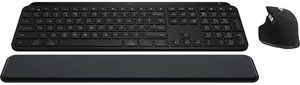
The Logitech MX Keys S Combo pairs the best productivity keyboard available with the MX Master 3S mouse — the definitive wireless productivity combo. The MX Keys S features spherically-dished key caps that match finger shapes, backlighting with smart illumination via proximity sensor, and the MagSpeed scroll wheel on the MX Master 3S provides 1,000 lines per second scrolling. Both devices connect to 3 devices simultaneously via Logi Bolt or Bluetooth, with Logitech Flow for cross-computer cursor movement.
- Best-in-class typing feel with spherically-dished keys
- MX Master 3S with MagSpeed scroll wheel
- Multi-device: 3 computers via Bolt or Bluetooth
- Logitech Flow cross-computer cursor
- Premium price
- Keyboard not mechanical — scissor switch only
The MX Keys S Combo is the go-to combo for professionals who type and use applications heavily. The keyboard is as good as scissor-switch typing gets, and the MX Master 3S mouse's customisable buttons integrate deeply with Logi Options+ for app-specific shortcuts.
2. Logitech MK850 — Best Multi-Device Combo

The Logitech MK850 is designed for multi-device users — both keyboard and mouse support 3-device switching via dedicated buttons, with Bluetooth and USB receiver options. The full-size keyboard includes a numpad, dedicated F-keys, and media controls. The M720 Triathlon mouse included has a fast scroll wheel and 6 programmable buttons. Excellent for users who switch between desktop and laptop regularly.
- Dedicated 3-device switching on both keyboard and mouse
- Full-size layout with numpad
- Bluetooth + USB receiver dual connectivity
- 24-month keyboard battery life
- Full-size footprint — takes more desk space
- Typing feel below MX Keys S
3. Microsoft Sculpt Ergonomic — Discontinued, But Still Worth Knowing About
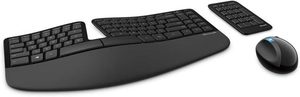
Microsoft has discontinued this one, and that changes the recommendation rather than the keyboard. On its merits the Sculpt Ergonomic Desktop remains one of the best split ergonomic combos ever made: the curved, split layout puts the hands at a natural angle, the cushioned palm rest keeps the wrists from bending back, and the numpad is a separate unit you can place wherever it suits you. It earned its reputation honestly. What has changed is that Microsoft exited ergonomic keyboards altogether, so nothing new is being produced. What is left sits with third-party sellers, often at prices far above what it originally cost, with no manufacturer support behind it. The low rating on the current listing reflects that situation, not the design.
- Split curved layout — still among the best ergonomic designs made
- Cushioned palm rest included
- Separate numpad for flexible placement
- Paired Arc mouse with ergonomic curve
- Discontinued — Microsoft has left the ergonomic keyboard market
- Third-party stock only — listings sit around $570, against roughly $100 when it was current
- No manufacturer support or replacement parts
- USB dongle required — no Bluetooth option
Buying new instead? Logitech's ERGO range is where most Sculpt owners have gone — the Wave Keys and Lift vertical mouse ship as a current, supported combo.
See on Amazon →4. Logitech MK295 — Best Budget Combo
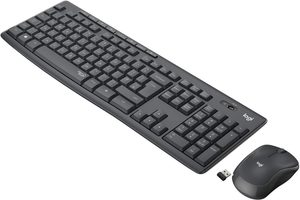
At around $1 the Logitech MK295 Silent delivers a reliable wireless combo with notably quiet key and mouse click sounds — 90% less noise than standard combos according to Logitech. Full-size keyboard with numpad, SilentTouch mouse, and 24-month keyboard battery life. The single USB receiver connects both devices. Excellent for shared office environments, libraries, and anyone who types loudly and wants to avoid disturbing others.
- 90% quieter than standard keyboard/mouse
- Outstanding value
- 24-month keyboard battery
- Single USB receiver for both devices
- No backlight
- No multi-device support — single computer only
5. Apple Magic Keyboard with Touch ID — Best for Mac
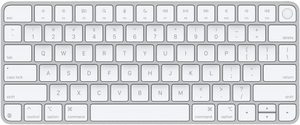
This is the one entry here that is not a combo, and it is worth being clear about why: Apple does not sell the Magic Keyboard and Magic Mouse as a bundle, so the two are bought separately. The keyboard is the half that earns its place. Touch ID unlocks the Mac and authorises payments without typing a password, the low-profile scissor keys match the feel of a MacBook, and it pairs itself the moment you plug it into the Mac. The Magic Mouse is the optional other half — its multitouch surface drives macOS gestures well, but the charging port on the underside means it cannot be used while charging, which is the complaint that has followed it for a decade.
- Touch ID for instant Mac authentication and Apple Pay
- Same key feel as a MacBook; pairs on first connection
- Matches iMac and Mac Studio finishes
- USB-C rechargeable, months per charge
- Keyboard only — the Magic Mouse is a separate purchase
- Magic Mouse charges on its underside, so it cannot be used while charging
- Expensive once you buy both halves
- Touch ID works only with Apple-silicon Macs
6. Logitech MK540 Advanced — Best Everyday Full-Size Combo
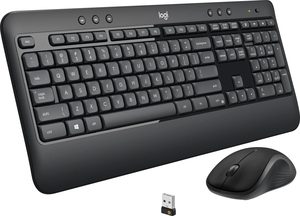
If the MX Keys S is more keyboard than the job needs, the MK540 is the sensible middle. It is a plain full-size layout with a number pad, concave keys and a weighted base that stays where you put it, paired with a right-handed mouse and a single 2.4 GHz receiver for both. The detail owners mention most often is the smallest one: a caps-lock indicator light, which sounds trivial until you have typed a password in capitals. Batteries come installed, and Logitech quotes three years for the keyboard and eighteen months for the mouse. It is also the most heavily reviewed combo here by a wide margin — 473 ratings at 4.4 stars against 65 for the MX Keys S Combo — which matters when you are buying something you will touch every day.
- Caps-lock indicator light — the detail owners praise most
- Full size with number pad; weighted base does not slide
- One 2.4 GHz receiver covers keyboard and mouse
- 473 ratings at 4.4 — by far the best-established pick here
- Faint key legends — hard to read in a dim room
- Not for gaming; no backlight, no mechanical switches
- Some long-term owners report keyboard input lag and a sticking mouse button after months of use
- Will not pair with an older Logitech Unifying dongle — use the receiver in the box
The MK540 is the combo to pick when nothing about the setup needs to be clever. It has no multi-device switching, no backlight and no app to configure — it plugs in and works, and it is the one product on this page with a long enough review record to know how it ages.
What to Look for in a Wireless Keyboard & Mouse Combo
Connectivity: Bluetooth vs USB receiver
Bluetooth connects without using a USB port — beneficial for laptops with few ports. USB receivers (Logitech Unifying, Bolt) offer more reliable connections with lower latency. A single receiver for both keyboard and mouse is practical. Some combos support both connection types (MK850).
Multi-device support
If you switch between multiple computers, look for combos that support 2–3 device pairing (MX Keys S Combo, MK850). The ability to switch with a button press rather than re-pairing saves significant friction throughout the day.
Battery life
Keyboard battery life ranges from a few months (backlit keyboards) to 24+ months (non-backlit). Mouse battery life is typically 12–24 months. Rechargeable via USB-C (MX Keys S, Apple Magic) is more convenient long-term than replaceable AA batteries.
Ergonomics
For wrist health, look for a keyboard with slight negative tilt (back edge lower than front) and a mouse with a comfortable natural grip. A split design of the kind Microsoft's Sculpt made popular is the most beneficial layout for RSI prevention — though that particular model is discontinued, so a current split keyboard from Logitech's ERGO range is where to look. Standard combos are fine for occasional use but become problematic at 8+ hours daily.
Our Verdict
The Logitech MX Keys S Combo is the best wireless keyboard and mouse combo for professional use — the typing feel and MagSpeed scrolling are genuinely best-in-class. For multi-device switching between 3 computers with a full-size layout, the Logitech MK850 is the practical choice. On a budget, the Logitech MK295 Silent delivers reliable performance at under $1.
Frequently Asked Questions
Bluetooth or 2.4GHz dongle wireless keyboard?
2.4GHz dongles (Logitech Unifying, Lightspeed) offer lower latency and don't require pairing — plug and play instantly. Bluetooth (Logitech MX Keys S) works across phones, tablets, and laptops without taking a USB port — better for multi-device setups. For typing and office work, both work well; choose dongle for gaming, Bluetooth for flexibility across devices.
How long does a wireless keyboard battery last?
Logitech MX Keys S: ~10 days per charge with backlighting, 5 months without. Microsoft Sculpt Ergonomic (discontinued): 12 months on standard AAA batteries. Apple Magic Keyboard: ~1 month per charge. Premium keyboards have rechargeable USB-C batteries (no battery purchases needed); budget keyboards use AA/AAA. Charging via USB-C while typing is supported on most modern wireless keyboards.
Ergonomic split keyboard vs straight keyboard — which is better?
Split/ergonomic keyboards reduce wrist strain by aligning hands with natural shoulder width — significant benefit for typing-heavy work or RSI sufferers. Straight keyboards (Logitech MX Keys S) are more familiar and have full key layout — better for general use. For users typing 4+ hours daily with wrist discomfort, ergonomic is worth the premium and the one-to-two week adjustment. Note that the Microsoft Sculpt, long the default recommendation here, is discontinued — Logitech's ERGO range is the current option.
Logitech MX Keys S Combo vs separate keyboard and mouse?
The MX Keys S Combo bundles the keyboard with the MX Master 3S mouse at a discount over buying separately. Both devices use Logitech Unifying receiver — one USB port for both. For matched aesthetic and unified Logitech Flow software (move between computers seamlessly), the bundle is the best value. Buy separately only if you want a different mouse style.