As an Amazon Associate and member of other affiliate programs, we earn from qualifying purchases. How we test →
Depth Masks, a proper colour grading wheel, face-level AI masks — and a one-click hand-off to Affinity.
DxO PhotoLab is the full replacement for Lightroom — not a pre-processor. Where version 9 was about squeezing the last drop of quality out of the RAW file, version 10 is about what you do afterwards: Depth Masks that select by distance from the camera, a colour grading tool built around a single wheel, AI Masks that can now isolate individual people and individual facial features, U Point refinement layered on top of AI selections, automatic sensor dust removal, and a direct hand-off to Affinity for pixel-level work.
How to read this page: PhotoLab 10 was released publicly on 1 September 2026. We have had the release build since the press materials went out on 18 August and have run it as our everyday editor since — every image processed here for the past two weeks has gone through version 10. So this is not a press-release summary: the feature descriptions come from DxO’s documentation, but the assessment comes from using it. Our hands-on notes after two weeks are further down the page.
Walkthrough presented by PhotoJoseph, used with permission. Hosted on our YouTube channel.
Local adjustments based on distance from the camera, not shape or colour. AI builds a depth map of the scene, then sliders and feathering handles decide where the effect falls off. No camera depth data required.
🎨A single colour wheel drives shadows, midtones, highlights and overall balance independently — or linked across tonal ranges so the relationship between them is preserved while you explore looks.
👥AI Masks now find every person in the frame. One mask for all of them, a combined mask for a chosen few, or a separate mask per person — group portraits stop being a manual masking job.
👁️Eyebrows, eyes, iris and pupil, sclera, teeth, facial hair, face skin and lips join sky, subject, background, people, animals, flowers and vehicles as selectable AI Mask categories.
🎯Make an AI selection, then refine it with the U Point eyedropper — expanding or contracting by colour and luminosity. Plus a new Control Brush and elliptical Control Points.
🅰️A new button beside the export options sends the photograph directly into Affinity for retouching, compositing and fine detail work. DxO calls it the first step of a wider integration.
✨AI-powered sensor dust removal at RAW level. Spots and small imperfections are detected and removed across batches before they interrupt the edit.
🔬The foundation carries over: DeepPRIME XD3 denoising for every supported camera, and optical profiles measured in DxO’s lab for thousands of real camera-lens combinations.
🕐A full-featured 30-day trial with no payment details required. Process your own RAW files and judge the output yourself before spending anything.
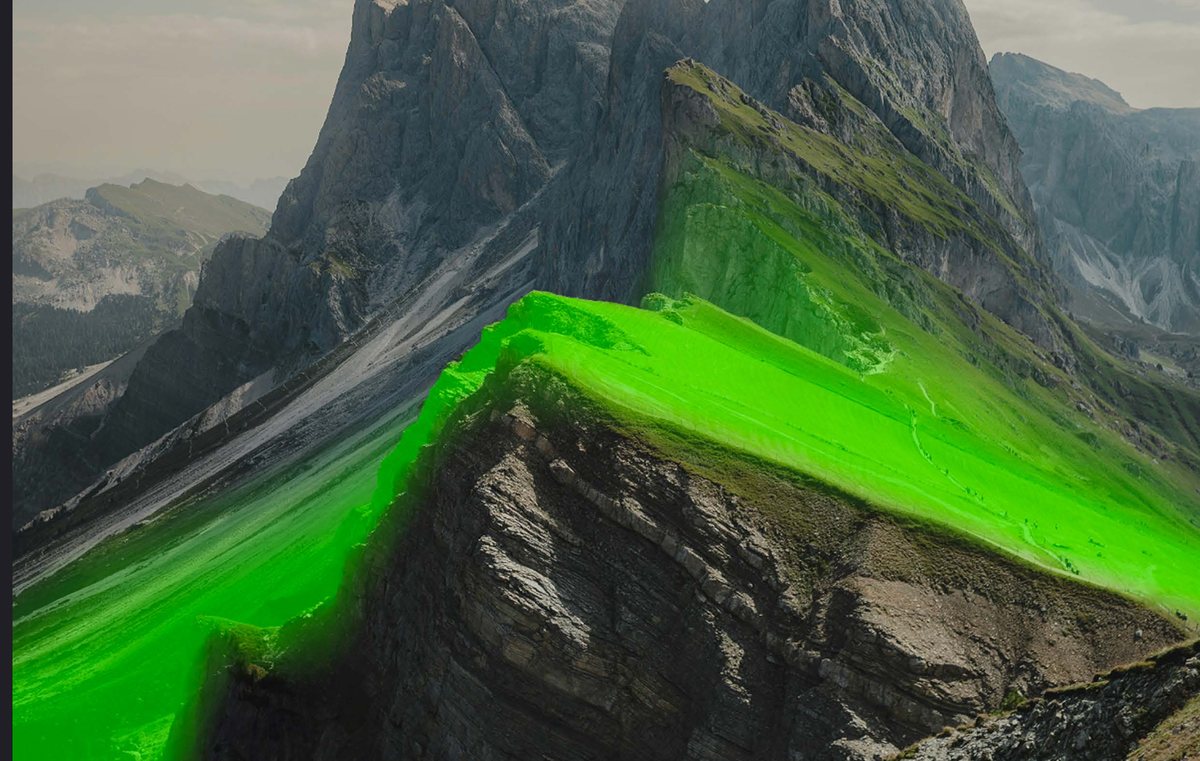
Every masking tool in every RAW editor works on what a pixel looks like: its colour, its luminosity, or the shape the model thinks it belongs to. Depth Masks work on where the pixel is. PhotoLab 10 analyses the image with AI, generates a depth map, and lets you target the foreground, the midground or the background as separate regions — without needing depth data embedded by the camera.
Once a filter or adjustment is applied, sliders and adjustable feathering handles decide exactly where in the scene it takes effect and how gradually it fades. That is the part that matters in practice: a haze lift that only touches the far ridge, or a warmth push that stops before it reaches the background, without hand-painting a gradient that follows terrain. For landscape and wildlife work this is the headline feature of the release.
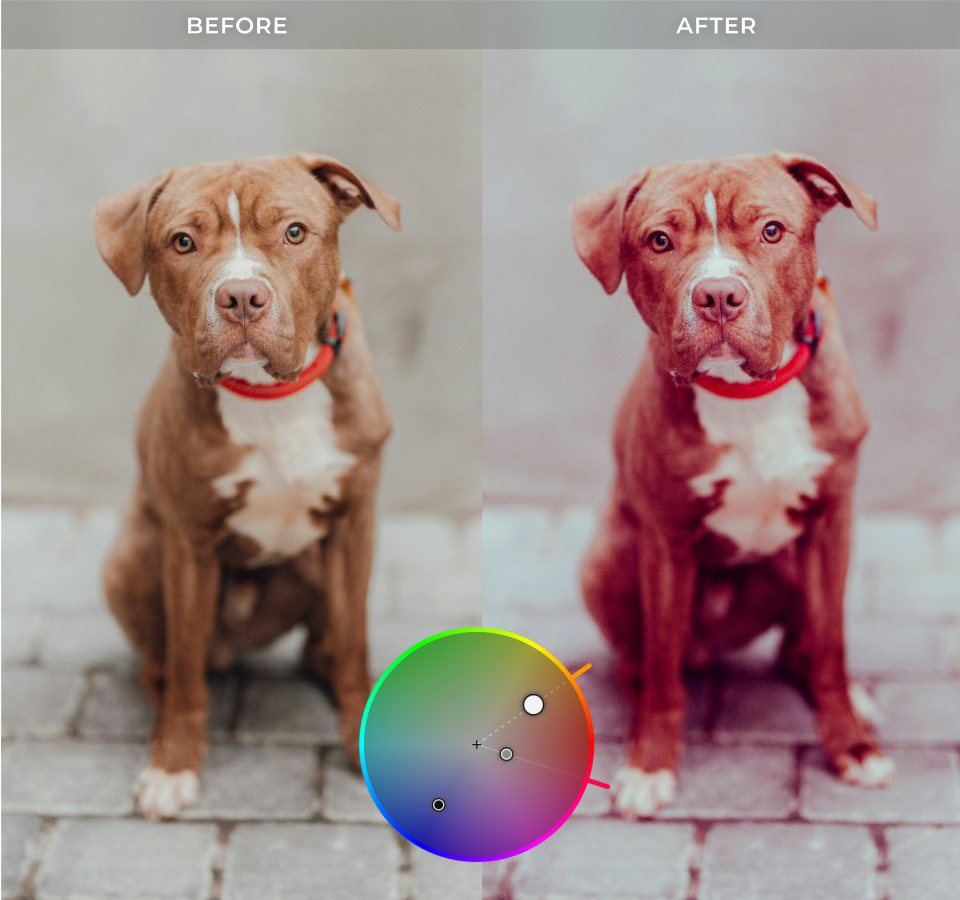
PhotoLab has had three-way colour tools for years, but they lived in a panel that felt like a technical control rather than a creative one. Version 10 replaces that with a single colour wheel interface: shadows, midtones, highlights and overall colour balance, each adjustable on its own.
The part worth noting is the linking. Adjustments can be tied across tonal ranges so their relative relationship is preserved while you move the whole grade around — you find a look, then shift it wholesale instead of rebuilding it three times. It is a smaller change than Depth Masks on paper, and probably the one you will use on more images.

AI Masks in PhotoLab 9 could select “people” as a category. Version 10 identifies each person individually. You choose: a single mask covering everyone, a combined mask for a selected subset, or one mask per person — created in a single pass from a small dialog that lists the people it found.
The practical case is group portraits and family scenes, where one subject is backlit and the other is not, and the old workflow meant painting a mask by hand around a moving child. Photography Life’s comparison of PhotoLab 9 against Capture One already found DxO “produced much better selections with a single click, even for complex edges such as fur, wing feathers, or animals with unusual shapes or poses.” Version 10 extends that accuracy from categories down to individuals.
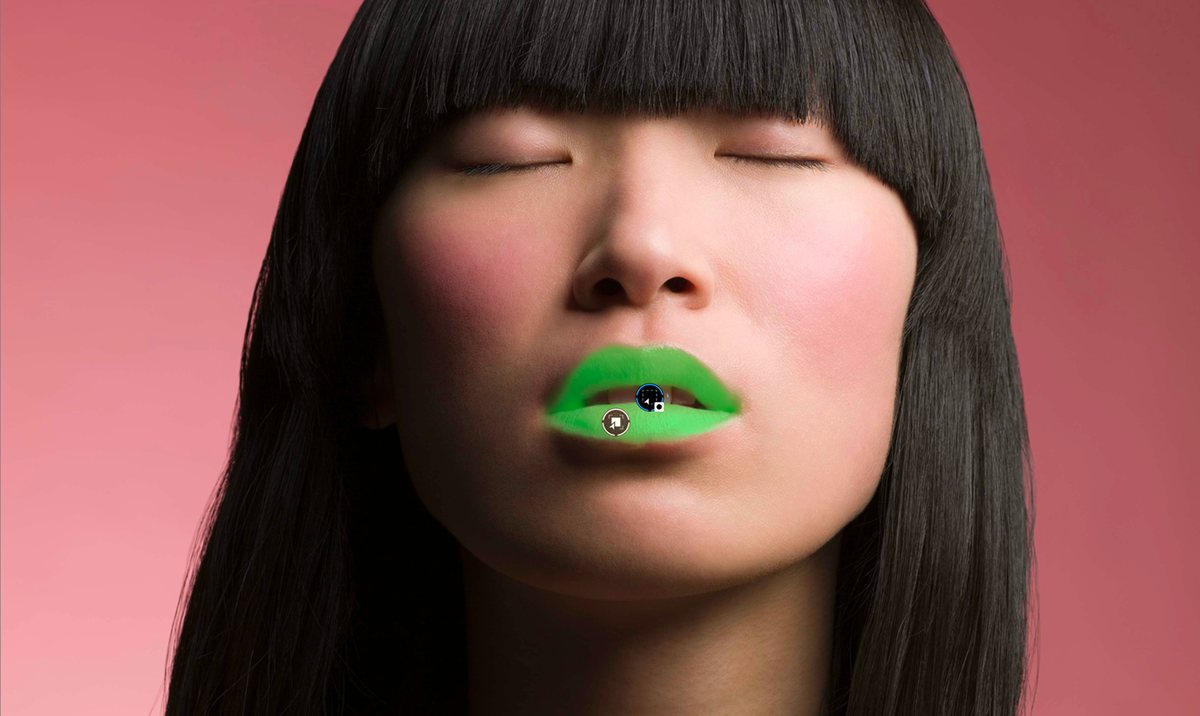
Face segmentation adds eyebrows, eyes, iris and pupil, sclera, teeth, facial hair, face skin and lips to the AI Mask category list, alongside the existing sky, subject, background, people, animals, flowers and vehicles.
This is retouching territory that normally means round-tripping to Photoshop: brightening sclera without turning eyes grey, warming lips a half-step, taking the shine off face skin while leaving the hair alone. Doing it non-destructively inside the RAW editor, on a mask the software generated, removes an export step from the portrait workflow entirely.
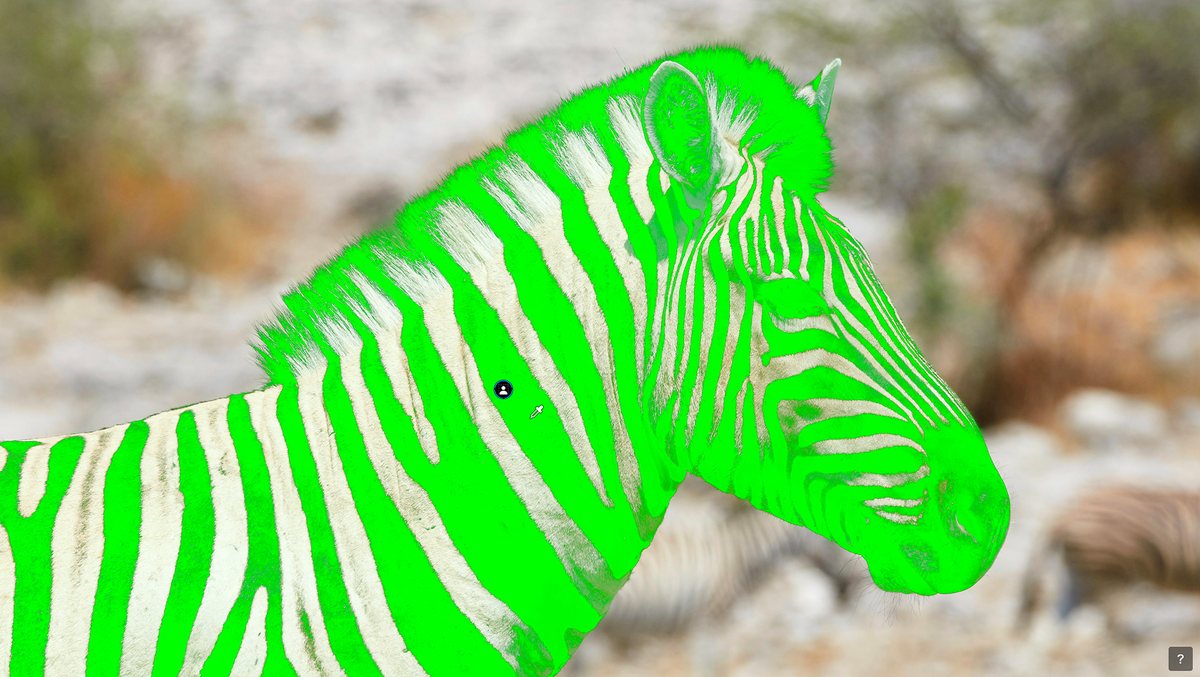
U Point — DxO’s Control Point technology, which selects by colour and luminosity from a single click — predates AI masking by well over a decade and is still the most intuitive local-adjustment tool in the category. Until now it and AI Masks were parallel systems. In version 10 they stack: make the AI selection first, then expand or contract it with the U Point eyedropper.
Two more additions round out local adjustments. The Control Brush paints like a conventional brush but carries U Point’s colour and luminosity intelligence, so it does not bleed across edges the way a plain brush does. And Control Points can now be elliptical rather than only circular, which fits far more subjects — a horizon band, a face, a wing — without stacking four circles to approximate the shape.
Anyone who changes lenses in the field knows the routine: import a set, find the same three dust spots in every sky, and clone them out frame by frame. PhotoLab 10 detects and removes sensor dust and small imperfections automatically, at the RAW level, before the edit starts.
Because it runs at RAW level it applies across a batch rather than per image, which is the whole point — sensor dust is by definition the same defect in the same place on every frame from that session.

The honest limitation of any RAW editor is that it edits parametrically. Sooner or later a picture needs pixels moved: a distracting branch cloned out, two frames composited, a detail rebuilt by hand. PhotoLab 10 adds a button beside its existing export options that sends the image straight into Affinity for exactly that.
It is a sensible pairing for anyone who left the Adobe subscription: DxO’s RAW processing, denoising and optical corrections as the base, Affinity’s pixel toolset for everything after — and neither of them rented by the month. DxO describes this release as the first step in an evolving integration between the two applications, with more planned. Treat the current version as a hand-off, not a round-trip.
We have run version 10 as our everyday editor since the 18 August press build — close-up and macro work, mostly insects, mostly focus-stacked. Feature lists are one thing; here is what survived contact with real files.
The obvious assumption — and the one DxO’s own launch imagery invites, with its mountain ridges — is that depth masking needs a scene with depth to work on. At 1:1 magnification the depth of field is millimetres, so it would be reasonable to expect the depth map to collapse into a single plane.
It doesn’t. It works on everything. Because it builds the mask from the subject and what sits behind it, and grades the separation between them, macro is exactly the case it handles well — and it is unusually precise at telling those layers apart. In practice it has moved straight into the daily rotation rather than staying a landscape novelty.
Reviews tend to list every tool. This is the set that gets used, in order of frequency:
This is the most useful thing we found that is not in DxO’s materials. The new hand-off is presented as an Affinity integration, but the shortcuts sitting alongside the export options are editable. You are not limited to the applications DxO shipped buttons for.
For focus stacking that matters a lot: it means sending a selection straight to Helicon Focus from inside PhotoLab, rather than exporting TIFFs to a folder and picking them up in the other application. We have barely touched Affinity itself — the editing we do has not needed pixel work yet — but the configurable hand-off has changed the stacking workflow on its own.
Nothing dramatic to report, which is the point. It catches the small stuff without being asked. We do not have a serious dust problem to begin with, so treat this as “it handles ordinary sensor dust reliably” rather than as a stress test.
We cannot honestly claim a measurable general speed-up over 9.6. Exporting TIFFs feels quicker, but that is a subjective impression and we have not benchmarked it, so do not buy on that basis.
The genuine annoyance is opening and moving around a large library. PhotoLab reads every .dop sidecar when it opens a folder — or writes them the first time you pull the files in — and with a big archive that is slow enough to notice.
It is the same class of problem Lightroom has; Lightroom just charges you for it at import instead. The practical fix is not a setting, it is filing discipline: keep folders small and split the archive by month or by session rather than pointing PhotoLab at everything at once. Worth knowing before you migrate a decade of RAWs into it and conclude the software is slow.
Lightroom costs roughly €12–15/month on Creative Cloud. Over three years, that’s €432–540. PhotoLab 10 costs 249,99 € — once. In under two years it pays for itself against a Lightroom subscription, and you keep it permanently whether or not you ever buy version 11.
Underneath the version 10 features, the reason to be here has not changed: DeepPRIME XD3 is still the strongest AI noise reduction in the category, and DxO Modules — optical profiles measured in a lab for thousands of specific camera-lens combinations rather than derived from metadata — are still the most precise distortion, vignetting and chromatic aberration corrections available anywhere.
PhotoLab 10 is a perpetual licence, available from 1 September 2026 for macOS and Windows. There is a paid upgrade path from version 8 and 9, and a 30-day full-feature trial that does not ask for payment details.
USD: $249.99 new • $129.99 upgrade | GBP: £229.99 new • £114.99 upgrade
On version 9? Version 10 is not a free update — it is the 129,99 € upgrade. If the new masking and colour tools are not something you would use, PhotoLab 9.6 keeps working exactly as it does today.
Use this code at checkout on dxo.com — valid for new customers.
One-time purchase • 30-day free trial available • No subscription
For a decade DxO’s argument has been image quality: DeepPRIME, then XD, then XD3, plus lens corrections nobody else can match because nobody else measures the glass. That argument was won some time ago. The gap was everything downstream — masking that felt dated next to Lightroom’s, colour tools that felt technical rather than creative, and no path to a pixel editor unless you kept Photoshop around.
Version 10 goes straight at that gap. Depth Masks are genuinely novel — selecting by distance is something Lightroom cannot do at all. Face segmentation and per-person masks close the portrait-retouching gap. U Point layered on top of AI Masks is the combination people have been asking for since AI masking arrived. And the Affinity button, small as it is, completes a subscription-free stack end to end.
Upgrading from 9? 129,99 € is fair if you mask often — landscape, portrait, wildlife. If you mostly import, denoise and export, version 9.6 already does that and there is no urgency. Coming from Lightroom? This is the strongest version to switch on: run the 30-day trial against a real shoot before spending anything.
Use code LENSBYNEXOE15 for 15% off — valid for new customers at checkout on dxo.com.
September 1, 2026. It is available immediately from shop.dxo.com for macOS and Windows.
Depth Masks (AI-generated depth maps for distance-based local adjustments), a new colour grading tool built around a single colour wheel, individual people selection and face segmentation in AI Masks, U Point refinement inside AI Masks, a Control Brush and elliptical Control Points, automatic sensor dust removal at RAW level, and a one-click hand-off to Affinity for pixel editing. Workflow additions include as-shot crop ratios, histogram adjustments inside PhotoLibrary, improved database backup and restore, and simplified folder relocation.
No. Version 10 is a paid upgrade: 129,99 € / $129.99 / £114.99 from version 8 or 9. A new licence is 249,99 € / $249.99 / £229.99.
No — it is a perpetual licence. There is no monthly fee, and the software keeps working if you never upgrade again.
Depth Masks let you make local adjustments based on distance from the camera rather than shape or colour. PhotoLab 10 uses AI to analyse the image and build a depth map, so you can target foreground, midground or background without depth data embedded by the camera. Sliders and feathering handles control exactly where the effect falls off.
Yes. They are not limited to scenes with landscape-scale depth. Because the mask is built from the subject and what sits behind it, with the separation graded between them, close-up work is handled well — in two weeks of daily macro use we found it unusually precise at telling depth layers apart, even where depth of field is only millimetres. More in our hands-on notes.
Yes. It is presented as an Affinity integration, but the shortcuts alongside the export options are editable, so you can point them at other applications. For focus stacking that means sending a selection straight to Helicon Focus from inside PhotoLab instead of exporting TIFFs to a folder first.
A new button next to PhotoLab’s existing export options sends the photograph straight into Affinity for pixel-level retouching, compositing and detail work. DxO handles RAW processing, denoising and optical corrections; Affinity handles everything beyond that. DxO describes it as the first step of a wider integration between the two applications.
DxO PureRAW 6 is a pre-processor that outputs improved DNGs for editing in Lightroom or Capture One. PhotoLab replaces Lightroom entirely. Both include DeepPRIME XD3. PureRAW (129,99 €) is right if you want to stay in Lightroom. PhotoLab is right if you want to leave it.
Yes — Nik Collection 9 runs as a plugin inside PhotoLab. The complete DxO workflow is: PhotoLab for RAW editing and noise reduction, Nik Collection for creative colour grading and effects, Affinity for pixel-level work.
Yes — DxO offers a 30-day full-feature trial from dxo.com/dxo-photolab/download. No payment details required.

