As an Amazon Associate and member of other affiliate programs, we earn from qualifying purchases. How we test →
Hands-on test, benchmarked against Topaz Photo AI and Lightroom.
Version 9 adds six new features — AI Masks, Depth Masks, Photoshop-style Blend Modes, a Color Grading wheel, plus Halation, Chromatic Shift and Glass Effect filters. This review synthesises hands-on findings from six peer reviews and community threads published April–May 2026 (Rod Lawton at Life After Photoshop, Thomas Fitzgerald, Christian Hoiberg, DPReview forums, Lightroom Queen forums, Nikon Cafe).
Pixel-precise subject selection via click or bounding box. Works inside Color Efex, Silver Efex and Analog Efex — you no longer need to leave Nik to do selections.
📐AI-generated depth map lets you target adjustments by distance — foreground, midground, background. Genuinely useful for landscape work.
🎚️Photoshop-style blend modes (Overlay, Soft Light, Multiply, etc.) for every filter. The single biggest creative expansion in v9.
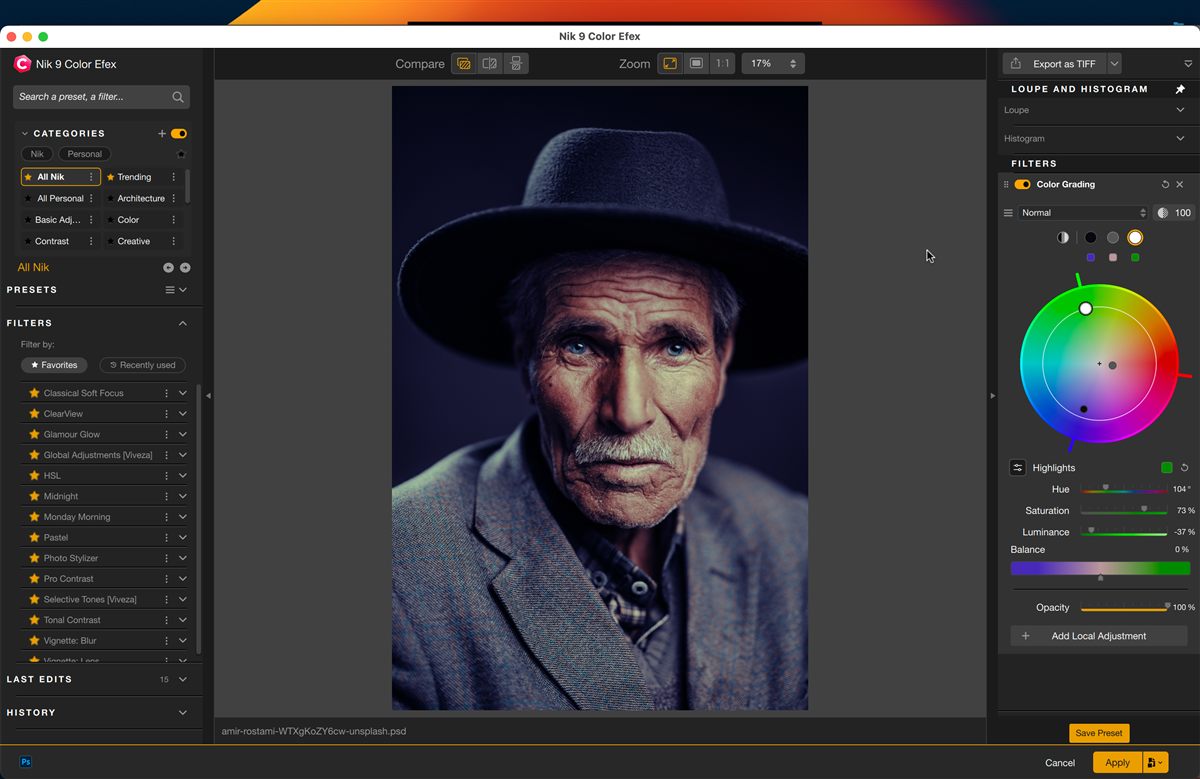
🎨Single colour wheel with separate control points for shadows, midtones, highlights and overall. Unique design, not a clone of standard 3-way correctors.
🎞Soft glow from highlights, mimicking older analog film stocks. Controls for brightness, radius, intensity, hue and opacity. Well-executed.
🔮Two niche creative filters (glass distortion + offset-print colour misalignment). Lawton: “quite cool, but how often will you use it?”
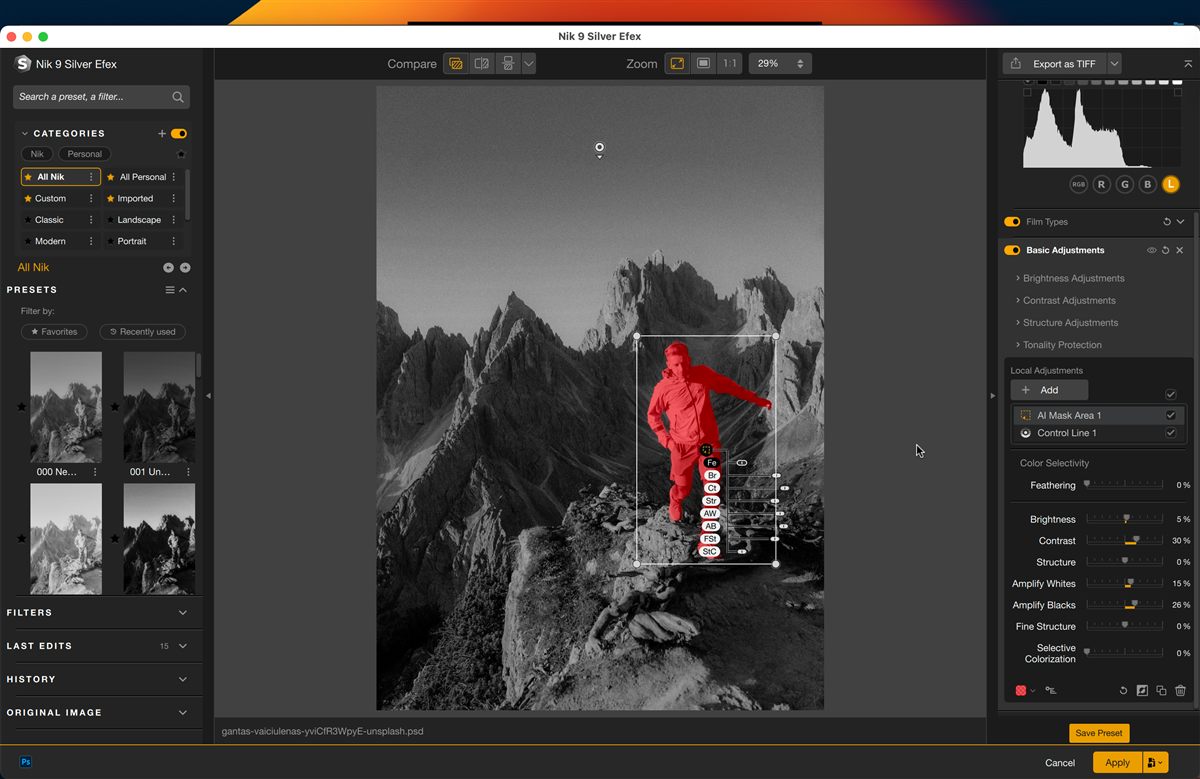
Before v9, masking inside Color Efex or Silver Efex was limited to the U-point system and gradient/brush tools. Now you click on a subject (person, tree, building) or drag a bounding box, and the software cuts a pixel-precise selection. Lawton observes selections are “fast and accurate.”
The honest caveat from Christian Hoiberg: if you primarily mask in Lightroom before sending to Nik, you may rarely reach for AI Masks. The feature’s value depends entirely on workflow — minimal gain for Lightroom-heavy users, substantial gain if Color Efex or Silver Efex is your primary editing environment.
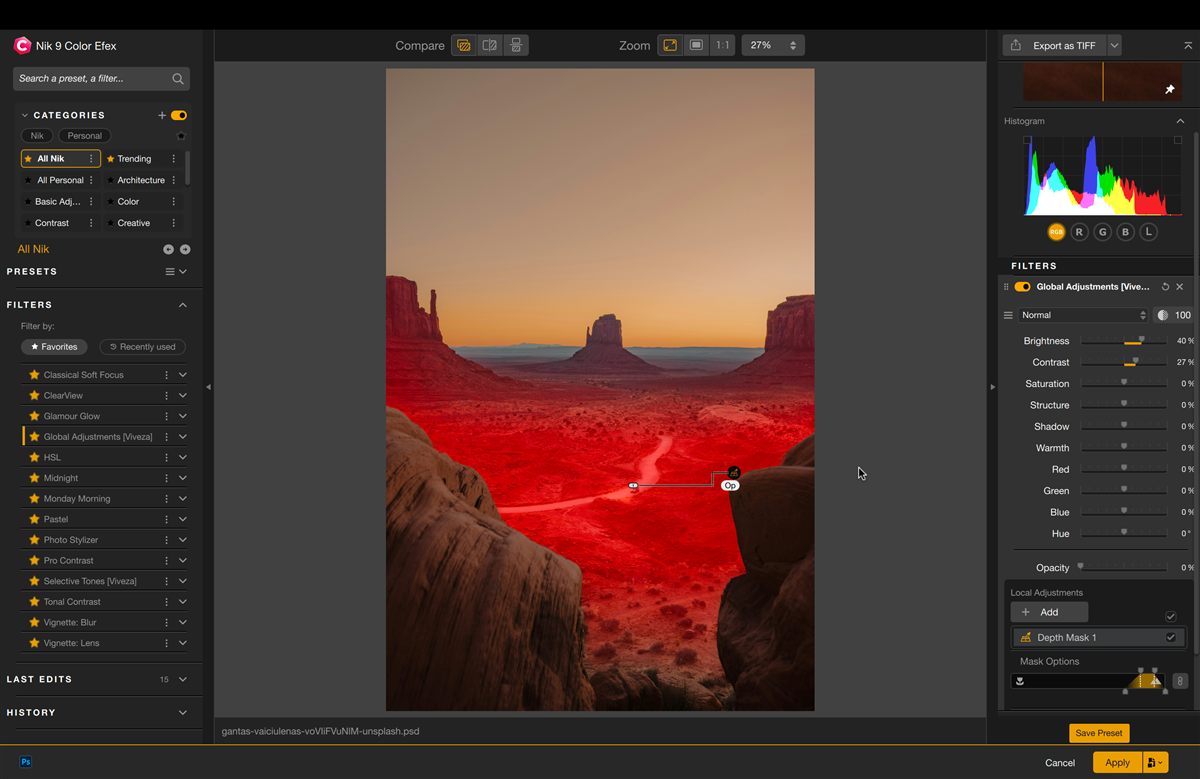
AI analyses the image to generate a depth map — no embedded depth data required. Sliders with feathering handles let you target adjustments by foreground, midground or background.
Hoiberg notes this is genuinely useful for landscape photography (apply a filter only to the sky, or only to the immediate foreground), but it “won’t replace precise manual masking for complex images.” A time-saver, not a magic bullet.
Filters in Color Efex and Analog Efex now support Photoshop-style blend modes — Multiply, Screen, Overlay, Soft Light, Color, Luminosity, etc. Thomas Fitzgerald shows how a light leak filter switched from the default “Screen X2” to “Overlay” produces dramatically different results.
Lawton: “a far-reaching change that could take some time to explore fully but substantially extends the Nik Collection’s creative depth.” This is the single biggest creative expansion in v9 and applies to every filter in two of the three flagship plugins.
Rather than copying the three-way colour corrector found in DaVinci, Premiere or Lightroom, DxO designed a single colour wheel with separate control points for shadows, midtones, highlights and overall. Multiple ranges can be locked together for synchronised changes.
Fitzgerald: “It looks a bit odd at first, but once you get used to it, it works quite well and is actually pretty intuitive.” Combined with AI Masks, this is what gives Color Efex new credibility as a standalone editing environment.
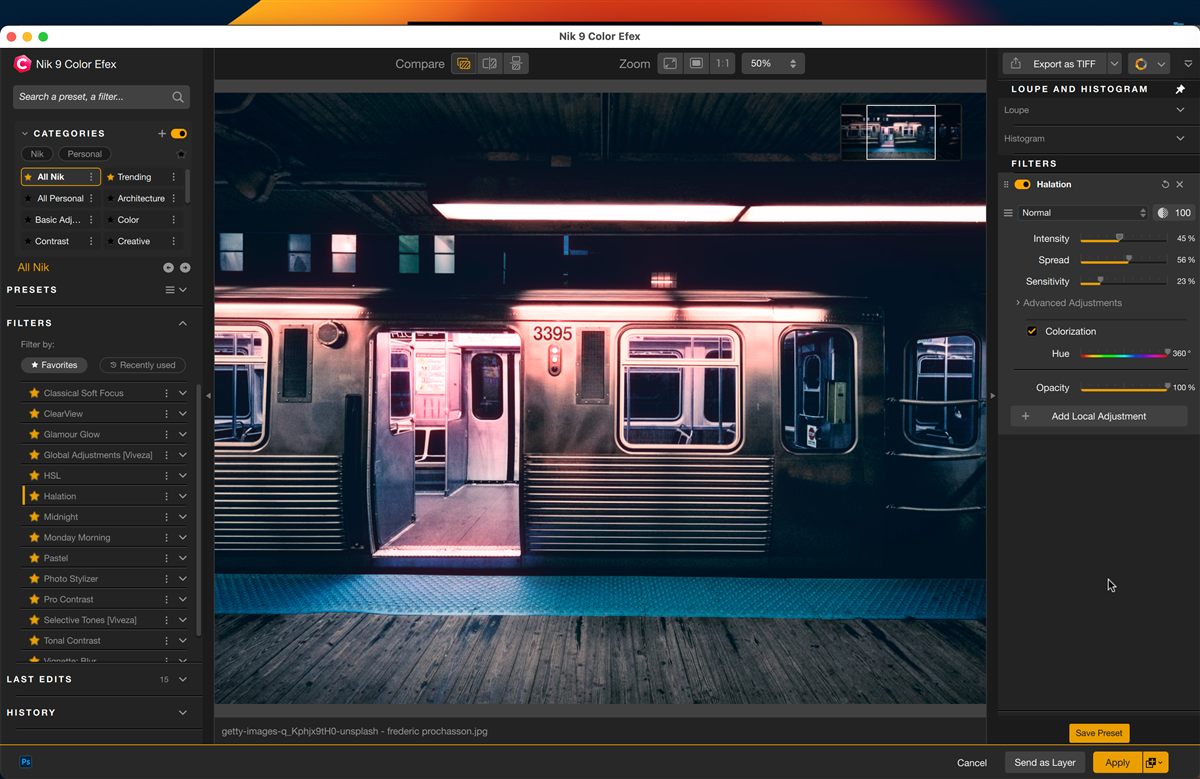
Halation is the bloom of warm red-orange light that spreads around highlights on analog film stock — light penetrating the emulsion layer and reflecting off the base. Nik 9 recreates this with control over brightness, radius, intensity, hue and opacity.
Hoiberg calls it a “well-executed addition for those who want them.” Applied with restraint it adds cinematic warmth to portraits, sunsets and anything with a bright light source. Best of the three new creative filters in v9.
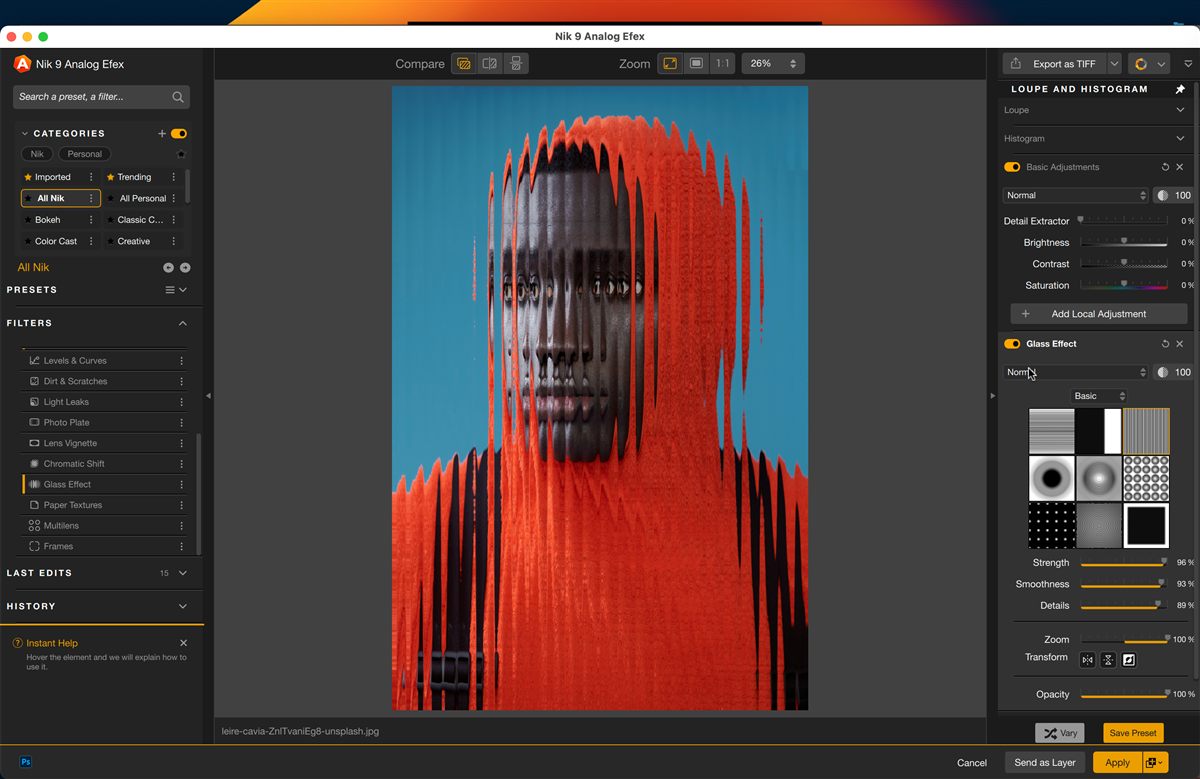
Glass Effect (Analog Efex) mimics shooting through textured glass with a library of distortion textures, onscreen controls, blend mode and mask support. Fitzgerald: “renders quite nicely” but suggests DxO should let users add custom texture maps.
Chromatic Shift (Analog Efex) simulates offset-print colour misalignment — three palette options plus controls for angle, offset strength and scale. Lawton: “it’s quite cool, but how often will you use it?” Both are niche but solid additions for stylised work.
These two are often weighed against each other on DPReview and Lightroom Queen forums, but they solve different problems. Topaz Photo AI is best-in-class for automatic enhancement: noise reduction, sharpening, upscaling. Most users in the DPReview thread who own both keep Topaz specifically for denoising wildlife or low-light shots.
Nik 9 is best-in-class for creative editing: Color Efex’s filter stack, Analog Efex’s film emulations, Silver Efex for B&W. None of these have a serious competitor at the price point. Topaz Photo AI ($199) is more expensive but bundles denoise + sharpen + upscale; Nik 9 ($149.99) gives you seven plugins covering a much broader creative range. Many photographers run both: Topaz for technical work, Nik for creative work.
Where Nik has fallen behind: Dfine, its noise reduction plugin, has seen minimal updates in five years. It is now outclassed by both Topaz Photo AI and Lightroom’s Enhance Denoise. If noise reduction is your primary need, this is not the suite to buy.
Adobe added AI subject and sky selection to Lightroom Classic over the past two years, and the quality is genuinely good. So is Nik 9’s new AI Masks pointless if you already pay for Adobe Creative Cloud?
Not quite, but the value calculation changes. Lightroom’s AI Masking only applies inside Lightroom — you cannot use it once you’ve sent the image to Color Efex or Silver Efex as a plugin. v9 closes that gap by adding masking inside the Nik plugin itself. If your workflow is 90% Lightroom and Nik is just for occasional Silver Efex B&W conversion, you’ll rarely touch AI Masks. If your workflow is 50% or more inside Nik plugins, AI Masks is a significant time-saver.
Nik Collection 9 includes seven plugins covering color, B&W, analog, HDR, selective adjustments, noise reduction and sharpening. v9’s headline updates land in Color Efex, Analog Efex and Silver Efex.

55+ creative filters. v9 adds Halation, Color Grading wheel and Blend Modes — biggest feature gains

Film camera simulations. v9 adds Chromatic Shift, Glass Effect and Blend Modes

Industry standard for B&W conversion. Mostly unchanged in v9 but still leads the category

HDR merge + tonemapping. Competent but not class-leading

Selective color & tone via U-Point technology. Familiar tool for long-time Nik users

Camera-profile noise reduction. Solid baseline cleanup before applying creative filters

Capture + output sharpening optimised for screen, inkjet, or print medium
Compared to ON1 Effects (~$70-80), Nik 9 is roughly twice the price. Compared to Adobe’s Creative Cloud Photography plan (~$120/year), Nik 9 pays for itself after roughly 18 months — and keeps working indefinitely without further payments.
Use this code at checkout on dxo.com — valid for the full suite, all individual plugins, and every other DxO product including PureRAW 6 and PhotoLab 10.
One-time purchase • Perpetual license • 3 computers
Nik Collection 9 is the most substantial update to the suite since DxO took over from Google in 2017. AI Masks, Depth Masks, Photoshop-style Blend Modes and the Color Grading wheel are genuine workflow improvements — not marketing window-dressing. For photographers who use Nik plugins as a primary editing environment, the $99.99 upgrade from v7/v8 is easy to justify on AI Masks and Blend Modes alone.
At $149.99 for a new perpetual license, the suite represents strong long-term value — it pays for itself versus Adobe’s subscription model after roughly 18 months and keeps working indefinitely. With the LENSBYNEXOE15 code, the price drops another 15%.
Nik Collection works best as part of a complete DxO workflow. If you’re not already using DeepPRIME noise reduction, these are worth reading:
Yes if you use Nik plugins as a primary editor — AI Masks and Photoshop-style Blend Modes alone justify the $99.99 upgrade. No if you mainly use Dfine, Sharpener or Viveza — those three have seen minimal updates in five years and are now outclassed by Topaz Photo AI and Lightroom Enhance Denoise.
Different products. Nik focuses on creative filters (Color Efex, Analog Efex, Silver Efex for B&W) plus the new AI Masks. Topaz Photo AI focuses on automatic enhancement (noise reduction, sharpening, upscaling) and is best-in-class for that. If you want creative film effects and B&W tools, Nik. If you want maximum noise reduction quality, Topaz. Many photographers use both.
For the new AI Masks and Depth Masks features: yes. DxO requires NVIDIA RTX 2000 series with 6GB VRAM minimum, AMD Radeon RX 6000 series with 6GB VRAM, or Intel Arc with 8GB VRAM. Older GPUs will run the standard plugins but cannot use the AI masking. On Apple Silicon, an M1 minimum is required.
No. Nik Collection 9 is a perpetual license — you pay $149.99 once and own it forever. DxO operates a two-year upgrade cycle, meaning you can skip every other version and still get upgrade pricing. One license activates on up to three computers.
Yes. All seven plugins integrate with Adobe Photoshop 2025/2026, Lightroom Classic 2025/2026, Affinity Photo 1.x/2.x/3.x, and DxO PhotoLab 8/9/10. Each can also run standalone — same features as the plugin version, just launched separately. Not compatible with Capture One as a true plugin, but can be used as an external editor.
AI Masks select subjects: you click or draw a bounding box around a person, animal, or object, and the software creates a pixel-precise selection. Depth Masks select by distance: the software analyses the image to generate a depth map, then you target adjustments by foreground/midground/background — useful for landscape photography where you want to apply a filter only to the sky or only to the foreground.
