
TP-Link Tapo C425 MagCam Review 2026 — 300-Day Battery, No Subscription
As an Amazon Associate and member of other affiliate programs, we earn from qualifying purchases. How we test →
Last updated: September 11, 2026 • Cross-checked against Consumer Reports, SafeWise and Digital Camera World coverage
- No hub, no subscription — microSD up to 512 GB sits inside the camera
- Up to 300 days per charge — TP-Link's lab figure at ~230 s of activity a day
- 2K QHD (2560×1440), 142° field of view, IP66
- Magnetic base — aim it by hand, lift it off to recharge
- Around $120 — well under comparable Ring and Nest cameras
- Charges over Micro USB — the one genuinely dated part
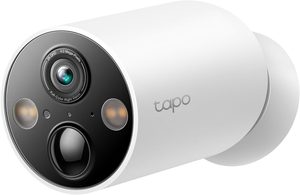
The Tapo C425 MagCam is a wire-free 2K outdoor camera that stores footage on a card inside its own body, needs no hub, and costs around $120. It replaced the Tapo C420S2 kit in TP-Link's line-up and fixes that kit's defining weakness: the C420S2 cameras were useless without the H200 hub, while the C425 talks to your WiFi directly. It carries Wirecutter's 2026 pick for best outdoor security camera and a PCMag Editors' Choice.
This review draws on published testing from Consumer Reports, SafeWise and Digital Camera World, alongside TP-Link's own documented battery figures. It is compared against the Eufy SoloCam S340, Reolink Argus 4 Pro and Arlo Pro 5S on the Best Outdoor Security Camera 2026 shortlist.
Storage: the part that decides the price over five years
Most battery cameras are cheap to buy and expensive to keep. The C425 breaks that pattern in a specific way: the microSD slot is in the camera, it accepts cards up to 512 GB, and person and vehicle detection runs on the device. There is no hub to buy, no base station to find a shelf for, and no monthly fee to see your own recordings.
TP-Link does sell a Tapo Care cloud plan, and it is worth understanding what it actually adds: off-site copies of clips, so footage survives a stolen camera. That is a real benefit for a camera mounted at head height on a driveway. But it is an addition, not a gate — the local workflow is complete on its own.
| What you pay for | Tapo C425 | Typical subscription cam |
|---|---|---|
| Hub or base station | Not needed | Often required |
| Local storage | microSD to 512 GB, in camera | Frequently hub-only or absent |
| Person/vehicle detection | On device, free | Commonly subscription-gated |
| Cloud history | Optional (Tapo Care) | Usually the default cost |
Battery: what "300 days" actually means
The headline figure is 300 days from the 10,000 mAh cell, and it deserves reading carefully rather than dismissing. TP-Link's number comes from its own laboratory conditions at roughly 230 seconds of camera activity per day. TP-Link also publishes the other end of that curve: at about 360 seconds a day, battery life falls to around 180 days.
That is unusually honest documentation for a battery claim, and it makes the number useful. A camera watching a quiet side gate will approach the high figure. A camera pointed at a pavement where people and cars pass all day will sit near the low one — still two to six months between charges, which is the point.
The optional Tapo A200 solar panel removes the question, but note that it is sold separately here. The C420S2 kit it replaced included panels in the box, so the comparison is not entirely in the C425's favour on that specific point.
Image quality: strong by day, ordinary in the dark
2K QHD at 2560×1440 across a 142° field of view is a sensible combination for a driveway or garden — wide enough to cover the approach, sharp enough to read a plate at a normal distance. Consumer Reports rates daytime footage among the sharpest it has seen from this class, while noting that fine patterns and subtle detail do not all survive.
At night the picture splits in two. With the Starlight sensor and the two built-in spotlights active, footage stays in colour, which is far more useful for identification than monochrome infrared. Fall back to pure infrared in genuine darkness and reviewers are consistent that this is the camera's weakest area: usable for detecting that someone is there, unreliable for working out who.
Mounting: magnetic, but not drill-free
The magnet is the feature the product is named for and it earns the name — the camera snaps onto its base, swivels freely for aiming, and lifts off in a second when the battery needs charging. Anyone who has stood on a ladder unscrewing a camera will appreciate the difference.
It is worth being precise about what still needs a drill, because the marketing can read otherwise: the supplied metal plate is normally secured with two screws. Only surfaces that are already ferrous take the base with no fixings at all. The magnet's real payoff is the removal and re-aiming, not the initial install.
Where it frustrates
Micro USB in 2026. This is the most consistent complaint across reviews, and it is a fair one. Every other device in a modern household charges over USB-C; the C425 does not. It does not affect image quality or reliability, but it means keeping an obsolete cable for one device, two to six times a year.
WiFi range sensitivity. Reviewers repeatedly note that reliability drops when the router is more than a room or two away. For a camera that is by definition mounted outside, that is worth planning for — a mesh node near the relevant wall is often the difference between dependable alerts and intermittent ones.
App friction. Slow loading, some initial setup awkwardness, and notification lag come up often enough to be treated as characteristics rather than isolated faults.
No offline mode. Footage stays local, but setup and remote access still require an internet connection and a Tapo account. There is no LAN-only operation for buyers who want nothing leaving the property.
Pros and cons
- No hub and no subscription — 512 GB microSD sits in the camera
- Documented battery range (300 days at ~230 s/day, 180 at ~360 s/day)
- Magnetic base makes aiming and recharging genuinely quick
- Full-colour night footage via Starlight sensor and twin spotlights
- IP66, person and vehicle detection, siren, activity zones
- Around $120 — well under comparable Ring and Nest cameras
- Micro USB charging — an obsolete connector on a 2026 product
- Infrared night vision is weak; faces are hard to identify in full darkness
- WiFi reliability drops when the router is more than a room or two away
- Solar panel (A200) sold separately, where the old C420S2 kit included panels
- No offline mode — a Tapo account and internet are required
- Not built for 24/7 continuous recording or 4K
How it compares
Tapo C425 vs Eufy SoloCam S340
The Eufy SoloCam S340 shoots 3K rather than 2K, adds a second lens with optical zoom, and ships with its solar panel included. It also costs substantially more. Pick the Eufy if image detail and bundled solar matter. Pick the C425 if you want the lowest sensible price for a subscription-free battery camera.
Tapo C425 vs Reolink Argus 4 Pro
The Reolink Argus 4 Pro delivers genuine 4K at a comparable price, which is the stronger spec on paper. The C425 answers with the magnetic mount, the larger card ceiling and TP-Link's app ecosystem. Pick the Reolink if resolution is the deciding factor. Pick the C425 if you value quick removal and re-aiming.
Tapo C425 vs the C420S2 it replaced
The C420S2 was a two-camera kit with solar panels and an H200 hub, and its cameras could not function without that hub. The C425 is one camera that needs no hub at all and holds its own card. You lose the second camera and the bundled panels; you gain independence from a single point of failure. For one location, the C425 is the better design. For two locations on the tightest budget, the old kit was better value while it lasted.
Who should not buy it
Anyone who needs reliable night-time identification rather than night-time detection — the infrared performance is the weak point, and a wired camera with better low-light optics is the honest answer. Anyone wanting 24/7 continuous recording, which this camera is not built for. Anyone with a router at the far end of the house and no intention of adding a mesh node. Buyers who insist on fully offline operation. And anyone who will be genuinely annoyed by keeping a Micro USB cable alive in 2026 — it is a small thing, but it is a recurring small thing.
Our verdict — 8.2/10
The C425 is the right camera for the most common outdoor situation: one approach to watch, a strong preference against monthly fees, and no appetite for running cable. It stores its own footage on a card up to 512 GB, runs its detection on-device, and asks for nothing after purchase. TP-Link's willingness to publish both ends of the battery curve rather than only the flattering number is a point in its favour.
It is not the sharpest camera in the category and it is not the best in the dark. The Micro USB port is indefensible on a 2026 product, and WiFi range wants planning. But at roughly $120, with no hub and no subscription, it does the main job well and it has taken the C420S2's place on our Best Outdoor Security Camera 2026 shortlist.
Frequently Asked Questions
Does the Tapo C425 need a hub?
No. This is the main change from the C420S2 kit it replaced. The C425 connects straight to your 2.4 GHz WiFi and takes a microSD card of up to 512 GB inside the camera body, so recordings stay on the camera with no hub and no subscription. TP-Link sells a Tapo Care cloud plan for off-site history, but nothing essential is locked behind it.
Does the Tapo C425 really last 300 days on a charge?
That figure comes from TP-Link's own lab conditions and assumes about 230 seconds of camera activity per day. TP-Link's own documentation states that raising activity to 360 seconds a day drops battery life to roughly 180 days. A camera pointed at a busy pavement or driveway will sit at the lower end. The optional Tapo A200 solar panel, sold separately, removes the question entirely.
Can the Tapo C425 be mounted without drilling?
Not entirely. The camera itself is magnetic and snaps onto its base, which is what makes aiming and removal for charging so quick. The base plate still needs securing — reviewers report two drill holes for the supplied metal plate. Once the plate is up, taking the camera down to recharge is a one-second job, which is the practical benefit of the magnet.
How good is the Tapo C425 at night?
In colour mode it is good: a Starlight sensor plus two built-in spotlights keep footage in colour rather than grey. In pure infrared, with no spotlight and no ambient light, reviewers consistently describe the image as the camera's weakest area and note that recognising a face is difficult. If night-time identification is the job you are buying for, that is the limitation to weigh.
Tapo C425 vs Eufy SoloCam S340 — which should I buy?
The Eufy SoloCam S340 wins on resolution (3K against 2K), adds a second lens with optical zoom, and includes its solar panel in the box. The Tapo C425 costs meaningfully less, mounts magnetically, and takes a 512 GB card. Buy the Eufy if image detail and built-in solar matter most; buy the C425 if you want the lowest sensible price for a subscription-free battery camera.
Does the Tapo C425 work fully offline?
No. Recordings are stored locally on the microSD card, but setup and remote viewing require an internet connection and a Tapo account. There is no fully offline, LAN-only mode. Buyers who want a camera that never talks to a manufacturer server should look at a PoE system with its own NVR instead.