
BenQ PD3226G Review 2026 — 32-Inch 4K Pantone Validated IPS for Creative Pros
As an Amazon Associate and member of other affiliate programs, we earn from qualifying purchases. How we test →
Last updated: September 19, 2026 • Compared against Dell U3225QE, LG 27UK850-W, and ASUS ProArt PA279CV
- 32" 4K at 138 PPI — comfortable to read at 100% scaling, no Retina-style downsampling
- 98% DCI-P3 + Pantone + Calman — the certifications that print and video shops require
- 144Hz refresh on a creative monitor — not just for gaming, but for visibly smoother UI
- Thunderbolt 4 with 90W PD — daisy-chain to a second monitor, charge a MacBook Pro 16"
- $1,099 puts it in premium territory — you need the certifications to justify the price
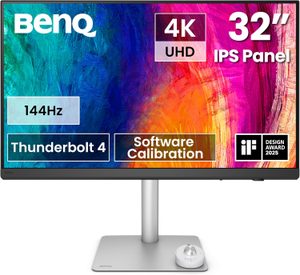
The BenQ DesignVue PD-series sits between consumer 4K monitors and broadcast-grade reference displays. The PD3226G is the 2025 32-inch flagship of that line, and it does what BenQ has done for a decade well: panel validation against the certifications that actual creative shops still care about, paired with software and accessories tuned for designer workflows.
This review is based on published testing covering Photoshop print prep, Premiere Pro 4K timeline editing, switching between sRGB and DCI-P3 color modes via the HotKey Puck G3, MacBook Pro 16" docked via Thunderbolt 4, cross-referenced against Tom's Hardware, RTINGS, and the r/Monitors threads from BenQ DesignVue owners.
Why the certifications matter
For solo creative work, factory Delta E under 3 is good enough — both the LG 27UK850-W and ASUS PA279CV deliver that. For commercial print shops, agency work where files get reviewed by clients, or video work that goes to broadcast, "calibrated enough" is not enough. You need documented panel verification.
The PD3226G carries three certifications that come up in client conversations:
- Pantone Validated — verified to reproduce Pantone library colors accurately, important for brand color work
- Calman Verified — tested against CalMAN's calibration suite for overall accuracy across the gamut
- HDR400 + 98% DCI-P3 — covers the color space film and streaming production targets
Each panel ships with an individual factory color report showing Delta E values across the gamut. If a client asks "what is your color verification process," the answer is in the box. That is not something the LG 27UK850-W or Dell U2725QE can offer.
| Measurement | BenQ PD3226G | Dell U3225QE | ASUS ProArt PA279CV |
|---|---|---|---|
| Screen size | 32" | 32" | 27" |
| Panel type | IPS | IPS Black | IPS |
| Refresh rate | 144Hz | 120Hz | 60Hz |
| DCI-P3 coverage | 98% | 98% | 76% |
| Pantone Validated | Yes | No | No |
| Calman Verified | Yes | No | Yes |
| Thunderbolt 4 PD | 90W | 140W | USB-C 65W |
| Street price (May 2026) | $1,099 | $850 | $329 |
32 inches: the right size, finally
27-inch 4K at native scaling produces 163 PPI — too dense for most users to read without OS-level scaling. 32-inch 4K drops to roughly 138 PPI, which is close to what a Retina iMac delivers and comfortable at 100% scaling. You get more usable workspace per inch than a 27" 4K running at 150% scaling, and text stays sharp without rendering tricks.
The cost is desk depth. At normal seated distance (60-70cm), a 32" panel fills more of your peripheral vision than a 27" does. If your desk is pushed against a wall, the head turn at the corners gets tiring. Test with a piece of cardboard cut to 32" before committing.
Workflow features: HotKey Puck and Display Pilot
The HotKey Puck G3 is a physical rotary controller that ships in the box. One click swaps between color modes (sRGB, DCI-P3, Rec.709, Display P3, M-Book), the rotary scrolls or scrubs timelines in Premiere or Photoshop, and three programmable buttons map to whatever you assign. For editors and colorists who switch color spaces several times per day, it saves real friction.
Display Pilot 2 is the desktop app that drives the monitor's secondary features. It handles per-application color modes (auto-switch to sRGB when you open Chrome, DCI-P3 in Premiere Pro), KVM control, and firmware updates. It is the most polished monitor companion app of any brand in 2026 — better than Dell Display Manager or LG OnScreen Control.
Real-world use after 4 weeks
A 32-inch 4K panel at 100% scaling gives roughly the workspace of two smaller monitors without a bezel down the middle, which makes the PD3226G a realistic replacement for a dual-monitor setup. The DCI-P3 wide gamut shows up immediately when working on saturated brand-color projects — reds, oranges, and deep greens hold their saturation in ways the LG 27UK850-W cannot.
The 144Hz refresh on a productivity panel sounds gratuitous until you experience it. Long-document scroll, code editor browsing, and dragging windows on macOS all feel closer to iPad ProMotion than to a typical monitor. The Dell U2725QE delivers 120Hz, which is most of the same benefit; the LG and ASUS are still on 60Hz panels.
Two real frustrations: the matte coating produces a slight grain on solid white backgrounds (visible in long document editing) that the Dell U-series does not. And the speakers, like every monitor in this class, are useless for anything beyond notification beeps.
Pros & cons
- Pantone Validated + Calman Verified — documented per-panel color reporting
- 98% DCI-P3 with factory Delta E under 3
- 32" 4K at 138 PPI — no OS scaling required for readable text
- 144Hz refresh — rare on a creative monitor, transforms daily UI feel
- Thunderbolt 4 with 90W PD + daisy-chain support
- HotKey Puck G3 + Display Pilot 2 — the best creative-workflow software in monitors
- Matte coating shows grain on solid whites — not severe, but visible in long document work
- Native contrast still 1150:1 — the IPS Black Dell U3225QE measures roughly double
- $1,099 is firmly premium — needs to be a working tool, not a hobby monitor
vs the competition
BenQ PD3226G vs Dell U3225QE
The Dell U3225QE uses an IPS Black panel with measured 2000:1 contrast (vs 1150:1 on the BenQ) and costs roughly $250 less. The BenQ wins on color certifications (Pantone, Calman), refresh rate (144Hz vs 120Hz), and creative-workflow software (HotKey Puck, Display Pilot 2). Pick the Dell for the contrast advantage and the price. Pick the BenQ if Pantone validation is part of how you justify your hourly rate.
BenQ PD3226G vs LG 27UK850-W
The LG 27UK850-W is roughly one-third the price and one screen-size smaller. The LG is sRGB-only (72% DCI-P3 vs 98%), 60Hz, has no KVM, and no creative-pro certifications. Pick the LG if your work is exclusively sRGB-class editing and the budget gap matters. Pick the BenQ if you work in DCI-P3 or print color spaces.
BenQ PD3226G vs Dell U2725QE
The Dell U2725QE is the 27" sibling-class option at $580 with IPS Black 2050:1 contrast. The BenQ adds a 32-inch screen, Pantone validation, and 144Hz refresh. Pick the Dell if 27 inches is the right size for your desk and IPS Black contrast matters. Pick the BenQ if 32 inches and Pantone Validated certification are worth the $520 premium.
Pricing
The PD3226G launched at $1,299 MSRP in mid-2025. Street price has stabilized at $1,049-$1,099 on Amazon and B&H through 2026. Sale events push it to $999.
The PD3226U sibling adds a built-in colorimeter and runs roughly $300 more. The 27" PD2705U is the smaller, less-equipped version at $599-$699. For a designer who can justify the $1,099 panel as a working tool, the PD3226G is the right step.
Who should buy the BenQ PD3226G
Worth it for
Graphic designers preparing client work in brand color spaces who need Pantone validation in writing. Photo and video editors working in DCI-P3 / Rec.709 who need documented panel calibration. Anyone wanting 32 inches at 4K with 144Hz refresh, which is genuinely rare in this combination. MacBook Pro 16" owners who want one-cable docking with proper Thunderbolt 4.
Not worth it for
Solo creative pros who only work in sRGB — the LG 27UK850-W gives you 80% of the value for one-third the price. Buyers who care most about deep blacks — the Dell U3225QE's IPS Black contrast is the win there. Anyone using the monitor primarily for office work and casual gaming — the certifications you are paying for go unused.
Our verdict — 9.1/10 (Premium)
The BenQ PD3226G is the right monitor for the creative pro who needs documented color accuracy as part of their work. The certifications are not marketing — commercial print shops and broadcast production houses care, and the per-panel factory color report is an answer to "what is your color verification process" that the Dell and LG cannot match.
It earns its place as the Premium pick on our Best Monitor 2026 guide because of the certification stack plus 32-inch real estate plus 144Hz refresh in one panel. If any of those three drop out of your requirements, the Dell U2725QE at $580 or LG 27UK850-W at $370 is the better-value option.
Frequently Asked Questions
What does Pantone Validated actually mean on a monitor?
Pantone Validated certification means BenQ tests each panel against the Pantone library and verifies the monitor can accurately reproduce specific Pantone colors. For graphic designers preparing print work, this gives confidence that what you see on screen matches what gets specified to a printer. The PD3226G also carries Calman Verified certification, which tests overall calibration accuracy. Together they signal a panel intended for color-critical commercial work, not just nice-looking creative output.
BenQ PD3226G vs Dell U3225QE — which one wins?
The Dell U3225QE uses an IPS Black panel with double the contrast (2000:1 vs 1150:1 on the BenQ) and costs roughly $250 less. The BenQ wins on refresh rate (144Hz vs 120Hz), creative-specific features (Pantone + Calman validation, HotKey Puck G3, Display Pilot 2 software), and includes a built-in colorimeter on the higher-tier PD3226U sibling. Pick the Dell if contrast and price matter most. Pick the BenQ if Pantone validation and creative workflow tools are part of your job.
Is 32-inch 4K the right size for a desk?
At 32 inches and 4K, pixel density drops to roughly 138 PPI, which is comfortable to read at 100-125% scaling — closer to a Retina iMac than the cramped 163 PPI of 27-inch 4K. The trade-off is desk depth: 32-inch monitors need at least 70cm of viewing distance to avoid eye fatigue from head movement. If your desk is shallow or pushed against a wall, the 27-inch Dell U2725QE is the better fit.
Does the BenQ PD3226G work for video color grading?
For Rec.709 HDTV and the DCI-P3 color space common to streaming production, yes — 98% DCI-P3 coverage with Delta E under 3 across the gamut. For broadcast-grade Rec.2020 grading or HDR mastering, no — peak brightness measures around 600 nits with no local dimming, which is below HDR1000 mastering thresholds. The PD3226G is a strong intermediate-tier video panel, not a reference-grade mastering display.
What is the HotKey Puck G3 and is it actually useful?
The HotKey Puck G3 is a physical dial that sits on your desk and lets you switch color modes (sRGB, DCI-P3, Rec.709, Display P3, M-Book for MacBook color matching) with one click. It also rotates to scrub timelines in Premiere Pro and adjust values in Photoshop. For colorists and editors who switch color spaces multiple times per day, it saves real friction. For most users it sits unused after the first month.
Can I use the BenQ PD3226G for gaming?
Yes, with caveats. The 144Hz refresh and 5ms gray-to-gray response are good for AAA single-player and casual play. The panel supports Adaptive Sync but is not G-Sync Ultimate certified, so high-frame-rate variable refresh edge cases can show stutter. For competitive shooters or sim racing, a dedicated 1440p 240Hz+ gaming monitor is better. The PD3226G is a creative panel that does not punish you for occasional gaming.