
Best Drawing Tablet 2026 — Top 5 Compared & Ranked
As an Amazon Associate and member of other affiliate programs, we earn from qualifying purchases. How we test →
Last updated: September 5, 2026 • 5 models compared
- Wacom Intuos Pro Medium — Best overall pen tablet (4.8/5)
- Huion Kamvas 13 Gen 3 — Best budget pen display (4.5/5)
- Huion Inspiroy 2 Medium — Best beginner pen tablet (4.3/5)
Drawing tablets split into two types: screenless pen tablets (you draw on a surface while watching a separate monitor) and pen displays (a screen you draw directly on). Both have a place depending on your workflow, budget, and experience level. We compare five models available in the UK across pen accuracy, build quality, and value.
Quick Overview
| Model | Best for | Score |
|---|---|---|
| Wacom Intuos Pro Medium | Best overall pen tablet Best Pick | ★★★★☆ 4.8 |
| Huion Kamvas 13 Gen 3 | Best budget pen display Best Budget | ★★★★½ 4.5 |
| Huion Inspiroy 2 Medium | Best beginner pen tablet | ★★★★½ 4.3 |
| Wacom Cintiq 16 | Best professional display Best Premium | ★★★★½ 4.7 |
| XP-Pen Artist Pro 16 Gen 2 | Best mid-range display Runner-up | ★★★★½ 4.6 |
1. Wacom Intuos Pro Medium — Best Overall Pen Tablet

The Wacom Intuos Pro Medium ships with the Pro Pen 3 — 16K pressure levels with tilt recognition and virtually zero lag, the most precise input device in its class. A 224 × 148 mm active area matches the A5 working space preferred by most illustrators. Multi-touch gestures, Bluetooth wireless, and Wacom's unmatched driver stability make it the industry standard for professional digital art, photo retouching, and 3D sculpting workflows.
- Pro Pen 3 — 16K pressure, best-in-class accuracy
- Bluetooth wireless, multi-touch surface
- Rock-solid Wacom driver — works natively with every major app
- 8 customisable ExpressKeys + touch ring
- No built-in screen — requires separate monitor
- Higher price than Huion/XP-Pen equivalents
2. Huion Kamvas 13 Gen 3 — Best Budget Pen Display
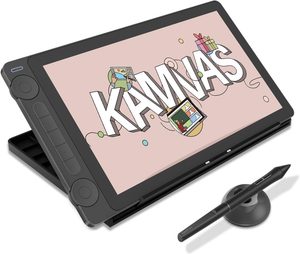
The Kamvas 13 Gen 3 brings a fully laminated 13.3-inch IPS display with 99% sRGB coverage to an entry price point — eliminating the parallax gap that made older pen displays feel imprecise. The PW600 pen delivers 8192 levels at a tilt angle of ±60°. Canvas glass reduces reflections significantly compared to older glossy panels. The most natural drawing-on-screen experience available at this price.
- Fully laminated panel — no parallax gap
- 99% sRGB, accurate colour out of the box
- Canvas glass — anti-glare without plastic film feel
- Single USB-C connection for power and data
- 1080p resolution — 13.3" at 165 ppi is acceptable but not sharp
- No built-in stand — separate stand required for comfortable use
3. XP-Pen Artist Pro 16 Gen 2 — Best Mid-Range Display
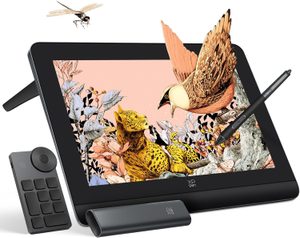
The Artist Pro 16 Gen 2 pairs a 2.5K QHD fully laminated display with XP-Pen's X3 Pro stylus at 16K pressure levels — matching Wacom's Pro Pen 3 spec at a lower price. 99% sRGB and 93% DCI-P3 coverage make it capable for colour-critical work. The 15.4-inch panel gives more real estate than 13-inch displays without the desk footprint of a 22-inch Cintiq. A strong step up from entry-level displays for serious hobbyists and working illustrators.
- 2.5K QHD — noticeably sharper than 1080p displays
- X3 Pro pen — 16K pressure, ±60° tilt
- 93% DCI-P3 — usable for colour grading
- 8 shortcut keys + 2 dials on body
- Drivers less mature than Wacom — occasional update required
- Fan-free design can warm noticeably under heavy use
4. Wacom Cintiq 16 (2025) — Best Professional Display
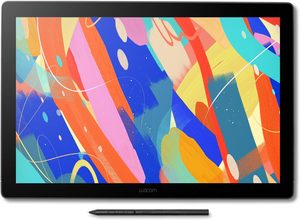
The 2025 Cintiq 16 brings Wacom's Pro Pen 3 (16K pressure, 8K tilt) to their most accessible pen display, paired with a 2.5K display and full Wacom driver reliability. The anti-glare etched glass feels closer to paper than any competing panel. Wacom's decade of Cintiq refinement shows in the feel: consistent pressure response edge-to-edge, zero driver conflicts, and native support in every professional creative application including Photoshop, Illustrator, Clip Studio, and Blender.
- Pro Pen 3 — 16K pressure, best in class feel
- Wacom driver stability — zero conflicts in professional apps
- Etched anti-glare glass — closest to paper feel available
- 2.5K panel — sharp and colour-accurate
- Premium price vs. XP-Pen Artist Pro 16 Gen 2
- Stand sold separately
5. Huion Inspiroy 2 Medium — Best Beginner Pen Tablet
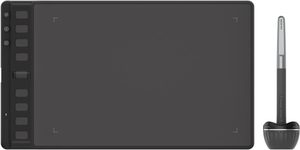
The Inspiroy 2 M is the most affordable route into a screenless pen tablet with 8192 pressure levels and a genuine 10 × 6.25 inch working area. The PW110 pen is battery-free and responds to 60° tilt. Eight programmable shortcut keys and a scroll wheel speed up repetitive tasks. Compatible with Windows, Mac, Android, and Chromebook via USB-C. The right choice for students and hobbyists who want reliable digital drawing without spending on a display.
- 8192 pressure levels at an entry price
- Large 10 × 6.25 inch active area
- Battery-free pen — no charging required
- Works with Windows, Mac, Android, Chromebook
- No screen — harder to learn than display tablets
- Huion driver less polished than Wacom
Pen Tablet vs Pen Display
Pen tablet (screenless)
You draw on a flat surface while watching a separate monitor. There is a hand-eye coordination adjustment period of 1–2 weeks for most users. Professionals in animation and photo editing often prefer them — the monitor is at eye level, reducing neck strain over long sessions. The Wacom Intuos Pro and Huion Inspiroy are in this category.
Pen display
A screen you draw directly on. The learning curve is near zero — it works exactly like drawing on paper. Preferred by illustrators, comic artists, and concept artists who want immediate visual feedback. The Kamvas 13, Artist Pro 16, and Cintiq 16 are pen displays.
Pressure sensitivity and tilt
8192 levels is sufficient for all illustration and painting work. 16K (Wacom Pro Pen 3, XP-Pen X3 Pro) provides finer gradations at very light pressure — most useful for professional inking and hair detail work. Tilt recognition (±60°) enables natural brush angle effects in apps like Photoshop and Clip Studio Paint.
Our Verdict
For the most accurate and driver-reliable pen tablet, the Wacom Intuos Pro Medium remains the professional standard. If you prefer drawing on screen, the Wacom Cintiq 16 (2025) combines Pro Pen 3 precision with the best panel feel available, while the XP-Pen Artist Pro 16 Gen 2 delivers near-equivalent specs at a lower price. Beginners on a budget should start with the Huion Inspiroy 2 Medium or Huion Kamvas 13 Gen 3.