
Best Monitor 2026 — Top 5 for Work, Gaming & Creative Use
As an Amazon Associate and member of other affiliate programs, we earn from qualifying purchases. How we test →
Last updated: September 1, 2026 • 5 monitors reviewed
- LG 27UK850-W — 4K photo editing (4.7/5)
- Dell U2725QE — Work & productivity (4.6/5)
- BenQ PD2705U — Creative professionals (4.5/5)
The right monitor can transform your work and creative output. Panel type, resolution, colour accuracy and connectivity matter more than screen size alone. These five have been selected for how they perform in real-world use — from value 4K photo editing to premium 32-inch productivity workstations.
Quick Comparison
| Model | Best for | Score |
|---|---|---|
| LG 27UK850-W | 4K photo editing Best Pick | ★★★★½ 4.7 |
| Dell U2725QE | Work & productivity Runner-up | ★★★★½ 4.6 |
| BenQ PD2705U | Creative professionals | ★★★★½ 4.5 |
| BenQ PD3226G | Large-screen productivity Premium | ★★★★½ 4.4 |
| ASUS ProArt PA279CV | Colour-accurate on a budget Best Budget | ★★★★☆ 4.2 |
1. LG 27UK850-W — Best 4K Monitor for Photo Editing

→ Read our full LG 27UK850-W review (27" 4K IPS with USB-C 60W PD)
The LG 27UK850-W is a 27-inch 4K IPS panel aimed at photographers and designers who want accurate colour without a professional price tag. Its 99% sRGB coverage means colours are consistent and true to life straight out of the box, with no manual calibration required for most workflows. USB-C 60W Power Delivery handles video and laptop charging over a single cable, decluttering a creative desk significantly. At 60Hz this is not a gaming monitor — but for colour-critical work, document editing or photo retouching it punches well above its price.
- 4K IPS — noticeably sharper text than 1440p at 27"
- 99% sRGB coverage — accurate out of the box
- USB-C 60W Power Delivery — single-cable laptop connection
- Best value 4K IPS on this list
- 60Hz only — not suitable for gaming
- No factory calibration report
2. Dell UltraSharp U2725QE — Best Work & Productivity Monitor

Dell's newest UltraSharp is the definitive all-in-one productivity monitor for 2026. It ships factory calibrated to Delta E <2 with a report included — so colour accuracy is verified before you even open a project. The Thunderbolt 4 Hub handles 96W laptop charging, 40Gbps data transfer and daisy-chaining to a second display all from a single cable, while the built-in KVM lets you switch keyboard and mouse between two computers without reaching behind the desk. The step up to 120Hz over the previous U2723D makes everyday scrolling and UI interaction noticeably smoother — a small but real quality-of-life improvement over all-day use.
- Factory calibrated — Delta E <2 report included
- Thunderbolt 4 Hub — 96W laptop charging + data
- 120Hz IPS — noticeably smoother than 60Hz for daily use
- Built-in KVM for two-computer setups
- Around $680
- Not designed for gaming
→ Read our full Dell U2725QE review (UltraSharp 4K with 90W USB-C)
3. BenQ PD2705U — Best for Creative Professionals
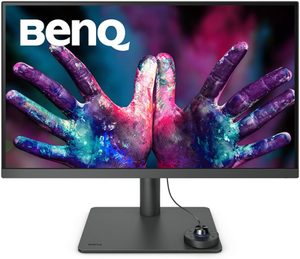
The BenQ PD2705U is purpose-built for designers and video editors who work in wide-gamut colour spaces. Its 95% DCI-P3 coverage means colours in your project match what audiences see on high-end displays and in print, while 100% sRGB ensures standard web work is equally accurate. Thunderbolt 4 connects at 40Gbps — fast enough to edit directly from an external NVMe drive or run a GPU enclosure without bottlenecks. Hardware calibration via BenQ's Palette Master software lets you verify and adjust accuracy over time, rather than relying solely on factory settings.
- 95% DCI-P3 — accurate wide-gamut colour for print and video
- Thunderbolt 4 — 40Gbps data transfer, future-proof
- Hardware calibration support (Palette Master software)
- Compact 27" size with premium colour specs
- 60Hz — work-focused only, not for gaming
- Premium price for a 27" panel
4. BenQ PD3226G — Best Large-Screen Productivity Monitor
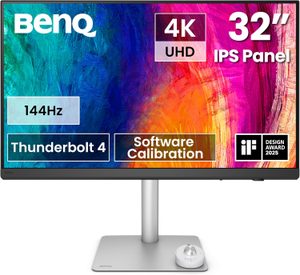
The BenQ PD3226G is the most complete large-screen work monitor available in 2026 — a 32-inch 4K IPS panel that genuinely covers every productivity requirement in one unit. The 144Hz refresh rate makes it the only monitor on this list suited for both colour-critical creative work and smooth gaming, while 95% P3 and 100% sRGB ensure colour accuracy across both use cases. Thunderbolt 4 with 90W charging handles docking, and the Nano Matte surface eliminates reflections in bright offices where most glossy IPS panels become unusable. The built-in KVM and daisy-chain support make it the logical hub for a dual-computer desk.
- 32" 4K 144Hz — expansive workspace with smooth scrolling
- Thunderbolt 4 + 90W PD — single-cable docking
- 95% P3, 100% sRGB — colour-accurate for creative work
- Nano Matte panel — reflection-free in bright offices
- High price point
- Large 32" footprint — needs a deep desk
→ Read our full BenQ PD3226G review (32" 4K designer monitor with PD)
5. ASUS ProArt PA279CV — Best Budget Colour-Accurate Monitor
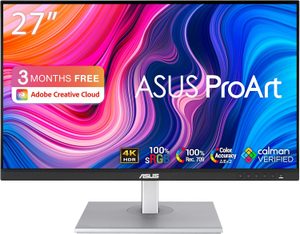
The ASUS ProArt PA279CV delivers the essentials of professional colour work — 4K IPS, 100% sRGB, 100% Rec. 709, and factory calibration to Delta E <2 — at a price significantly below the Dell and BenQ equivalents. It is the right choice for freelancers, students and home creators who need a monitor they can trust for accurate colour work without paying for Thunderbolt 4, 120Hz or KVM features they will rarely use. USB-C 65W Power Delivery covers single-cable laptop use for most ultrabooks. What you give up compared to the Dell U2725QE is 40Gbps data bandwidth, the hardware KVM, and the factory calibration report — all features that matter for professional studio use but are unnecessary for most workflows.
- Factory calibrated to Delta E <2 — accurate out of the box
- 100% sRGB + 100% Rec. 709 coverage
- USB-C 65W charging — single-cable laptop connection
- Best value on this list for colour-sensitive work
- No Thunderbolt 4 — USB-C 65W only
- No built-in KVM switch
→ Read our full ASUS ProArt PA279CV review (27" 4K calibrated at $450)
What to Look for in a Monitor
Panel type
IPS is the right default for work and creative use: accurate colour, wide viewing angles, fast response. VA offers deeper blacks — better for movies and immersive gaming. OLED delivers perfect contrast but carries burn-in risk with static UI elements. For all-day desk work, IPS is the safest choice in 2026.
Resolution
4K at 27 inches is the productivity sweet spot — text is noticeably sharper than 1440p and pixel density works without aggressive scaling on most operating systems. For gaming, 1440p delivers higher framerates at a lower GPU cost without sacrificing visible sharpness at normal desk distances.
USB-C and Power Delivery
If you use a laptop, a monitor with USB-C 65W+ Power Delivery replaces your charger entirely. Thunderbolt 4 adds 40Gbps data bandwidth — useful for external SSDs and GPU enclosures. All premium work monitors on this list include USB-C Power Delivery; only the BenQ PD2705U, Dell U2725QE and BenQ PD3226G include full Thunderbolt 4.
Colour accuracy
Delta E <2 means colour errors are invisible to the human eye — the threshold for professional colour work. Factory calibration with a report tells you the monitor meets spec before you begin. The Dell U2725QE, BenQ PD3226G and ASUS ProArt PA279CV all ship factory calibrated; the LG 27UK850-W does not but still achieves strong accuracy in practice.
Our Verdict
The LG 27UK850-W is the best-value 4K IPS monitor for photographers and designers who don't need 120Hz. The Dell U2725QE is the clear winner for productivity — factory calibration, Thunderbolt 4 Hub, 96W charging and 120Hz in one package. Designers needing wide-gamut colour in a 27-inch form factor should choose the BenQ PD2705U. For the best large-screen experience, the BenQ PD3226G is the most complete 32-inch work monitor tested. Budget-conscious buyers wanting factory-calibrated colour should go with the ASUS ProArt PA279CV.