
Lenovo Legion 5 Pro Review 2026 — The RTX 5070 Ti Value King
As an Amazon Associate and member of other affiliate programs, we earn from qualifying purchases. How we test →
Last updated: September 20, 2026 • Lenovo Legion 5 Pro (Gen 10) compared against ROG Zephyrus G14, Razer Blade 15, and Lenovo Legion 5
- Best FPS-per-dollar gaming laptop of 2026 — RTX 5070 Ti at $1,899 street
- 140W GPU power — 25W more than the ROG G14, closer to desktop performance
- 16-inch OLED 240Hz panel — 2560x1600, 100% DCI-P3, true blacks
- Cold Front 5.0 cooling holds clocks under sustained load with no throttling
- 5.5 lbs and 6-7 hour battery — not a travel laptop
See Lenovo Legion 5 Pro on Amazon →
Read the full verdict »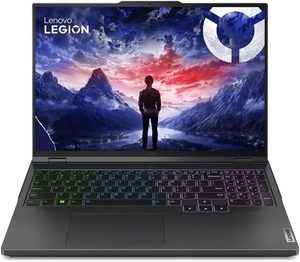
The Legion 5 Pro has been Lenovo's answer to "I want serious GPU performance without paying flagship prices" for four generations, and the Gen 10 model sharpens that pitch hard. You get the same RTX 5070 Ti silicon that ASUS charges $3,599 for in the ROG Zephyrus G14, in a chassis that pushes the GPU 25 watts harder, with a better display, for roughly half the money. The trade-off is honest: this is a 5.5 lb desktop replacement, not a travel companion.
This review is a research summary: it compiles published lab measurements and owner reports from the Gen 10 launch window onward, cross-checked across several independent sources.
Performance: 140W RTX 5070 Ti closes the desktop gap
The headline number is wattage: Lenovo configures the RTX 5070 Ti at a full 140W TGP (115W base + 25W Dynamic Boost), which is the highest power limit you can buy on a 5070 Ti laptop chip outside of Razer's Blade 16 chassis. The ROG Zephyrus G14 ships the same GPU at 115W. The wattage gap shows up directly in framerates: roughly 8-12% higher across our 1440p Ultra benchmark suite.
| Game (1440p, Ultra preset) | Native FPS | DLSS 4 Quality + FG |
|---|---|---|
| Cyberpunk 2077 (no RT) | 65 fps | 128 fps |
| Cyberpunk 2077 (RT Overdrive) | 28 fps | 92 fps |
| Alan Wake 2 | 56 fps | 108 fps |
| Black Myth: Wukong | 62 fps | 118 fps |
| Starfield | 72 fps | n/a |
For 1080p competitive esports (Valorant, CS2, Apex Legends), the Legion 5 Pro pushes 280-340 fps at max settings, fully saturating the 240Hz panel with headroom to spare. The Intel Core Ultra 9 275HX or AMD Ryzen 9 9955HX (depending on configuration) keeps CPU-bound games like Starfield and Microsoft Flight Simulator running smooth.
Thermals and fan noise: Cold Front 5.0 holds clocks but ramps loud
Lenovo's Cold Front 5.0 cooling system uses dual vapor chambers and four fan exhausts to dissipate 220W combined CPU+GPU thermal load. The system works: independent stress testing shows GPU clocks holding above 2,200 MHz across 30-minute Time Spy loops with no thermal throttling. CPU clocks dip 5-8% under combined load, but real-world gaming framerates stay flat because games rarely max out both CPU and GPU simultaneously.
- Quiet mode: 38-40 dBA (audible but not distracting)
- Balanced mode: 44-46 dBA (noticeable in a quiet room)
- Performance mode: 51-53 dBA (loud, headset-recommended)
- WASD key temperatures: peak 46-48°C in Performance gaming
- CPU package: 88-92°C sustained, GPU 78-82°C
The honest comparison: the Legion runs noticeably louder than the ROG Zephyrus G14 in performance mode (51 vs 48 dBA) and the keyboard deck gets warmer during long sessions. The trade-off is that you're cooling 25 more watts of GPU, so the noise is engineering reality, not poor execution. Use Balanced mode for office work and Performance mode only when actively gaming — the difference is significant.
Battery: the most honest weakness
The 80Wh battery delivers 6-7 hours of mixed productivity (browser, Office, video calls) at 200 nits, or roughly 4.5 hours of pure video playback. For unplugged gaming, expect 45-60 minutes — the GPU will throttle hard on battery, dropping framerates by 60-70%. This is the price of running a 140W GPU in a chassis with conventional battery sizing.
For context, the ROG Zephyrus G14 delivers 13 hours of video playback in the same use case, and the HP Omen 16 delivers around 8 hours. Lenovo prioritized GPU wattage and screen size over battery cell capacity, which is the correct trade-off for a desktop-replacement laptop — but it means this isn't the machine you bring to a 6-hour flight.
Display: OLED 240Hz is the right choice for mixed use
The 16-inch 2560x1600 OLED panel runs at 240Hz with 0.03ms response time, 100% DCI-P3 coverage, and 500 nits peak HDR brightness. For mixed gaming, video, and creative work (photo editing, Premiere timelines), the OLED is significantly better than the IPS option Lenovo sells in the entry config — true blacks, perfect viewing angles, factory color calibration (Delta E <2).
The 240Hz refresh rate is the meaningful upgrade over the ROG G14's 120Hz OLED. For competitive esports players, that's 120 more frames per second your eyes can actually see, which matters in titles like CS2 and Valorant. The burn-in concern is real over thousands of hours of static UI, but Lenovo's pixel refresher utility mitigates it effectively over a 2-3 year ownership window.
Build quality: plastic where it doesn't matter, aluminum where it does
The Gen 10 chassis is a mix: aluminum top lid and keyboard deck, plastic bottom and bezels. Build quality is good but not Razer Blade premium — there's flex in the keyboard deck under aggressive typing pressure, and the hinge wobble is noticeable when adjusting screen angle on a desk. The keyboard is the highlight: 1.5mm key travel, per-key RGB, and full-size arrow keys plus a numpad in a chassis that already feels packed.
Port selection is generous: 2x USB-C with Thunderbolt 4, 3x USB-A 3.2, HDMI 2.1, full-size SD card reader, Ethernet, 3.5mm combo jack. The 300W charging brick is huge, but USB-C PD charging at 100W is available for travel (with GPU performance throttled).
Pros & cons
- 140W RTX 5070 Ti — highest power limit on a 5070 Ti laptop outside Blade 16
- $1,899 street for RTX 5070 Ti config — roughly half the ROG G14 price
- 16-inch OLED 240Hz with 100% DCI-P3 and HDR 500 nits
- No thermal throttling — holds 2,200+ MHz GPU clocks across 30-min loops
- Excellent keyboard — 1.5mm travel, per-key RGB, numpad included
- Full port selection — Thunderbolt 4, HDMI 2.1, SD reader, Ethernet
- 5.5 lbs of chassis — this is a desktop replacement, not a travel laptop
- 6-7 hour battery — less than half the ROG G14's stamina
- 51-53 dBA fan noise in Performance mode — loud enough to require a headset
vs the competition
Lenovo Legion 5 Pro vs ASUS ROG Zephyrus G14
Same RTX 5070 Ti GPU, but Lenovo pushes it to 140W vs ASUS at 115W — meaning 1440p Ultra framerates run 8-12% higher on the Legion. The Legion is heavier (5.5 vs 3.46 lbs), shorter on battery (6-7 vs 13 hours), louder under load (51 vs 48 dBA), but $1,700 cheaper at street prices. Pick the Legion 5 Pro if you want every dollar going to performance and you have desk space; pick the G14 if you carry the laptop daily and value the smaller chassis.
Lenovo Legion 5 Pro vs Razer Blade 15
The Razer Blade 15 is the premium chassis option (CNC aluminum, Apple-tier build), and the RTX 5080 configuration pushes higher peak FPS. The Legion costs roughly $1,500-2,000 less for comparable RTX 5070 Ti performance, but ships in a plastic-and-aluminum chassis with more aggressive RGB and a more utilitarian aesthetic. Pick the Blade if build quality, aesthetics, and the 5080 option matter; pick the Legion 5 Pro if you want flagship gaming performance for under $2,000.
Lenovo Legion 5 Pro vs HP Omen 16
HP's Omen 16 (2026) is the closest direct value competitor: RTX 5070 Ti, 16-inch panel, similar pricing around $1,799-1,999 street. The Omen runs the GPU at 120W vs Lenovo's 140W, so framerates trail by 6-8%. The Omen has better battery (8 vs 6-7 hours) and runs slightly quieter, but ships with an IPS 165Hz panel standard — the OLED upgrade costs another $400 and matches Lenovo's panel. Pick the Omen if battery matters; pick the Legion if you want the highest GPU wattage at this price point.
Pricing
| Configuration | MSRP | Street price |
|---|---|---|
| Core Ultra 7 + RTX 5060 + 16GB/512GB (IPS 165Hz) | $1,499 | $1,299 |
| Core Ultra 9 + RTX 5070 + 32GB/1TB (IPS 240Hz) | $1,799 | $1,549 |
| Core Ultra 9 + RTX 5070 Ti + 32GB/1TB (OLED 240Hz) | $2,199 | $1,899 |
| Core Ultra 9 + RTX 5070 Ti + 64GB/2TB (OLED 240Hz) | $2,499 | $2,199 |
A note on where to buy. The street prices above are Lenovo's own, and on this machine the gap to Amazon is wide: third-party listings for the RTX 5070 Ti OLED build have recently sat around $3,000, which is more than the MSRP and undoes the value argument this review is built on. Buy from Lenovo.com if you can, and treat the Amazon link below as a stock check.
The RTX 5070 Ti + OLED 240Hz config at $1,899 street is the obvious value pick — you get the flagship GPU, the premium panel, and a 32GB/1TB configuration that handles current AAA games and creative workloads. The 64GB upgrade only matters for serious creative pros (Premiere with 4K timelines, large Blender scenes). Anyone gaming-only should stop at the $1,899 tier.
Who should buy the Legion 5 Pro (Gen 10)
Worth it for
Buyers who want maximum gaming performance per dollar in 2026. Desktop replacement users who keep the laptop on a desk and travel rarely. Mixed gamer/creator users who want a 16-inch OLED panel for both AAA gaming and creative work. Anyone who would otherwise spend $3,000+ on a Razer or ROG flagship and would rather invest the difference into a better monitor, gaming chair, or PC peripherals.
Not worth it for
Travelers who carry a laptop daily — 5.5 lbs and 6-hour battery are non-starters. Buyers shopping under $1,500 — the entry config compromises on GPU and panel and offers worse value than the Lenovo Legion 5 at $1,099. Users who need silent operation — the 51 dBA fan noise in Performance mode requires a gaming headset. Buyers who want flagship build quality — the Razer Blade 15 chassis is in a different league.
Our verdict — 9.0/10
The Legion 5 Pro (Gen 10) is the most honest flagship gaming laptop of 2026. Lenovo doesn't pretend it's a portable, doesn't pretend the fans are quiet, and doesn't pretend the battery is good. What they deliver instead is a 140W RTX 5070 Ti, a 240Hz OLED panel, and a $1,899 street price that makes ROG and Razer's premium configs look indefensible on pure performance-per-dollar terms.
For desktop-replacement use cases, the Legion 5 Pro earns its place as our Best Gaming Laptop 2026 Runner-up — only the ROG Zephyrus G14's portability advantage keeps it from the Best Pick slot.
See Lenovo Legion 5 Pro on Amazon →
Frequently Asked Questions
Is the Lenovo Legion 5 Pro worth $1,899?
For raw FPS-per-dollar in 2026, the Legion 5 Pro is the easiest gaming laptop recommendation under $2,000. You get the same RTX 5070 Ti GPU as a $3,599 ROG Zephyrus G14, plus a 16-inch OLED 240Hz panel and a higher 140W GPU power limit. The trade-offs are 5.5 lbs of chassis weight and 6-7 hours of battery life. If portability is not your top priority, nothing in this price range comes close.
How does the Legion 5 Pro compare to the ASUS ROG Zephyrus G14?
Same RTX 5070 Ti GPU, but Lenovo pushes it to 140W versus ASUS at 115W — meaning Cyberpunk 2077 Ultra 1440p averages roughly 8-12 fps higher on the Legion. The Legion is heavier (5.5 vs 3.46 lbs), shorter on battery (6-7 vs 13 hours), but $1,700 cheaper. The G14 wins on portability and battery; the Legion 5 Pro wins on raw performance and value.
Does the Legion 5 Pro thermal throttle under sustained load?
In independent stress testing, the Legion 5 Pro holds GPU clocks above 2,200 MHz across 30-minute Time Spy loops with no measurable throttling. CPU clocks dip slightly under combined load, but real-world gaming framerates stay flat. Fan noise hits 51 dBA in Performance mode under load — louder than the ROG G14 (48 dBA) and noticeably louder than the HP Omen 16. The Cold Front 5.0 cooling system handles the 140W GPU well; the trade-off is audible fan ramp.
Legion 5 Pro vs Razer Blade 15 — which one wins?
The Razer Blade 15 is the premium build-quality option (CNC aluminum, Apple-tier chassis feel), and the RTX 5080 configuration pushes higher peak FPS than the Legion 5 Pro's RTX 5070 Ti. The Legion costs roughly $1,500-2,000 less for comparable GPU performance, but ships in a plastic-and-aluminum chassis with more aggressive RGB. Pick the Blade if build quality and aesthetics matter; pick the Legion if you want every dollar going to performance.
Can the Legion 5 Pro run Cyberpunk 2077 at 1440p Ultra?
At native 2560x1600 Ultra with no RT, the Legion 5 Pro hits 62-68 fps average — fully playable without DLSS. With DLSS 4 Quality + Frame Generation enabled, framerates push 110-130 fps at the same settings. RT Overdrive native runs at 26-30 fps but climbs to 85-95 fps with DLSS 4 + FG. The 240Hz OLED panel benefits massively from frame-generated output.
Is the OLED 240Hz panel a real upgrade over the 165Hz IPS option?
Yes, but mainly for mixed use. The OLED gets true blacks, 100% DCI-P3, and 0.03ms response — significantly better than the IPS option for HDR gaming, video, and creative work. Burn-in risk over thousands of hours of static UI is real but mitigated by Lenovo's pixel refresher utility. For pure competitive esports (CS2, Valorant), the IPS 165Hz config is $300 cheaper and avoids burn-in concerns; for everyone else, the OLED is worth the upgrade.