
Lenovo Legion 5 Review 2026 — The Best Budget Gaming Laptop Under $1,100
As an Amazon Associate and member of other affiliate programs, we earn from qualifying purchases. How we test →
Last updated: September 20, 2026 • Lenovo Legion 5 (Gen 10) compared against Acer Nitro 17, HP Victus 16, and Lenovo Legion 5 Pro
- Cheapest path to 60+ fps 1080p Ultra gaming on a current-gen GPU in 2026
- RTX 5060 at 115W — 58-65 fps in Cyberpunk 2077 1080p Ultra native
- 15.6-inch 165Hz IPS panel — smoother than 60Hz/144Hz competitors
- $1,099 street for RTX 5060 + 16GB/512GB config
- Plastic chassis and 5-hour battery — the budget DNA shows
See Lenovo Legion 5 on Amazon →
Read the full verdict »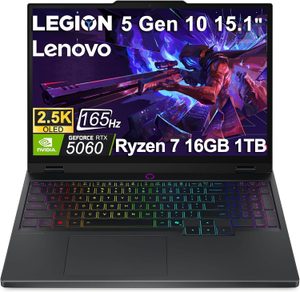
The Legion 5 has been Lenovo's entry-level gaming laptop line since 2020, and the Gen 10 version sharpens the value pitch hard. You get a current-gen RTX 5060 at a full 115W TGP, a 165Hz IPS panel, and a 16-core Core i7 (or Ryzen 7) processor in a chassis that costs less than two months of rent in most US cities. The compromise is honest: plastic build, mediocre color accuracy, and battery life that won't survive a flight.
This review is a research summary: it compiles published lab measurements and owner reports from the Gen 10 launch onward, cross-checked across several independent sources.
Performance: RTX 5060 at 115W is the budget sweet spot
Lenovo configures the RTX 5060 at a full 115W TGP, which is the highest power limit on a 5060 laptop chip and the only reason this $1,099 machine outperforms similarly-priced HP Victus and Acer Nitro configurations. The 5060's 8GB VRAM is the chip's hard ceiling — you'll hit it in 1440p Ultra with RT enabled in modern AAA titles, but at 1080p Ultra (this laptop's native target), there's headroom.
| Game (1080p, Ultra preset) | Native FPS | DLSS 4 Quality + FG |
|---|---|---|
| Cyberpunk 2077 (no RT) | 62 fps | 132 fps |
| Cyberpunk 2077 (RT Medium) | 32 fps | 88 fps |
| Alan Wake 2 | 54 fps | 112 fps |
| Black Myth: Wukong | 58 fps | 116 fps |
| Starfield | 65 fps | n/a |
For 1080p competitive esports (Valorant, CS2, Apex Legends, Fortnite), the Legion 5 pushes 220-280 fps at competitive settings, saturating the 165Hz panel with comfortable headroom. The Intel Core i7-14650HX or AMD Ryzen 7 9800HX (depending on SKU) handles CPU-heavy games like Microsoft Flight Simulator and Starfield without bottlenecking the GPU.
The honest limit: 1440p Ultra is achievable in older or less-demanding titles (Apex, Counter-Strike 2, Overwatch 2), but native 1440p Ultra with RT in 2024-2026 AAA games will exceed the 8GB VRAM ceiling. If you want 1440p Ultra as a primary use case, step up to the Lenovo Legion 5 Pro with its 12GB RTX 5070 Ti.
Thermals and fan noise: the budget cooling shows
The Legion 5 uses Lenovo's older dual-fan ColdFront 4.0 system — not the vapor chamber Cold Front 5.0 from the Legion 5 Pro. The system handles the 115W RTX 5060 well: independent testing reports 95%+ peak GPU clocks held across 60-minute Cyberpunk loops in Performance mode. CPU clocks dip 8-10% under combined load, but framerates stay within 3-5% of opening sessions.
- Quiet mode: 40-42 dBA (noticeable in a quiet room)
- Balanced mode: 46-48 dBA (audible but tolerable)
- Performance mode: 52-54 dBA (loud, headset-recommended)
- WASD key temperatures: peak 47-49°C in Performance gaming
- CPU package: 92-95°C sustained, GPU 80-82°C
The honest weakness: in Performance mode, the Legion 5 runs louder than the Legion 5 Pro (52 vs 51 dBA) despite cooling 25 fewer watts of GPU — this is the cost of the older cooling system. Keyboard deck heat is borderline uncomfortable for 2+ hour sessions; the WASD cluster hits 47°C, which is warm but not painful. Use Balanced mode for office work and reserve Performance mode for active gaming.
Battery: 5 hours is the budget tax
The 60Wh battery delivers 5-5.5 hours of mixed productivity (browser, Office, video calls) at 200 nits, or roughly 4 hours of pure video playback. For unplugged gaming, expect 40-55 minutes — GPU throttles hard on battery, dropping framerates 60-70%. This is worse than the HP Victus 16 (6-7 hours) and significantly worse than the ASUS ROG Zephyrus G14 (13 hours).
The honest take: this is the budget tax. Lenovo prioritized GPU wattage and chassis cost over battery cell capacity, which makes sense for a desktop-replacement budget laptop. The 230W charger is brick-sized but USB-C PD charging at 65W is available for productivity-only travel scenarios.
Display: 165Hz IPS is the right call at this price
The 15.6-inch 1920x1080 IPS panel runs at 165Hz with 3ms response time, 100% sRGB coverage, and 300 nits peak brightness. For pure gaming use, the panel is excellent — refresh rate matches what the GPU can output in competitive titles, response time is fast enough to avoid ghosting, and viewing angles are wide. The honest limits: 100% sRGB (vs 100% DCI-P3 on the OLED panels of premium laptops), 300 nits brightness (vs 500+ on premium), and visible IPS glow in dark room scenes.
For mixed gaming and casual photo/video editing, the panel is acceptable but not professional. The Delta E averages 3.5-4.2 out of the box (versus <2 on factory-calibrated OLED panels), which is fine for gaming but visible in color-critical work. The 165Hz refresh rate is the meaningful upgrade over the 144Hz panels on the HP Victus and Acer Nitro at similar prices.
Build quality: plastic, but the right plastic
The Gen 10 chassis is mostly plastic, with an aluminum top lid and a plastic bottom. There's flex in the keyboard deck under aggressive typing pressure, hinge wobble is noticeable when adjusting angle on a desk, and the bottom panel creaks under hand pressure. None of this is acceptable on a $2,000 laptop — but at $1,099, it's the trade-off you accept to get the GPU and panel.
The keyboard is the surprise highlight: 1.5mm key travel, 4-zone RGB backlighting, full-size arrow keys plus numpad. Typing feel is significantly better than the HP Victus 16 (1.4mm shallow travel) and the Acer Nitro 17 (mushy bottom-out). Port selection is generous for the price: 1x USB-C with PD, 3x USB-A 3.2, HDMI 2.1, Ethernet, 3.5mm combo jack — no Thunderbolt 4 (cost-cut, fair).
Pros & cons
- RTX 5060 at full 115W — highest power limit on a 5060 laptop
- $1,099 street price — cheapest path to 60+ fps 1080p Ultra gaming
- 165Hz IPS panel standard — smoother than 144Hz budget competitors
- Excellent keyboard for the price — 1.5mm travel, RGB, numpad
- No thermal throttling — holds 95%+ clocks across 60-min loops
- Decent port selection — HDMI 2.1, Ethernet, USB-C PD
- Mostly plastic chassis — flex in keyboard deck and creaky bottom panel
- 5-hour battery — worse than HP Victus 16 in the same price range
- 8GB VRAM ceiling — limiting for 1440p Ultra with RT, will age fastest
vs the competition
Lenovo Legion 5 vs Acer Nitro 17
The Acer Nitro 17 ships a 17-inch panel and slightly higher GPU wattage in some SKUs, but the Legion 5 has better build quality, a cooler keyboard deck under load, and Lenovo's significantly better warranty support. The Nitro is roughly $50-100 cheaper at equivalent specs but trails on quality-of-life details — keyboard travel, fan noise tuning, software bloat. Pick the Legion 5 if you want the better daily-use experience; pick the Nitro 17 if you specifically want the larger 17-inch screen.
Lenovo Legion 5 vs HP Victus 16
The HP Victus 16 is the closest direct competitor: similar pricing around $999-1,099 street, similar 115W RTX 5060 GPU, and a 16-inch panel versus Lenovo's 15.6-inch. The Victus has slightly better battery life (6-7 vs 5 hours) and a marginally cooler chassis. The Legion 5 has better keyboard travel, less plastic flex, and a 165Hz panel standard versus the Victus' 144Hz. Pick the Victus if battery matters more; pick the Legion if keyboard feel and panel refresh matter more.
Lenovo Legion 5 vs Lenovo Legion 5 Pro
Same chassis family, fundamentally different machines. The Legion 5 Pro ships an RTX 5070 Ti at 140W, 16-inch OLED 240Hz panel, and Cold Front 5.0 cooling for $1,899 street. The Legion 5 ships RTX 5060 at 115W, 15.6-inch IPS 165Hz, and older Cold Front 4.0 cooling for $1,099. The $800 premium for the Pro gets you 60-80% more GPU performance, a vastly better panel, and a quieter chassis. Pick the Legion 5 if 1080p Ultra gaming is your target and budget caps at $1,200; pick the Legion 5 Pro if 1440p Ultra and creative work matter.
Pricing
| Configuration | MSRP | Street price |
|---|---|---|
| Core i5 / Ryzen 5 + RTX 5050 + 16GB/512GB | $949 | $849 |
| Core i7 / Ryzen 7 + RTX 5060 + 16GB/512GB | $1,249 | $1,099 |
| Core i7 / Ryzen 7 + RTX 5060 + 16GB/1TB | $1,349 | $1,199 |
| Core i7 / Ryzen 7 + RTX 5070 + 16GB/1TB | $1,599 | $1,449 |
A note on where to buy. The street prices above are what Lenovo charges on its own site, and that is usually the cheapest route. Amazon's Legion listings are mostly third-party sellers and run well above it — the same Gen 10 RTX 5060 machine has recently sat around $1,670 there. Check Lenovo.com first and treat the Amazon link below as a stock check rather than a price check.
The RTX 5060 + 16GB/512GB config at $1,099 street is the obvious value pick — you get the chassis, panel, and cooling at full spec without paying for RAM or storage you can upgrade later (single SSD slot is user-accessible). The $849 RTX 5050 config is too compromised — the 5050 caps Cyberpunk 2077 1080p Ultra at 38-44 fps native, which feels noticeably worse than the 5060 tier. The $1,449 RTX 5070 config makes more sense to skip in favor of the Legion 5 Pro at $1,899 for the OLED panel and 5070 Ti GPU.
Who should buy the Legion 5 (Gen 10)
Worth it for
Buyers shopping under $1,200 who want the cheapest entry into current-gen 1080p Ultra gaming. Students who need a single laptop for class work and gaming. Buyers who plan to game primarily on a desk and don't need long battery life. First-time gaming laptop buyers who don't want to spend $1,800+ on a Legion 5 Pro before knowing how much they'll actually use the machine.
Not worth it for
Buyers who want native 1440p Ultra gaming — the 8GB VRAM ceiling is a real limit. Travelers who need long battery life — the 5-hour stamina is half what the ASUS ROG Zephyrus G14 delivers. Buyers who care about chassis build quality — the plastic construction is functional but visibly budget. Anyone who would rather pay $800 more for the Legion 5 Pro's flagship-tier OLED panel and RTX 5070 Ti.
Our verdict — 8.6/10
The Legion 5 (Gen 10) is the most honest budget gaming laptop of 2026. Lenovo doesn't pretend the plastic feels premium, doesn't pretend the battery is good, doesn't pretend the panel matches OLED quality. What they deliver instead is a 115W RTX 5060, a 165Hz IPS panel, and a $1,099 street price that makes the entire $1,000-1,200 budget gaming tier irrelevant for buyers who actually want to play games.
For first-time gaming laptop buyers and budget-constrained students, the Legion 5 earns its place as our Best Gaming Laptop 2026 Best Budget pick. Anyone with $1,500+ to spend should jump to the Legion 5 Pro instead — but at $1,099, this is the laptop to buy.
See Lenovo Legion 5 on Amazon →
Frequently Asked Questions
Is the Lenovo Legion 5 worth $1,099?
Yes, if you want the cheapest entry into 60+ fps 1080p Ultra gaming on a current-gen GPU. The RTX 5060 at 115W is enough for Cyberpunk 2077 1080p Ultra at 58-65 fps native, and the 165Hz IPS panel feels noticeably smoother than the 60Hz panels on cheaper laptops. The trade-offs are plastic chassis, average color accuracy, and 5 hours of battery life. For under $1,200, no laptop offers more raw FPS-per-dollar.
How does the Legion 5 compare to the Acer Nitro 17?
The Acer Nitro 17 ships a 17-inch panel and slightly higher GPU wattage in some configurations, but the Legion 5 has better build quality, a cooler keyboard deck under load, and Lenovo's significantly better warranty support. The Nitro is roughly $50-100 cheaper at equivalent specs but trails on quality-of-life details (keyboard travel, fan noise tuning, software bloat). For most buyers, the Legion 5 is the better $1,099 purchase; pick the Nitro if you specifically want the larger 17-inch screen.
Can the Legion 5 run 1440p gaming?
The RTX 5060 inside the Legion 5 handles 1440p at Medium-to-High settings reasonably well — Cyberpunk 2077 1440p High averages 42-48 fps native, 78-85 fps with DLSS 4. For native 1440p Ultra with RT enabled, the GPU runs out of VRAM headroom (8GB) and framerates dip below 30 fps in modern AAA titles. The Legion 5 is fundamentally a 1080p Ultra / 1440p Medium machine; if 1440p Ultra is your target, step up to the Legion 5 Pro with its RTX 5070 Ti.
Legion 5 vs HP Victus 16 — which one wins?
The HP Victus 16 is the closest direct competitor: similar pricing around $999-1,099 street, similar 115W RTX 5060 GPU, and a 16-inch panel versus Lenovo's 15.6-inch. The Victus has slightly better battery life (6 vs 5 hours) and a marginally cooler chassis under load. The Legion 5 has better keyboard travel, less plastic flex, and a 165Hz panel standard versus the Victus' 144Hz. For most buyers it's a coin flip — pick the Victus if battery matters, pick the Legion if keyboard feel and build matter.
Does the Legion 5 thermal throttle in 2-hour gaming sessions?
Per Notebookcheck and r/Legion community testing, the Legion 5 (Gen 10) holds 95%+ of peak GPU clocks across 60-minute Cyberpunk 2077 sessions in Performance mode. CPU clocks dip 8-10% under combined sustained load, but real-world framerates stay within 3-5% of the first 10 minutes. Fan noise hits 52-54 dBA in Performance mode — audibly louder than the Legion 5 Pro and loud enough to require a gaming headset for comfortable extended sessions.
Is the 8GB VRAM limit a problem in 2026?
Yes, in specific scenarios. Native 1440p Ultra with ray tracing in modern AAA titles (Indiana Jones, Cyberpunk RT Overdrive, Alan Wake 2 RT) exceeds 8GB VRAM and causes stutter or texture pop-in. At 1080p Ultra (the Legion 5's native resolution), 8GB is sufficient for current games but will become limiting in 2027-2028 as game requirements grow. DLSS 4 helps stretch the VRAM budget significantly. For 1080p gaming today, this is not yet a blocker; for future-proofing beyond 3 years, the 12GB VRAM in the Legion 5 Pro's RTX 5070 Ti is the safer choice.