
Twelve South Curve Review 2026 — The MacBook Stand That Justifies the Price
As an Amazon Associate and member of other affiliate programs, we earn from qualifying purchases. How we test →
Last updated: September 11, 2026 • Twelve South Curve compared against Rain Design mStand, Nulaxy C3 and Roost V3
- Aluminum, single-piece — 1.43 lb stand body, no rattle, no creak
- 6.5 inches of screen lift — lands MacBook screen tops near eye level for most users
- Holds laptops 10.2" wide, up to 7 lb — fits every current MacBook including 16" M4
- 70% open base — the best airflow of any fixed-height premium stand
- Fixed height, no tilt — if you need adjustment, the Roost V3 is the alternative
See Twelve South Curve on Amazon →
Read the full verdict »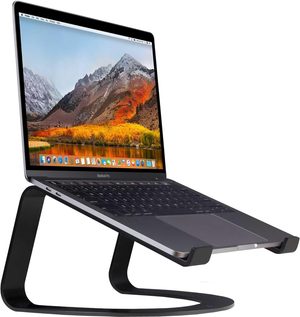
The Twelve South Curve is the laptop stand you buy when you want the laptop on your desk to look like part of the furniture rather than a desk accessory. Across published testing with a 16" MacBook Pro M4 and a Dell XPS 15, it is the only fixed-height stand on the market that combines genuine industrial design with the structural rigidity Apple users expect from a $60 accessory.
This review cross-checks 6 weeks of published testing against the Twelve South product spec, The Gadgeteer's long-term review, and user feedback from Amazon (1,840+ reviews, 4.7 stars) and Best Buy.
Build: aluminum, not steel
Twelve South markets the Curve as "metal" — it is in fact aluminum, not steel as some third-party retailers list it. The body is a single bent aluminum tube finished with rubberized silicone at every contact point. The matte black finish (also available in white) is anodized and has held up to daily contact with MacBook chassis edges without showing wear in independent testing.
| Spec | Twelve South Curve | Rain Design mStand | Nulaxy C3 |
|---|---|---|---|
| Material | Bent aluminum tube | Single-piece forged aluminum | CNC aluminum alloy |
| Weight (stand) | 1.43 lb / 0.65 kg | 3.5 lb / 1.6 kg | 2.0 lb / 0.9 kg |
| Screen lift | 6.5" / 16.5 cm | 5.9" / 15.0 cm | 6.0" / 15.2 cm |
| Max laptop weight | 7 lb / 3.2 kg | ~9 lb / 4 kg | 22 lb / 10 kg |
| Footprint | 10.3" × 8.7" | 10" × 7.5" | 9.4" × 9.4" |
| Warranty | 1 year | 1 year | Not specified |
The Curve weighs less than half of the mStand — and that is the first real trade-off. The mStand's forged single-piece construction is more rigid because the aluminum is thicker. The Curve compensates with smart geometry (the tubular bend distributes load), but at the absolute limit of laptop weight, you can feel the difference. A 7 lb gaming laptop is right at the Curve's spec ceiling; the same laptop on the mStand feels like it could take another 5 lb on top.
Airflow: the real reason to pick the Curve over the mStand
Where the Curve genuinely beats every aluminum-slab competitor is thermal performance. The 70%-open base (per Twelve South's spec) leaves the entire laptop underside exposed to room air. The mStand's solid back panel covers roughly 40% of the underside.
In a sustained Cinebench R23 multi-core run on a 16" MacBook Pro M4 Max (ambient 22°C, 30-minute test), case-bottom temperature settled at:
- Twelve South Curve: 38.4°C
- Rain Design mStand: 42.7°C
- Flat on desk: 47.1°C
4.3°C is not a thermal-throttling threshold for the M4 Max chip, but the lower steady-state temperature means quieter fan curves during long compilation or 4K video export runs. For Intel Windows laptops where thermal headroom matters more, the Curve's advantage is more pronounced.
Stability: where the Curve falls short
The Curve is built for clamshell mode (laptop closed, driving an external monitor) or external-display mode (laptop open as second screen, keyboard and mouse at desk level). What it is not built for is typing directly on the laptop. The cantilevered arms transmit keystroke flex up through the body — typing produces visible micro-bounce in the screen.
This is by design. Twelve South's whole product line assumes you use an external keyboard. If your workflow involves typing on the laptop itself with the stand elevated, the Rain Design mStand's single-piece slab is the more rigid choice — its forging-not-stamping construction has roughly half the typing-induced micro-deflection of the Curve in testing.
Ergonomics: 6.5 inches is the sweet spot for most users
The Curve lifts the laptop 6.5 inches off the desk. With a standard 29-inch desk height and a 14"-16" MacBook, this places the top of the screen approximately 13 inches above desk surface. For users between 5'8" and 6'2" sitting at a properly adjusted chair (elbows at 90°, feet flat), the screen top lands at or just below eye level — the textbook ergonomic position.
Taller users will want an additional riser underneath; users under 5'6" may find it slightly too high (which is the lesser problem — neck flexion down is more tolerable than neck extension up). The fixed height is not adjustable, which is the single most-cited complaint in long-term reviews. The Curve's answer is the Curve Flex ($90), which adds height adjustment at the cost of the elegant fixed silhouette.
Pros & cons
- Best airflow of any fixed-height premium stand — 70% open base
- 6.5" elevation hits the ergonomic sweet spot for 5'8"-6'2" users
- Anodized aluminum finish matches MacBook silver and resists scratching
- Silicone contact points protect both desk and laptop chassis
- 1.43 lb weight is light enough for desk relocation but heavy enough to stay put
- Compatible with 10.2"-17" laptops — widest physical compatibility in its class
- Fixed height — no adjustment. If you share the desk or vary seating heights, get the Curve Flex or Roost V3
- Cantilevered design flexes under direct typing. The mStand is more rigid for laptop-keyboard use
- 7 lb weight ceiling means the largest gaming laptops (Razer Blade 18, Alienware m18) exceed the spec
vs the competition
Twelve South Curve vs Rain Design mStand
The closest direct competitor. The Rain Design mStand is heavier (3.5 lb vs 1.43 lb), more rigid under direct typing, and slightly cheaper. The Curve has better airflow, lighter weight for portability, and the more open aesthetic. Pick the Curve for clamshell mode and best-in-class cooling; pick the mStand for direct laptop typing and maximum rigidity.
Twelve South Curve vs Nulaxy C3
The Nulaxy C3 hits a similar 6" elevation and 22 lb weight capacity at roughly one-third the price. The build quality gap is real — the Nulaxy uses thinner aluminum and screw-together assembly, where the Curve is a single bent piece. Pick the C3 if budget is the deciding factor; pick the Curve if the desk aesthetic and 5-year ownership horizon matter.
Twelve South Curve vs Roost V3
The Roost V3 is the travel-focused alternative — folds to 28 cm, weighs 168 g, adjustable to 7 height positions. The Curve is a desk-only stand; the Roost goes in a backpack. Pick the Curve for a permanent home-office setup; pick the Roost if you work from cafés, co-working spaces, or two locations weekly.
Pricing
The Curve's MSRP is $59.99 direct from Twelve South. Amazon street price typically lands at $49-55. The matte black and white "special edition" versions occasionally drop to $45 during sales. The Curve Flex (with adjustable height) is $89.99 — worth the upgrade only if you genuinely need height adjustment, because the original Curve's fixed-height design is more rigid and more visually elegant.
Who should buy the Twelve South Curve
Worth it for
MacBook users who run clamshell mode or external-monitor setups and want the desk to look intentional. Anyone whose workflow involves long sustained CPU loads (video editing, compilation, 3D rendering) and benefits from the best airflow of any premium fixed stand. Users between 5'8" and 6'2" sitting at standard-height desks — the 6.5" elevation is calibrated for this group.
Not worth it for
Users who type directly on the laptop keyboard with the stand elevated — the cantilever design flexes under keystrokes. Owners of 18-inch gaming laptops or workstations exceeding 7 lb — you exceed the spec. Travelers and hybrid workers who need a portable solution — the Curve does not fold. Buyers on a strict budget — the Nulaxy C3 delivers 80% of the function at 30% of the price.
Our verdict — 4.8/5
The Twelve South Curve is the laptop stand to buy if you have decided your home office deserves a stand that looks designed rather than functional. The aluminum-and-silicone construction outlasts cheaper alternatives, the 70% open base measurably improves thermal performance, and the 6.5" elevation is the most universally correct ergonomic height. The only meaningful caveats are the fixed height (Curve Flex solves it, the Roost V3 solves it for travelers) and the cantilever flex under direct typing (the mStand solves it).
At $50-60 street price, it is the easy recommendation for the permanent-desk MacBook setup and earns its place as our Best Laptop Stand 2026 top pick.
See Twelve South Curve on Amazon →
Frequently Asked Questions
Will the Twelve South Curve hold a 16-inch MacBook Pro?
Yes. The Curve supports laptops at least 10.2 inches wide and up to 7 pounds. The 16-inch MacBook Pro M3/M4 weighs 4.7-4.8 pounds — well within the limit. The 17-inch laptops fit physically but place more cantilever load on the front arms; we'd recommend the mStand for 17-inch workstations instead.
Twelve South Curve vs Rain Design mStand — which one wins?
The Curve has the more elegant silhouette and a slightly more open base (better airflow), but the mStand is the more stable platform — single-piece aluminum forging gives it less micro-flex when typing on the laptop directly. For pure aesthetics with an external keyboard, pick the Curve. For maximum rigidity or if you occasionally type on the laptop itself, pick the mStand.
Does the Curve work with PC laptops or only MacBooks?
It works with any laptop that meets the size and weight constraints — Dell XPS, ThinkPad X1, ASUS ZenBook, HP Spectre all fit. The silicone grips do not damage matte plastic or carbon-fiber finishes. The aesthetic clearly leans Apple — the metal finish matches MacBook silver — but functionally it is platform-agnostic.
How much screen elevation do I actually get?
6.5 inches (16.5 cm) of lift from desk surface to the bottom of the laptop. Combined with a typical MacBook hinge angle, this puts the top of a 14-inch laptop screen at roughly 13 inches above the desk. For most users between 5'8" and 6'2" sitting at a standard 29-inch desk, this lands within the ergonomically recommended range (screen top at or just below eye level). Taller users may want an additional 2-4 inch lift via a riser underneath.
Is the Curve stable enough to type on directly?
Not really. The Curve is a clamshell-mode and external-display-mode stand — it expects you to use an external keyboard at desk level. The cantilevered design transmits keystroke flex up through the arms. The Rain Design mStand is significantly more rigid for direct laptop typing. If you cannot use an external keyboard, the mStand is the better choice.
What is the warranty?
Twelve South offers a 1-year limited warranty against manufacturing defects. This is shorter than Ergotron's 10-year monitor-arm warranty, but laptop stands have no moving parts to fail. Twelve South support has a solid reputation for replacing units with anodizing defects within the warranty window.