
Focus Stacking for Macro Photography: Complete Guide 2026
- Shoot — RAW, manual focus, f/8, 1/100s with flash, ISO 100–200
- Process — DxO PureRAW for DeepPRIME noise reduction, export uncompressed TIFF
- Stack — Helicon Focus, Method B then Method C, export as TIFF or PSD
Last updated: September 19, 2026 • Full workflow covered
At high magnification, depth of field collapses to fractions of a millimetre. Focus stacking is the solution — and it's more accessible than you think. This guide covers the complete workflow: shooting, software, and common pitfalls.
What is focus stacking?
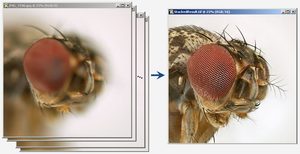
Focus stacking means taking multiple photographs of the same subject at different focus distances, then merging them in post-processing to create a final image with sharp focus throughout. At 1:1 magnification, depth of field is measured in millimetres — the head of an insect might be sharp while the tail is soft. No single exposure captures everything. Focus stacking solves this by photographing the entire subject in layers.
The process: mount your camera on a tripod or macro rail. Take a photo, manually advance focus slightly toward the subject, take another photo. Repeat 20–50 times, moving the focus plane through the entire subject. Load all images into stacking software, which aligns them and blends the sharp parts of each exposure. The result is front-to-back sharpness impossible with any single shot.
How to shoot focus brackets
Camera settings
Aperture: f/4 to f/8 • Shutter: 1/100s • ISO: 50–200 • Focus: Manual
Handheld stacking is the standard approach for insect photography in the field — not tripod work. Insects are shot early morning (before the heat makes them active and fly away), in conditions where ambient light is often low or absent. Flash is your primary light source: it freezes movement at 1/100s regardless of ambient, gives consistent exposure across all frames, and lets you shoot in the pre-dawn when subjects are still. See our macro flash guide for gear recommendations.
For handheld stacking, hold the camera and breathe forward slowly while firing a rapid burst — the OM System OM-1 Mark II with Pro Capture at 15fps makes this especially effective. Stacking software aligns handheld frames well provided flash freeze is sharp enough.
Set aperture to f/4–f/8 for most subjects. At f/11–f/16, diffraction softens the image and the software struggles to align genuinely blurry frames. Exception: with a 90mm lens and 2× teleconverter, f/10 is appropriate to control the increased depth-of-field per increment. Shoot Manual mode — TTL metering varies between frames and ruins blending. Use manual focus and advance focus slightly between shots; each frame should overlap with the previous one so the software has enough reference to align.
How many frames?
The number depends on magnification and subject depth. At 1:1 with f/8, 10–20 frames typically cover a small insect front-to-back in handheld work. Larger subjects need more. The OM System OM-1 Mark II has built-in focus bracketing, but note the limit: maximum 15 frames with the in-camera system, which is sufficient for most subjects at standard magnification. For deeper subjects, shoot manually in bursts. Software needs overlap between frames — advance focus in small steps and err on the side of more frames rather than fewer.
Software comparison
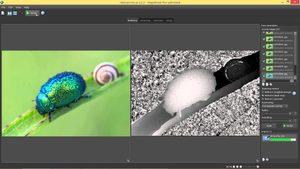
The most popular focus-stacking software for macro photographers. Method B (pyramid) algorithm works reliably on insects. Minimal learning curve — load your sequence, select Method B, hit Process. $30/year subscription, Windows and Mac.
- Fast processing (10–30 seconds)
- 3 algorithms for different subjects
- Built-in retouching tools
- RAW, TIFF, JPEG support
- Subscription model (not one-time)
- Complex subjects may need Zerene
Zerene's DMap algorithm is superior to Helicon for subjects with overlapping parts — butterfly wings, compound eyes. If Helicon creates halos or misaligns, Zerene often solves it. $89 one-time purchase, Windows, Mac, and Linux.
- DMap algorithm handles complex subjects
- One-time purchase (no subscription)
- Linux support
- Strong alignment even with movement
- Slower processing than Helicon
- Steeper learning curve
Common problems and solutions
Misalignment
Problem: Stacking software can't align images — ghosting or halos appear.
Solution: Check that you took single shots consistently without subject movement. If the subject moved between frames, re-shoot. Try Zerene Stacker's DMap algorithm — it's more robust for edge cases.
Halos around sharp areas
Problem: Glowing halos around insect parts in the stacked image.
Solution: Focus increment was too large — each frame didn't overlap enough with the next. Re-shoot with smaller focus steps. If re-shooting isn't possible, try Zerene or adjust Helicon's tolerance settings.
Missing parts (phantom wings)
Problem: Wings or legs disappear, or appear as ghostly duplicates.
Solution: Subject moved during bracket sequence (wind, vibration, or the insect walked). Retake in a windless location or use a heavier tripod. Use shorter exposure times.
Noise in the final image
Problem: The stacked image is grainier than expected.
Solution: Pre-process RAW files with DxO PureRAW before stacking. PureRAW reduces noise while preserving detail, producing a cleaner stack than post-processing noise reduction.
Gear that makes stacking easier
Any camera that shoots RAW can produce a focus stack, but three things make handheld insect stacking much easier: a camera that brackets focus by itself, a true 1:1 (or higher) macro lens, and clean RAW files before the stacker sees them.
- OM System OM-1 Mark II — focus bracketing and in-camera stacking built in, plus Pro Capture for handheld bursts. Read our review.
- M.Zuiko 90mm f/3.5 Macro IS PRO — 2:1 magnification on Micro Four Thirds, so small insects fill the frame without extension. Read our review.
- Canon RF 100mm f/2.8L Macro — the full-frame choice at up to 1.4x magnification. Read our review.
- Raynox DCR-250 — a clip-on close-up lens that adds magnification to a lens you already own, for a fraction of the price of a dedicated macro. Read our review.
OM-1 Mark II on Amazon → M.Zuiko 90mm on Amazon → Canon RF 100mm on Amazon → Raynox DCR-250 on Amazon →
Recommended workflow
RAW → DxO PureRAW → TIFF → Helicon Focus → Lightroom
- Shoot in RAW — Manual focus, f/8, 1/100s with flash, ISO 100–200. Handheld: fire a burst while breathing focus forward; the OM System OM-1 Mark II with Pro Capture at 15fps works excellently for this. Built-in focus bracketing is available but limited to 15 frames — use manual bursts for deeper subjects.
- Process in DxO PureRAW — Run all RAW files through DeepPRIME noise reduction. Export as uncompressed TIFF. See our DxO PureRAW review, or get DxO PureRAW (15% off with code LENSBYNEXOE15).
- Stack in Helicon Focus — Method B then C — Load your TIFF sequence and run Method B (pyramid): it produces sharp detail in the interior. Then run the same sequence through Method C: it often gives cleaner background rendering and sharper edges. Load both outputs back into Helicon as a two-image stack and blend them — the result combines Method B's interior sharpness with Method C's cleaner edges and background.
- Export as TIFF or PSD — Preserves layers for further editing in Photoshop if needed.
- Final grade in Lightroom or Helicon HC — Colour correction, contrast, and output sharpening.
Pre-processing with PureRAW before stacking produces significantly cleaner results than post-stack noise reduction — the stacking algorithm works better with clean input frames.
FAQ
Can I focus-stack handheld?
Yes — handheld stacking is the primary technique for insect photography. Flash at 1/100s freezes motion so each frame is sharp regardless of camera movement. Fire a rapid burst while slowly breathing forward, and the stacking software aligns the frames. The OM System OM-1 Mark II with Pro Capture at 15fps is ideal for this workflow. Tripod and rail setups are used for studio-style macro work, not field shooting.
How long does stacking take?
Shooting 15 frames handheld: about 1 second with Pro Capture. Software processing: 10–30 seconds (Helicon) to 1–2 minutes (Zerene). Post-processing in Lightroom: 5–10 minutes. Total per image: roughly 15–20 minutes including software and post.
Do I need expensive software?
No. Helicon at $30/year is affordable. Zerene at $89 one-time is a small investment for professional results. Free alternatives (CombineZM, Picolay) exist but are slower and less reliable.
What happens if one frame is out of focus?
The software will try to use it but may create artifacts. Delete bad frames before stacking. The software aligns based on overlap — a single bad frame ruins that transition point.