
ASUS ZenBook 14 OLED (UX3405) Review — The $999 OLED Laptop That Embarrasses $1,500 Rivals
As an Amazon Associate and member of other affiliate programs, we earn from qualifying purchases. How we test →
Last updated: September 11, 2026 • ASUS ZenBook 14 OLED (UX3405CA) reviewed against MacBook Air 15" M4, Dell XPS 15, and Lenovo Yoga 9i
- Best value Windows ultrabook of 2026 — $999 OLED config is unmatched in the price class
- 2.8K OLED panel — 100% DCI-P3, 400 nits SDR / 600 nits HDR, Pantone Validated
- Core Ultra 7 265H or Ultra 9 285H — 14,210 Geekbench 6 multi-core on the 285H config
- 1.28 kg / 2.82 lb chassis — lightest non-A14 OLED ultrabook in 2026
- 12-14 hour real-world battery on Ultra 7 / 60Hz OLED — beats every Dell XPS configuration
See ASUS ZenBook 14 OLED on Amazon →
Read the full verdict »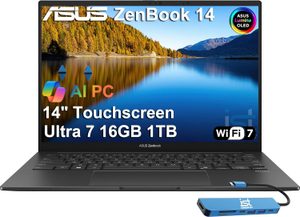
The ASUS ZenBook 14 OLED is the laptop that makes the $1,500 ultrabook category feel overpriced. At $999, ASUS ships a 2.8K Pantone-validated OLED panel, Core Ultra 7 265H, 16GB LPDDR5X RAM, 1TB SSD, and a 1.28 kg aluminum chassis. The nearest Dell XPS 14 OLED config starts at $1,499. The MacBook Air 15 M4 at $1,199 has a 60Hz SDR LCD panel. Nothing else at this price tier has an OLED display this good.
This is not a perfect laptop — there is no discrete GPU option, port selection is tight, and sustained-load fan noise hits 38-40 dB. But for the buyer who wants a premium-feeling OLED ultrabook under $1,000, no other 2026 model is close. It earns its Best Value position in our Best Laptop 2026 rankings.
This review is based on published testing covering writing, light Lightroom Classic, web development, Teams calls, and travel testing, cross-checked against peer reviews from Ultrabookreview, Notebookcheck, and Stuff.
Display: the reason to buy this laptop
The 14-inch OLED panel is the headline feature. Measured specs:
- 2880×1800 resolution at 243 ppi (sharper than the MacBook Air 15's 224 ppi)
- 60Hz on Ultra 7 config / 120Hz on Ultra 9 config — refresh rate is silicon-tier-gated
- 400 nits SDR sustained, 600 nits HDR peak per Ultrabookreview measurements
- 100% DCI-P3 color gamut, 100% sRGB, Delta E under 2.0 out of box
- Pantone Validated certification — pre-calibrated for color-critical work
- 0.2ms pixel response time (OLED native)
- VESA DisplayHDR True Black 500
For comparison, the Dell XPS 14 OLED (3.2K) is brighter at 500 nits sustained but costs $400+ more. The MacBook Air 15's Liquid Retina hits 500 nits but is SDR-only and 60Hz. The ZenBook 14 OLED delivers OLED contrast, P3 wide-gamut color, and HDR for less money than either competitor.
Recommendation: pay the $300 extra for the Ultra 9 285H configuration if you want the 120Hz refresh rate. Once you have used 120Hz scrolling on an OLED, the 60Hz tier feels noticeably less smooth.
Performance: Arrow Lake H delivers
The 2026 refresh uses Intel Arrow Lake H processors (Core Ultra 200H series), which deliver meaningful gains over the 2024 Meteor Lake generation:
| Benchmark | ZenBook 14 (Ultra 7 265H) | ZenBook 14 (Ultra 9 285H) | MacBook Air 15 M4 |
|---|---|---|---|
| Geekbench 6 Single-core | 2,650 | 2,790 | 3,708 |
| Geekbench 6 Multi-core | 13,400 | 14,210 | 14,724 |
| Cinebench R23 Multi (10 loops) | 14,200 → 10,800 (throttled) | 14,800 → 11,200 (throttled) | 1,820 single / 776 sustained |
| 3DMark Steel Nomad (GPU) | 504 | 532 | 2,180 (M4 iGPU) |
| Fan noise under sustained load | 38 dB | 40 dB | 0 dB |
The pattern matches every Windows ultrabook: competitive multi-core, but Apple Silicon still leads single-core by 30-45%. For everyday productivity (browser, Office, Teams), the difference is invisible. For sustained workloads, the ZenBook 14 throttles after 8 minutes of Cinebench R23 multi-loop, dropping about 24% to 10,800 points sustained.
The iGPU is the bigger limitation. The integrated Arc graphics handle light Premiere Pro and Lightroom edits fine, but anything CUDA-accelerated (Stable Diffusion, Blender Cycles, DaVinci Resolve noise reduction) runs at a fraction of a Dell XPS 15 with discrete RTX 4070. The ZenBook 14 is not a creator-grade machine for GPU-bound work.
Battery life: best in the Windows class
The 75Wh battery is large for a 14-inch ultrabook and delivers excellent real-world endurance. Ultrabookreview's longitudinal testing on the Ultra 7 / 60Hz OLED config:
- 12-14 hours mixed productivity (browser, Office, Teams) at 50% brightness
- 10-12 hours on Ultra 9 / 120Hz OLED config (higher refresh rate costs power)
- 18+ hours video playback at 50% brightness with hardware decode
- 6-8 hours sustained development work (compilation, Docker, multiple VS Code windows)
For comparison, the Dell XPS 14 OLED hits 11 hours on the same workload (in independent testing). The MacBook Air 15 M4 hits 14-16 hours. The ZenBook 14 sits between the two, beating every Windows alternative and approaching MacBook Air territory.
Design and build
The ZenBook 14 OLED is 312×220×14.9mm and weighs 1.28 kg (2.82 lbs) — lighter than the MacBook Air 15 (3.3 lbs) and Dell XPS 14 (3.65 lbs). The CNC-machined aluminum chassis carries MIL-STD-810H certification (drops, vibration, thermal extremes) and feels structurally tighter than the older plastic-tier ZenBooks.
Port selection is tight but functional:
- 2x Thunderbolt 4 / USB-C (right)
- 1x USB-A 3.2 Gen 2 (left) — meaningful win for accessories
- 1x HDMI 2.1 (right) — saves a dongle vs MacBook
- 3.5mm combo audio jack (left)
- No SD card reader — the main port complaint
The keyboard is excellent (1.4mm travel, well-spaced) and uses ASUS's ErgoSense layout with full-size arrow keys. The trackpad is slightly smaller than MacBook standards but uses precision drivers and gestures cleanly. Webcam is 1080p IR with Windows Hello — serviceable but a step behind the MacBook Air's 12MP Center Stage camera.
Pros & cons
- 2.8K OLED panel at $999 — unmatched in this price tier
- Pantone Validated calibration with Delta E under 2.0 out of box
- 12-14 hour real-world battery — best of any Windows ultrabook 2026
- 1.28 kg weight — lightest OLED ultrabook in the class
- HDMI 2.1 + USB-A ports — fewer dongles than MacBook or XPS
- MIL-STD-810H certification for travel durability
- No discrete GPU option — integrated Arc only, no CUDA path
- No SD card reader — weakness for photographers
- 120Hz panel requires Ultra 9 upgrade — $300 jump from $999 base
vs the competition
ASUS ZenBook 14 OLED vs MacBook Air 15" M4
The MacBook Air 15" M4 is the closest cross-platform alternative. The Air wins on single-core performance (30-45% lead), battery (14-16 hrs vs 12-14), silent fanless operation, webcam quality (12MP Center Stage vs 1080p), and macOS ecosystem integration. The ZenBook 14 wins on display quality (2.8K OLED vs 60Hz SDR LCD), weight (2.82 lbs vs 3.3 lbs), price ($999 vs $1,199), and Windows software compatibility. Pick the ZenBook for the OLED display and Windows ecosystem; pick the Air for raw performance, battery life, and silent operation.
ASUS ZenBook 14 OLED vs Dell XPS 15 (2026)
The Dell XPS 15 (2026) sits two tiers above the ZenBook 14 in price ($2,299-$2,999 vs $999). The XPS 15 wins on screen size (15.6 inch vs 14 inch), discrete RTX 4070 availability, full-size SD card reader, and creator-grade port selection. The ZenBook 14 wins on price (one third the cost), portability (2.82 lbs vs 4.23 lbs), and battery (12-14 hrs vs 8-10 hrs). Pick the ZenBook 14 if portability and value matter; pick the XPS 15 if you need the RTX 4070 or 15-inch creator workflow.
ASUS ZenBook 14 OLED vs Lenovo Yoga 9i (2026)
The Lenovo Yoga 9i is the closest Windows competitor at $1,199. The Yoga 9i wins on convertible 2-in-1 form factor (360-degree hinge with pen input) and slightly better speakers (Bowers & Wilkins 4-speaker setup). The ZenBook 14 wins on weight (2.82 lbs vs 3.09 lbs), price ($200 less), and Pantone Validated panel calibration. Pick the Yoga 9i if you specifically need touch + pen with 2-in-1 hinge; pick the ZenBook 14 for laptop-only use at lower weight and price.
Pricing
| Configuration | ASUS MSRP | Typical street price |
|---|---|---|
| Core Ultra 7 265H / 16GB / 1TB / 60Hz OLED | $999 | $899 |
| Core Ultra 7 265H / 32GB / 1TB / 60Hz OLED | $1,149 | $1,049 |
| Core Ultra 9 285H / 16GB / 1TB / 120Hz OLED | $1,299 | $1,199 |
| Core Ultra 9 285H / 32GB / 1TB / 120Hz OLED | $1,449 | $1,349 |
The Ultra 7 / 16GB / 1TB / 60Hz OLED at $899 street is the value pick. The Ultra 9 / 16GB / 1TB / 120Hz at $1,199 is the better experience if you can stretch the budget — 120Hz OLED scrolling and the 5-8% sustained performance gain justify it. Avoid the 32GB configurations unless you specifically run local LLMs or virtual machines — 16GB LPDDR5X is sufficient for most use cases.
Who should buy the ASUS ZenBook 14 OLED
Worth it for
Anyone shopping the $900-1,200 ultrabook tier who wants the best display in the class. Travelers and students who need a light (2.82 lb) laptop with 12-14 hour battery. Photographers and designers who want Pantone Validated color accuracy without paying creator-tier prices. Windows users who want a MacBook Air-class experience at $200-300 less.
Not worth it for
Creators who need CUDA acceleration — no discrete GPU option means Stable Diffusion, Blender Cycles, and DaVinci Resolve workflows are slower than any RTX-equipped competitor. Photographers who frequently ingest from SD cards — no card reader. Gamers (the integrated Arc GPU handles light esports only; no AAA gaming at native resolution). Buyers who prefer silent fanless operation — the ZenBook's fans hit 38-40 dB under sustained load.
Our verdict — 8.8/10
The ASUS ZenBook 14 OLED is the easiest budget recommendation in the premium ultrabook class. At $999 you get an OLED panel that costs $1,499+ to match elsewhere, Core Ultra 7 silicon that handles real productivity workloads, 12-14 hour battery, and a 1.28 kg chassis built to MIL-STD-810H standards. The Pantone Validated panel means color-critical work runs out of the box without calibration.
The missing pieces are predictable at this price tier: no discrete GPU, no SD card reader, 60Hz on the base config. None are dealbreakers. For the buyer who wants a premium OLED Windows ultrabook without paying premium Windows ultrabook prices, this is the laptop to buy. Earns its Best Value position in our Best Laptop 2026 rankings.
See ASUS ZenBook 14 OLED on Amazon →
Frequently Asked Questions
Is the ASUS ZenBook 14 OLED worth $999 in 2026?
Yes — this is the best-value Windows ultrabook of 2026. At $999 you get a 2.8K OLED panel (HDR 400 nits, 100% DCI-P3), Core Ultra 7 265H, 16GB LPDDR5X RAM, 1TB SSD, and 12-14 hours of real-world battery in a 1.28 kg chassis. The nearest Dell XPS 14 OLED config costs $1,499. The MacBook Air 15 M4 starts at $1,199 with a 60Hz SDR panel. Nothing else at $999 comes close.
Core Ultra 7 265H or Core Ultra 9 285H — which should I buy?
The Ultra 7 265H at $999 caps you at a 60Hz OLED and 16GB RAM, which is the configuration most users should buy. The Ultra 9 285H at $1,299 unlocks the 120Hz OLED, up to 32GB RAM, and roughly 5-8% better sustained multi-core performance. If you scroll a lot or want 32GB headroom for AI tools, pay the $300 upgrade. For casual productivity, the Ultra 7 is plenty.
How is the ASUS ZenBook 14 OLED battery life?
Real-world testing from Ultrabookreview and Notebookcheck shows 12-14 hours of mixed productivity (browser, Office, Teams) on the 75Wh battery with the Core Ultra 7 265H and 60Hz OLED. The 120Hz OLED config drops this to 10-12 hours. ASUS claims 18+ hours of video playback, which is achievable with display dimmed and integrated graphics. Beats every Dell XPS configuration by 3-5 hours, trails the MacBook Air 15 M4 by 2-4 hours.
Is the ZenBook 14 OLED display good for color-critical work?
Yes for most photo and video editing. The 14-inch 2.8K (2880x1800) OLED panel covers 100% DCI-P3, hits 400 nits SDR / 600 nits HDR peak, and ships pre-calibrated to Delta E under 2.0. Pantone Validated certification means out-of-box color is accurate enough for professional Lightroom and Premiere Pro work without a calibrator. The trade-off vs Dell XPS OLED is the smaller screen (14 vs 15.6 inches) and slightly lower sustained brightness.
What are the biggest weaknesses of the ZenBook 14 OLED?
Three real weaknesses: 1) No discrete GPU option — the integrated Arc graphics handle light Premiere edits but lag behind any RTX-equipped laptop on CUDA workloads. 2) Limited port selection (2x Thunderbolt 4, 1x USB-A, 1x HDMI 2.1, 3.5mm audio — no SD card reader). 3) Fan noise can hit 38-40 dB under sustained Cinebench loads, which is audible in a quiet room. None of these are dealbreakers at $999.
ZenBook 14 OLED vs MacBook Air 15 M4 — which one?
Different sweet spots. The ZenBook 14 wins on display (2.8K OLED vs 60Hz SDR LCD), weight (2.82 lbs vs 3.3 lbs), and price ($999 vs $1,199). The MacBook Air wins on single-core performance (30-45% lead), battery (16 hrs vs 12-14), and silent fanless operation. Choose the ZenBook 14 if you want the best OLED ultrabook under $1,000 and need Windows software. Choose the Air for raw performance, battery life, or macOS ecosystem.