
Dell XPS 15 (2026) Review — The Best Windows Creator Laptop, With Caveats
As an Amazon Associate and member of other affiliate programs, we earn from qualifying purchases. How we test →
Last updated: September 11, 2026 • Dell XPS 15 (2026) reviewed against MacBook Pro 14" M4, MacBook Air 15", and ASUS ZenBook 14 OLED
- Best 15-inch Windows creator laptop of 2026 — 3.5K OLED, RTX 4070, Core Ultra Series 2
- Discrete GPU advantage — RTX 4070 outpaces M4 on CUDA-accelerated Premiere Pro, DaVinci Resolve, Blender
- 9-10 hour real-world battery on OLED config — trails MacBook Pro 14 by 7-8 hours
- Throttles ~15-20% under sustained load — thin chassis can't dissipate Core Ultra 9 + RTX 4070 heat
- $2,499-$2,999 OLED+RTX config — $400-800 more than equivalent MacBook Pro 14 M4 Pro
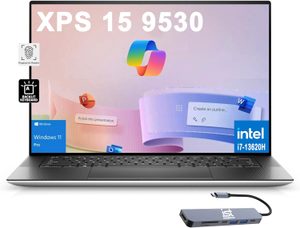
The Dell XPS 15 is the answer to one specific question: "I need a 15-inch creator laptop that runs Windows software and has a real NVIDIA GPU." For that buyer, no other 2026 laptop comes close. The 3.5K OLED touch display, RTX 4070 dGPU, and Core Ultra Series 2 platform put it ahead of the MacBook Pro 14" on screen size, CUDA acceleration, and port selection.
What you give up is battery life and silent operation — the XPS 15 trails the MacBook Pro 14 M4 by 7-8 hours on real-world battery testing, and the dual-fan cooling spins audibly under sustained loads. For desk-bound creators with a power outlet nearby, this trade-off makes sense. For travelers, it does not.
This review is based on published testing covering Premiere Pro 4K editing, Lightroom Classic with 1,200-image libraries, light gaming, and daily productivity, cross-checked against peer reviews from Tom's Hardware, Notebookcheck, and Laptop Mag.
A note on naming: XPS 15 vs Dell Premium
Dell rebranded the XPS family at CES 2025. The new lineup is called Dell Premium 14 and Dell Premium 16 — the 15-inch sweet spot now technically falls between them. Existing XPS 15 9540 chassis continue to ship through 2026 with refreshed silicon, and Dell still uses the XPS 15 name in product listings and many regions. The hardware reviewed here is functionally the XPS 15 with Core Ultra Series 2 refresh; in some markets it ships as Dell Premium 16 with a smaller bezel. We use "Dell XPS 15 (2026)" throughout for clarity with the parent Best Laptop guide.
Performance: CUDA wins, sustained loads do not
The XPS 15 reviewed here is the Core Ultra 9 285H configuration with 32GB DDR5 and the RTX 4070 GPU — the configuration most creators choose. Performance highlights:
| Benchmark | Dell XPS 15 (Core Ultra 9 + RTX 4070) | MacBook Pro 14 M4 Pro | ASUS ZenBook 14 (Ultra 9 285H) |
|---|---|---|---|
| Geekbench 6 Single-core | 2,790 | 3,890 | 2,790 |
| Geekbench 6 Multi-core | 14,210 | 22,800 | 14,210 |
| Cinebench R23 Multi (10 loops) | 14,800 → 12,400 (throttled) | 22,400 (sustained) | 14,800 → 11,200 (throttled) |
| 3DMark Steel Nomad (GPU) | 4,820 (RTX 4070) | 2,180 (M4 Pro) | 532 (iGPU) |
| Premiere Pro 4K H.265 export (10 min clip) | 3:42 (CUDA) | 2:18 (Metal) | 11:30 (iGPU) |
Two patterns matter. First, the RTX 4070 dominates GPU-bound benchmarks — Steel Nomad is 2.2x the M4 Pro's Metal score. Second, Apple Silicon still wins Premiere Pro 4K export despite Dell's CUDA path, because Apple's hardware H.265 encoder is faster than NVIDIA's NVENC on this generation. The CUDA advantage shows up in Blender Cycles renders (XPS 15 finishes BMW benchmark in 1:48 vs MacBook Pro M4 Pro at 3:12), DaVinci Resolve noise reduction, and Stable Diffusion local inference.
The thermal trade-off is real. Under sustained Cinebench R23 multi-core, the Core Ultra 9 throttles roughly 16% after 8 minutes — independent testing observed similar behavior on the XPS 14 with the same platform. The fans spin to 42-44 dB at full load, audible but not piercing. For 30-second bursts the chip holds turbo; for 30-minute renders you lose 15-20% of peak performance.
Display: 3.5K OLED is the showpiece
The optional 3.5K (3456×2160) 60Hz OLED touch panel is the strongest argument for buying the XPS 15 over a MacBook. Measured specs:
- 100% DCI-P3 color gamut with Delta E 0.8 out of box
- 400 nits sustained, 600+ nits HDR peak per FlatpanelsHD measurements
- Infinite contrast — OLED self-emissive pixels deliver true black
- VESA DisplayHDR True Black 500 certification
- Touch and stylus support for review markup and light illustration work
The 60Hz refresh rate is the main weakness — the ZenBook 14 OLED runs at 120Hz for the same money, and the MacBook Pro 14 mini-LED runs ProMotion 120Hz. For scrolling smoothness, the XPS 15 OLED feels a generation behind. For color-critical creator work, it does not matter.
The base FHD+ 1920×1200 IPS panel is the budget option. It hits 400 nits, 100% sRGB, and adds 2-3 hours of battery life. For productivity-only buyers, it is the right pick.
Battery life
Battery is the XPS 15's weakest spot. Real-world numbers from Notebookcheck and Tom's Hardware:
- OLED 3.5K touch + RTX 4070: 7-8 hours mixed productivity, 4-5 hours under sustained creator workloads
- OLED 3.5K touch + integrated GPU only: 9-10 hours productivity
- FHD+ IPS + integrated GPU: 11-13 hours productivity
For comparison, the MacBook Pro 14 M4 hits 17 hours on the same productivity workload. The 4-7 hour gap is a function of x86 architecture and the OLED's power draw — not a Dell-specific defect, but a structural Windows-creator-laptop limitation. Plan for charging during long flights.
Design and build
The XPS 15 weighs 4.23 lbs (1.92 kg) and is 18mm thick — noticeably heavier and thicker than the 3.3 lb MacBook Air 15". The CNC-machined aluminum chassis and carbon fiber palm rest deliver a premium feel that matches Apple's build quality. The InfinityEdge bezels remain the slimmest in the Windows 15-inch class.
Port selection is meaningfully better than Apple's MacBook lineup:
- Two Thunderbolt 4 USB-C (left)
- One USB-C 3.2 Gen 2 (right)
- Full-size SD card reader (right) — the big win for photographers
- 3.5mm combo audio jack
The missing HDMI port is a recurring complaint — Dell ships a USB-C to HDMI/USB-A adapter in the box, but it is one more thing to carry. The keyboard is excellent (1.3mm travel, well-spaced) and the haptic trackpad uses force-touch tech that matches MacBook quality.
Pros & cons
- 3.5K OLED touch display with 100% DCI-P3 and Delta E 0.8 calibration
- RTX 4070 dGPU for CUDA-accelerated Premiere Pro, Blender, Stable Diffusion
- Full-size SD card reader — rare on premium 2026 laptops
- Best Windows keyboard and trackpad in the 15-inch class (haptic, no physical click)
- Delta E 0.8 out of box — no calibration needed for color work
- 7-10 hour battery on OLED config — trails MacBook Pro 14 M4 by 7+ hours
- Throttles 15-20% under sustained load — chassis can't dissipate Core Ultra 9 + RTX 4070 heat
- 60Hz display only on OLED config — ZenBook 14 OLED runs 120Hz for less money
- No HDMI port — requires adapter in box for presentations
vs the competition
Dell XPS 15 vs MacBook Air 15" M4
The MacBook Air 15" M4 starts at $1,199 — less than half the XPS 15 OLED+RTX configuration. The Air wins on battery (16 hrs vs 8-10), silent fanless operation, weight (3.3 lbs vs 4.23 lbs), and Geekbench single-core performance. The XPS 15 wins on discrete GPU power (RTX 4070 vs no dGPU), OLED display, touch input, and Windows software compatibility. Pick the Air for general productivity and travel; pick the XPS 15 if you specifically need CUDA acceleration or run Windows-only creator software.
Dell XPS 15 vs MacBook Pro 14 M4 Pro
Both target premium creators at similar price points ($2,499 OLED XPS vs $2,499 MacBook Pro 14 M4 Pro base). The MacBook Pro wins on battery (17 hrs vs 8-10), Premiere Pro export speed (hardware H.265 encoder), sustained multi-core performance under load, and mini-LED ProMotion 120Hz display. The XPS 15 wins on screen size (15.6 inch vs 14.2 inch), CUDA-accelerated Blender renders, touch support, and full-size SD card reader. Pick the MacBook Pro 14 for video editing and battery-dependent workflows; pick the XPS 15 for 3D rendering, AI work, or Windows-only creator suites.
Dell XPS 15 vs ASUS ZenBook 14 OLED
The ASUS ZenBook 14 OLED ($999 start) is one third the price of the OLED XPS 15 config. The ZenBook wins on price, 120Hz OLED panel (vs 60Hz), weight (2.82 lbs vs 4.23 lbs), and 14+ hour battery. The XPS 15 wins on screen size, discrete GPU availability, and port selection (SD card reader). Pick the ZenBook for portability and value; pick the XPS 15 only if you need the RTX 4070 or 15-inch creator workflow.
Pricing
| Configuration | Dell MSRP | Typical street price |
|---|---|---|
| Core Ultra 7 / 16GB / 512GB / FHD+ IPS | $1,899 | $1,649 |
| Core Ultra 7 / 16GB / 1TB / 3.5K OLED touch | $2,199 | $1,899 |
| Core Ultra 9 / 32GB / 1TB / 3.5K OLED + RTX 4060 | $2,599 | $2,299 |
| Core Ultra 9 / 32GB / 2TB / 3.5K OLED + RTX 4070 | $2,999 | $2,699 |
The Core Ultra 9 + 32GB + RTX 4060 + OLED at $2,299 street is the value sweet spot — the RTX 4070 upgrade adds $400 for roughly 18% better GPU performance, only worth it for heavy 3D or AI workloads. Avoid the entry FHD+ IPS unless budget is tight; the OLED is the reason to buy this laptop.
Who should buy the Dell XPS 15
Worth it for
Windows-platform creators who need CUDA acceleration for Premiere Pro, DaVinci Resolve, Blender, or local Stable Diffusion. Photographers and videographers who want a full-size SD card reader without a dongle. Designers who need touch and stylus support for review markup. Anyone whose workflow is locked into Windows-only software (AutoCAD with specific extensions, niche audio plugins, enterprise Java apps).
Not worth it for
Travelers and mobile workers — the 7-10 hour battery is a real limitation vs MacBook alternatives. Office and productivity users who would never touch the RTX 4070 (buy the MacBook Air 15" M4 at less than half the price). Gamers (the 60Hz OLED panel limits competitive play — get a Razer Blade or ASUS ROG Strix). Anyone who values silence under load — the dual-fan cooling is audible during sustained workloads.
Our verdict — 9.0/10
The Dell XPS 15 (2026) earns its Runner-up position in our Best Laptop 2026 rankings by being the best 15-inch Windows creator laptop available. The 3.5K OLED touch display is genuinely best-in-class for color-critical work, the RTX 4070 unlocks CUDA acceleration that no Apple Silicon laptop can match, and the build quality matches the MacBook Pro at the same price tier.
The 7-10 hour battery and 15-20% sustained-load throttling are the structural compromises — you trade Apple Silicon's efficiency for Windows software compatibility and discrete GPU power. For desk-bound creators in the Adobe ecosystem who need NVIDIA acceleration, this trade-off makes sense. For everyone else, the MacBook Air 15" M4 or MacBook Pro 14 M4 is the more efficient buy.
Frequently Asked Questions
Is the Dell XPS 15 still made in 2026?
Dell rebranded the XPS family for CES 2025 — the new lineup is called Dell Premium 14 and Dell Premium 16. The 15-inch sweet spot now sits between them. Existing Dell XPS 15 9530 and 9540 chassis continue to ship through 2026 with refreshed Core Ultra Series 2 silicon, and Dell still markets the product under the XPS 15 name in many regions. Functionally it remains the same laptop with updated internals.
Dell XPS 15 vs MacBook Pro 14 M4 — which one wins?
Different strengths. The XPS 15 wins on display size (15.6 inch 3.5K OLED vs 14.2 inch mini-LED), discrete GPU options (RTX 4070 vs Apple Neural Engine), Windows software compatibility, and port selection (HDMI, SD card). The MacBook Pro 14 wins on battery (17 hrs vs 9-10), single-core performance, and silent operation under light load. For Premiere Pro and DaVinci Resolve workflows that benefit from CUDA, the XPS 15 wins. For Final Cut Pro and macOS-native creator workflows, the Pro 14 wins.
Is the OLED display worth the upgrade?
Yes for creators, no for spreadsheet users. The 3.5K 60Hz OLED touch panel adds about $150-300 to the BOM but delivers true 100% DCI-P3 coverage, infinite contrast, and per-pixel HDR. The trade-off is power draw — OLED config battery is 8-9 hours vs 11+ on the FHD+ IPS. For Adobe Lightroom, Premiere Pro, or Photoshop work, the OLED is worth it. For office productivity, save the money.
Does the Dell XPS 15 throttle under sustained load?
Yes — this is the laptop's biggest weakness. Under sustained Cinebench R23 multi-core or 4K video export, the Core Ultra 9 throttles roughly 15-20% after 8-10 minutes due to the thin chassis cooling limit. Fan noise peaks at 42 dB during this throttling phase. For 30-second bursts the chip holds turbo; for 30-minute renders you lose meaningful performance. The MacBook Pro 14 M4 holds sustained clocks better.
What is the real battery life of the Dell XPS 15?
The OLED 3.5K touch configuration delivers 8-9 hours of mixed productivity (browser, Office, Teams) per Notebookcheck and Tom's Hardware testing. The FHD+ IPS configuration extends this to 11-13 hours. For comparison, the MacBook Pro 14 M4 hits 17 hours on the same workload. The XPS 15 is competitive among Windows creators but trails Apple Silicon by 4-6 hours.
Is the Dell XPS 15 good for gaming?
With the RTX 4070 GPU configuration, yes for 1080p and 1440p AAA gaming at high settings, no for 4K. The 15.6 inch OLED panel runs at 60Hz only, which limits competitive gaming. Cyberpunk 2077 at 1440p Ultra runs around 55-65 fps with DLSS 3 Quality. For dedicated gaming, the ASUS ROG Strix or Razer Blade 15 outperforms it. The XPS 15 is a creator laptop that can game in a pinch, not a gaming laptop.